Details
How a Restaurant Website Turned Menu Browsers into Direct Order Inquiries
How a Restaurant Website Turned Menu Browsers into Direct Order Inquiries

1. Project Overview
A growing restaurant needed a professional website that could do more than display its menu, location, and contact number.
Most potential customers discovered the restaurant through Facebook, Instagram, Google Search, and online recommendations. They visited the website to check available dishes, prices, delivery coverage, opening hours, and current offers before deciding whether to order.
However, the existing digital experience worked more like a static menu. Customers could browse food items, but there was no clear journey for turning their interest into a direct order inquiry.
Many visitors eventually returned to social media, searched for the restaurant’s phone number, or left without taking any action.
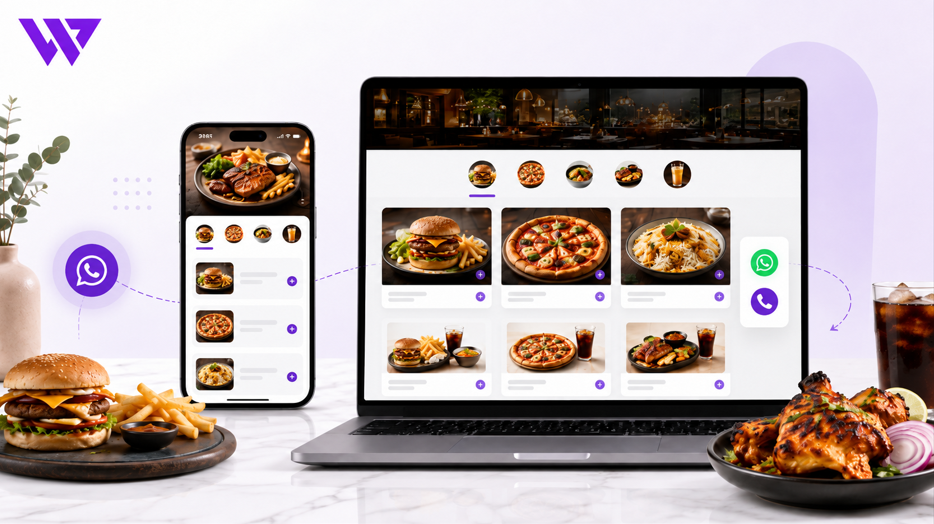
Webnion planned a responsive restaurant website that connected menu browsing with direct WhatsApp, phone, reservation, and order-inquiry actions.
The goal was to help customers understand the menu quickly, select suitable dishes, and contact the restaurant with useful order information through fewer steps.
2. The Business Challenge
Restaurant customers usually make decisions quickly.
Before ordering, they may want to know:
- Which dishes are currently available
- What ingredients or portions are included
- Whether a product is spicy
- Which items are suitable for sharing
- How much delivery costs
- Whether delivery is available in their area
- How long preparation may take
- Which payment methods are accepted
- Whether special requests are possible
- How to place a direct order
The restaurant faced several common challenges:
- The menu was difficult to browse on mobile devices
- Food categories were not organized clearly
- Customers could not identify popular items quickly
- Product images and descriptions were inconsistent
- Order buttons were not connected to specific dishes
- Customers sent incomplete order messages
- Delivery information was difficult to find
- Social media traffic did not have a focused ordering journey
- Repeated questions increased staff workload
- Customers sometimes abandoned the process before contacting the restaurant
The website needed to make the journey from appetite to inquiry faster and clearer.
3. Project Objectives
The project was planned around the following objectives:
- Organize the restaurant menu clearly
- Improve mobile menu browsing
- Present food items professionally
- Make prices and portion information easy to understand
- Highlight popular dishes and current offers
- Connect each menu item with a direct inquiry action
- Generate prepared WhatsApp order messages
- Communicate delivery coverage clearly
- Reduce repetitive customer questions
- Support table reservations and bulk orders
- Improve local search visibility
- Create a scalable structure for future menu updates
Every section was designed to help customers move toward a direct conversation or order inquiry.
4. Our Strategy
We planned the customer journey around how people naturally order food online.
The intended journey was:
Discover the restaurant → Browse the menu → Open a food item → Review details → Select quantity or variation → Start a direct order inquiry
Instead of treating the website as a digital brochure, we structured it as an assisted ordering platform.
The website provided enough information for customers to make a decision independently while keeping WhatsApp, phone, and reservation actions accessible when support was needed.
This helped the restaurant combine digital convenience with direct customer communication.
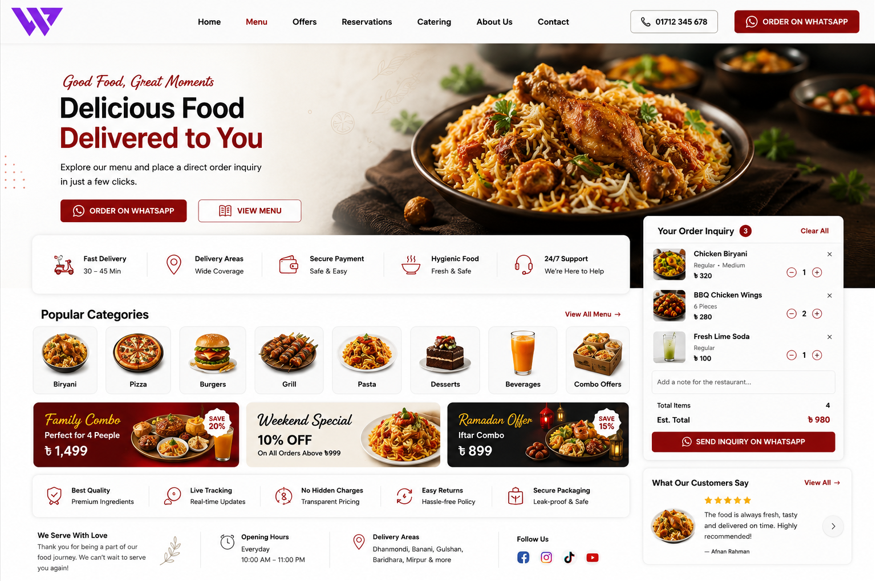
5. Mobile-First Restaurant Experience
Most restaurant customers browse menus from smartphones.
They may be at home, at work, travelling, or ordering for a group. The website therefore needed to remain easy to use with one hand and under time pressure.
The mobile navigation focused on essential sections:
- Menu
- Popular Items
- Offers
- Delivery Information
- Reservations
- Contact
- Order Inquiry
Large buttons, readable text, simple categories, and clear pricing made the mobile experience easier to scan.
Customers did not need to zoom, open complicated menus, or search for contact information manually.
6. Organizing the Menu into Clear Categories
The restaurant menu was divided into recognizable categories such as:
- Appetizers
- Main Courses
- Rice and Biryani
- Burgers and Sandwiches
- Pizza
- Pasta and Noodles
- Grilled Items
- Seafood
- Salads
- Desserts
- Beverages
- Family Meals
- Combo Offers
Clear categories reduced the amount of scrolling required.
Customers could open the section that matched their immediate interest instead of reviewing the entire menu.
The structure also allowed the restaurant to add, remove, or reorder menu categories in the future.
7. Visual Category Navigation
Mobile customers needed a faster way to understand the available food options.
Visual category cards could include:
- Category image
- Category name
- Number of available items
- Direct link to the menu section
This created a more intuitive experience than a long text-only list.
Customers could identify categories quickly and reach relevant food items within fewer taps.
8. Professional Food Presentation
Food photography strongly influences restaurant purchasing decisions.
The menu experience could include:
- Clear food images
- Consistent image proportions
- Close-up presentation
- Portion reference
- Packaging images
- Combo contents
- Restaurant presentation
- Real serving examples
Consistent photography made the restaurant appear more professional and helped customers understand what they could expect.
The website avoided using unrelated stock images when real product photography was available.
9. Clear Menu Item Information
Each menu item page or card was structured to answer important questions.
Information could include:
- Dish name
- Short description
- Main ingredients
- Portion size
- Serving suggestion
- Current price
- Previous price where applicable
- Available variations
- Spice level
- Availability
- Preparation notes
- Direct inquiry action
Customers could understand the dish without asking the restaurant for every basic detail.
This reduced repetitive conversations and improved inquiry quality.
10. Short, Appetite-Focused Descriptions
Menu descriptions needed to be useful without becoming too long.
A strong description could explain:
- Main ingredients
- Cooking style
- Taste profile
- Portion type
- Best use or serving occasion
For example:
“Juicy grilled chicken served with seasoned rice, fresh salad, and the restaurant’s signature sauce.”
This gives customers enough information to imagine the meal while keeping the menu easy to scan.
The website avoided exaggerated claims that could create unrealistic expectations.
11. Portion and Serving Information
Customers often need to know whether a dish is suitable for one person, a couple, or a group.
The menu could display information such as:
- Single serving
- Serves two
- Family portion
- Number of pieces
- Weight or quantity
- Included sides
- Beverage inclusion
Clear serving information made group orders easier and reduced confusion around combo meals.
It also helped customers compare value between individual dishes and larger meal packages.
12. Menu Variations and Add-ons
Food items may include several choices.
These could include:
- Small, medium, or large size
- Regular or spicy
- Different protein options
- Extra cheese
- Additional sauce
- Side dishes
- Beverage choices
- Meal upgrades
- Packaging options
Each variation or add-on could maintain its own price.
Customers could select their preferred options before opening the order inquiry.
This reduced messages where restaurant staff needed to ask several follow-up questions.
13. Popular and Recommended Dishes
First-time customers may not know what to order.
Dedicated sections could highlight:
- Best-selling dishes
- Chef’s recommendations
- Customer favourites
- New items
- Signature dishes
- Most-ordered combos
These sections helped customers reach trusted options quickly.
They also allowed the restaurant to give more visibility to important or profitable menu items.
14. Combo and Family Meal Presentation
Restaurant customers often want convenient packages for couples, families, offices, or small events.
Combo offers could clearly display:
- Items included
- Quantities
- Number of people served
- Regular total value
- Combo price
- Total savings
- Optional add-ons
- Availability
This helped customers understand the complete offer without checking several individual menu items.
Family and group packages also created stronger opportunities for higher-value inquiries.
15. Offer and Campaign Sections
The restaurant could create focused promotional sections for:
- Lunch offers
- Dinner packages
- Weekend specials
- Ramadan and Iftar offers
- Eid campaigns
- Couple meals
- Family packages
- Office lunch deals
- Student offers
- Limited-time combos
Each campaign could have:
- Offer title
- Food image
- Products included
- Current price
- Validity period
- Delivery conditions
- Direct order action
Expired promotions could be removed or disabled from the administration panel.
This prevented customers from seeing outdated offers.
16. Direct WhatsApp Order Inquiries
WhatsApp was treated as a primary conversion channel.
A customer could open WhatsApp directly from:
- Menu cards
- Food detail pages
- Combo sections
- Offer banners
- Sticky mobile actions
- The cart or inquiry summary
Instead of opening an empty chat, the website could prepare a message containing relevant information.
For example:
Hello, I would like to order the following item.
Item: Grilled Chicken Rice Bowl
Quantity: 2
Spice Level: Medium
Extra Sauce: Yes
Delivery Area: Dhanmondi
Product Link: [menu item link]
Please confirm availability, delivery charge, and total amount.
This gave the restaurant useful context from the beginning of the conversation.
17. Multi-Item Order Inquiry
Customers may want to select several dishes before contacting the restaurant.
The website could support an inquiry basket where visitors could add:
- Menu items
- Quantities
- Variations
- Add-ons
- Special instructions
The inquiry summary could then be sent through WhatsApp or a website form.
This created a smoother process than sending separate screenshots or typing every item manually.
It also reduced the risk of missing products during order confirmation.
18. Clear Call-to-Action Buttons
The website used direct, action-focused labels such as:
- Order on WhatsApp
- Call to Order
- Add to Inquiry
- View Menu
- Book a Table
- Request Catering
- Check Delivery Area
Generic labels such as “Learn More” were avoided when a more specific action was possible.
Clear buttons helped customers understand exactly what would happen after clicking.
19. Sticky Mobile Ordering Actions
Long menu pages can move important actions out of view.
A sticky mobile action could keep the following options accessible:
- WhatsApp Order
- Call Restaurant
- View Inquiry
- Book Table
The sticky area was designed carefully so it did not cover food descriptions or navigation.
Keeping direct actions visible reduced the need for customers to return to the top of the page.
20. Delivery Area and Charge Information
Delivery information is one of the most common sources of restaurant inquiries.
The website could clearly display:
- Delivery areas
- Minimum order amount
- Delivery charge
- Free-delivery conditions
- Estimated delivery time
- Pickup availability
- Delivery schedule
- Areas not currently supported
Customers could check whether delivery was available before starting the order conversation.
This reduced incomplete inquiries from unsupported locations.
21. Restaurant Opening Hours
The website needed to communicate when orders could be accepted.
Opening-hour information could include:
- Daily opening time
- Closing time
- Last order time
- Weekly closing day
- Holiday schedule
- Delivery hours
- Pickup hours
- Reservation hours
The website could also show whether the restaurant was currently open or closed when technically supported.
Clear timing information helped customers avoid placing urgent inquiries outside service hours.
22. Table Reservation System
Some customers wanted to dine at the restaurant rather than order delivery.
A reservation request could collect:
- Customer name
- Phone number
- Reservation date
- Preferred time
- Number of guests
- Seating preference
- Occasion
- Special requests
The restaurant could review and confirm the request manually.
The website clarified that submitting the form did not guarantee the reservation until the restaurant confirmed it.
23. Catering and Bulk Order Requests
Restaurants may also receive inquiries for:
- Office lunches
- Corporate meetings
- Birthday events
- Family gatherings
- Weddings
- School events
- Private parties
A structured catering form could collect:
- Event type
- Event date
- Number of guests
- Preferred menu
- Budget range
- Delivery location
- Serving requirements
- Contact information
This helped the restaurant receive enough information before preparing a quotation.
It also separated high-value catering leads from ordinary food orders.
24. Restaurant Location and Contact Information
Local customers needed to verify the restaurant easily.
The website could display:
- Restaurant name
- Address
- Map
- Phone number
- WhatsApp number
- Opening hours
- Email address
- Social media links
- Parking information
- Pickup instructions
A mobile customer could tap the phone number, open directions, or start a WhatsApp conversation directly.
Clear business information strengthened local trust.
25. Customer Reviews and Food Proof
Customer feedback helped visitors decide whether to order.
The website could present:
- Written reviews
- Food-specific ratings
- Customer meal photos
- Dining experience feedback
- Delivery reviews
- Packaging feedback
- Social media comments
- Video testimonials
Reviews were connected to relevant dishes or services where possible.
For example, a catering page could show feedback from previous event clients.
Customer permission was required before publishing private images or conversations.
26. Social Media Integration
Restaurants often generate interest through social platforms.
The website could connect with:
- TikTok
- YouTube
- Google Business Profile
Social media posts and advertisements could link directly to:
- Specific menu items
- Combo offers
- Campaign pages
- Reservation forms
- Catering inquiries
This created a more focused journey than sending every visitor to the general homepage.
27. Fast Mobile Page Performance
Restaurant customers may leave quickly if a menu takes too long to load.
The website was planned with attention to:
- Optimized WebP food images
- Responsive image sizes
- Lazy loading
- Reduced unnecessary scripts
- Clean front-end structure
- Efficient fonts
- Limited heavy animation
- Browser caching
Faster pages helped visitors move between menu categories without unnecessary waiting.
This was especially important for customers using mobile data.
28. Search and Menu Filters
A large restaurant menu could support search and filtering by:
- Food category
- Price range
- Vegetarian options
- Spice level
- Popular dishes
- New items
- Combo offers
- Availability
- Serving size
A customer could search for terms such as:
- Chicken biryani
- Beef burger
- Family meal
- Vegetarian pasta
- Dessert
- Cold coffee
This made product discovery faster for visitors with a specific preference.
29. Food Preference and Allergen Information
Where verified information was available, menu items could show:
- Vegetarian status
- Vegan status
- Contains dairy
- Contains nuts
- Contains seafood
- Contains gluten
- Spice level
- Halal information where verified
The restaurant avoided making unsupported allergen-free claims.
Customers with serious allergies were encouraged to contact the restaurant directly because cross-contact may be possible in a shared kitchen.
This created a more responsible information experience.
30. Direct Phone Ordering
Some customers preferred calling instead of using WhatsApp.
A visible click-to-call action helped them contact the restaurant immediately.
The phone action could appear:
- In the header
- Beside menu items
- In the sticky mobile bar
- On the contact page
- Near delivery information
Providing multiple ordering channels helped the restaurant serve different customer preferences.
31. Local Search Engine Optimization
The website structure supported local SEO through pages and information focused on:
- Restaurant in the target area
- Food delivery in the target area
- Specific cuisine
- Family restaurant
- Online food order
- Catering service
- Table reservation
- Popular menu categories
The website could also use:
- Clear page titles
- Meta descriptions
- Structured business information
- Menu content
- Location pages
- Image alt text
- Internal links
- Contact consistency
Local SEO does not guarantee rankings, but it creates a stronger foundation for relevant search visibility.
32. SEO-Friendly Menu Pages
Each important menu category could have its own focused page.
For example:
- Burger menu
- Pizza menu
- Biryani menu
- Family meal packages
- Dessert menu
- Catering services
These pages could include:
- Short category introduction
- Available dishes
- Pricing
- Popular selections
- Frequently asked questions
- Delivery information
- Direct inquiry actions
This made the website more useful to customers and easier for search engines to understand.
33. Google Business and Website Consistency
Customers often compare website information with Google listings.
Important details needed to remain consistent across both platforms:
- Restaurant name
- Address
- Phone number
- Opening hours
- Menu link
- Website address
- Service areas
Consistent information reduced customer confusion and supported local trust.
34. Order Inquiry Management
The restaurant needed an organized way to review incoming inquiries.
The system could record:
- Customer name
- Phone number
- Selected items
- Quantities
- Variations
- Delivery area
- Special instructions
- Inquiry source
- Inquiry status
- Staff notes
Statuses could include:
- New inquiry
- Contacted
- Availability confirmed
- Waiting for customer
- Order confirmed
- Preparing
- Completed
- Cancelled
This created better internal visibility than relying only on unorganized personal messages.
35. Tracking Customer Actions
The website could track meaningful interactions such as:
- Menu views
- Category visits
- Food-item views
- Add-to-inquiry actions
- WhatsApp clicks
- Phone clicks
- Reservation submissions
- Catering inquiries
- Direction clicks
This helped the restaurant understand which menu items and campaigns generated customer interest.
No unverified order, revenue, or conversion percentages were claimed.
36. Design Approach
The visual direction focused on appetite, speed, clarity, and direct action.
The design system included:
- Strong food photography
- Clean backgrounds
- Readable menu typography
- Clear pricing
- Visual category cards
- Consistent menu-item layouts
- Mobile-friendly filters
- Large ordering buttons
- Visible delivery information
- Responsive sections
The design allowed the food to remain the main focus.
The website felt appealing without becoming visually crowded or difficult to navigate.
37. Key Features Delivered
The restaurant website solution included:
- Responsive restaurant website design
- Mobile-first menu browsing
- Organized food categories
- Visual category navigation
- Professional food galleries
- Clear dish descriptions
- Portion and serving information
- Food variations and add-ons
- Popular dish sections
- Combo and family meal presentation
- Seasonal offer pages
- Product-specific WhatsApp inquiries
- Multi-item inquiry basket
- Direct call actions
- Sticky mobile ordering buttons
- Delivery area information
- Opening-hour display
- Table reservation requests
- Catering inquiry forms
- Customer reviews
- Social media integration
- Menu search and filters
- Food preference information
- Local SEO structure
- Inquiry management
- Customer-action tracking
- Scalable menu administration
Each feature was selected to improve menu discovery, inquiry quality, mobile usability, and direct customer communication.
38. The Outcome
The completed solution transformed the restaurant website from a static menu into a more practical lead and order-inquiry platform.
Customers could browse organized menu categories, understand dishes, review prices, select variations, and contact the restaurant with useful order details.
The restaurant gained a stronger system for direct orders, reservations, catering leads, seasonal campaigns, and local search visibility.
No unverified sales, revenue, or conversion percentages are being claimed. However, the website directly addressed the friction that previously existed between menu browsing and contacting the restaurant.
39. Business Value Created
The website helps the restaurant:
- Present its menu more professionally
- Make food easier to discover
- Improve mobile browsing
- Receive clearer order inquiries
- Reduce repetitive customer questions
- Promote combos and family meals
- Support WhatsApp and phone orders
- Communicate delivery information clearly
- Generate reservation requests
- Collect structured catering leads
- Support seasonal campaigns
- Improve local search foundations
- Track customer interest
- Update the menu more easily
- Build stronger direct customer relationships
The project demonstrates that a restaurant website becomes more valuable when every menu section supports the next customer action.
40. Why This Project Matters
Many restaurants depend heavily on third-party delivery platforms and social media messages.
These channels can support sales, but they may also limit the restaurant’s control over customer communication, menu presentation, and brand experience.
A direct restaurant website connects:
- Menu discovery
- Food education
- Pricing
- Delivery information
- Offers
- Phone orders
- Reservations
- Catering inquiries
The website becomes a direct digital ordering assistant rather than a basic online menu.
It helps the restaurant build a stronger relationship with customers before the order is confirmed.
41. Frequently Asked Questions
Can customers place a direct order through the website?
The website can support direct checkout or structured order inquiries through WhatsApp, phone, and website forms depending on the restaurant’s preferred process.
Can each food item have its own WhatsApp order button?
Yes. The message can include the dish name, selected variation, quantity, and product link automatically.
Can customers select several items before sending an inquiry?
Yes. An inquiry basket can collect multiple items and send one organized order summary.
Can delivery areas and charges be displayed?
Yes. The restaurant can show supported locations, delivery charges, minimum orders, and estimated delivery times.
Can customers reserve a table?
Yes. A reservation form can collect the date, time, guest number, and special requirements for manual confirmation.
Can the website support catering requests?
Yes. A structured form can collect event type, number of guests, preferred menu, budget, date, and delivery location.
Can the restaurant update menu prices and availability?
Yes. Authorized staff can manage menu items, prices, categories, images, variations, and availability dynamically.
Can seasonal offers be added?
Yes. The website can support campaign pages for Eid, Ramadan, weekends, family offers, and other promotions.
Is the website optimized for mobile customers?
Yes. Menu browsing, inquiries, calls, reservations, and delivery information can be optimized for smartphones.
Can the website help with local SEO?
Yes. Clear restaurant information, menu pages, location content, technical SEO, and consistent business details create a stronger local search foundation.
42. Need a Direct Order-Focused Website for Your Restaurant?
A restaurant website should do more than show food photos and a contact number.
It should help customers discover dishes, understand the menu, check delivery information, and begin an order conversation without unnecessary steps.
Webnion designs and develops responsive websites for:
- Restaurants
- Cafés
- Cloud kitchens
- Fast-food businesses
- Catering services
- Bakeries
- Food delivery brands
- Growing hospitality businesses
We create digital experiences that connect menu browsing, direct inquiries, WhatsApp ordering, reservations, campaigns, and local customer discovery.
Build a restaurant website that turns hungry visitors into organized, direct order inquiries.