Details
How a Toy Store Prepared Its Website for Seasonal Campaigns and Gift Buyers
How a Toy Store Prepared Its Website for Seasonal Campaigns and Gift Buyers

1. Project Overview
A growing toy store needed an e-commerce website that could support everyday product sales while also preparing the business for seasonal campaigns, gift buyers, and high-demand shopping periods.
The store offered products for babies, toddlers, school-age children, and families. Its catalog included educational toys, building sets, dolls, vehicles, puzzles, creative products, outdoor toys, electronic toys, and gift items.
During occasions such as Eid, birthdays, school holidays, New Year, and other celebrations, customer demand changed quickly. Shoppers wanted age-appropriate gift ideas, clear budgets, fast delivery information, and simple ways to discover suitable products.
However, the existing product structure did not make seasonal products or gift collections easy to find.
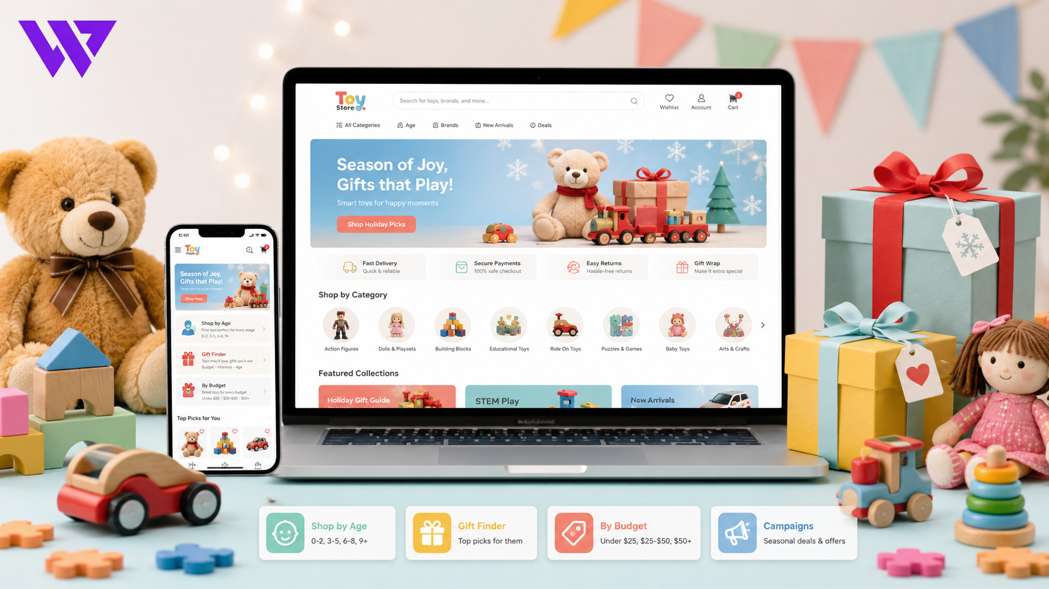
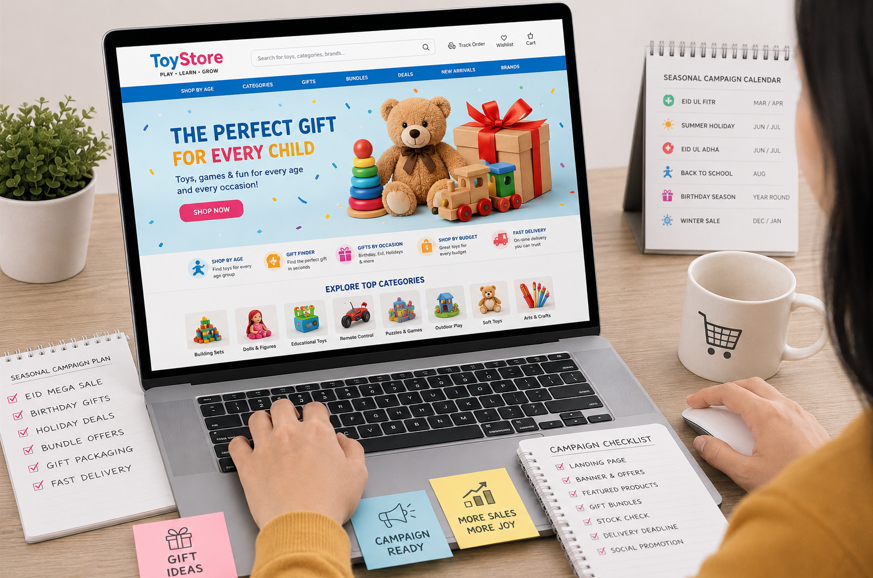
Webnion planned a responsive toy-store e-commerce experience focused on age-based discovery, gift-focused collections, campaign landing pages, mobile usability, and flexible promotional management.
The goal was to help the store prepare campaigns faster while making gift shopping easier for customers.
2. The Business Challenge
Toy buyers do not always know the exact product name they need.
A parent, relative, colleague, or family friend may only know:
- The child’s age
- The occasion
- The available budget
- The child’s interests
- Whether the gift is for a boy, girl, or any child
- Whether delivery is required before a specific date
This creates a discovery-focused shopping journey.
The store faced several common challenges:
- Products were not organized by age
- Gift buyers struggled to choose suitable items
- Seasonal campaigns required manual website changes
- Promotional banners were difficult to update quickly
- Campaign products were mixed with regular items
- Customers could not browse by budget
- Product availability was unclear during busy periods
- Mobile visitors faced long product lists
- Bundle and gift-set information was inconsistent
- Delivery deadlines were not communicated clearly
- Expired campaign offers remained visible too long
- The business lacked a reusable campaign structure
The website needed to remain useful throughout the year while becoming flexible enough for major sales periods.
3. Project Objectives
The project was planned around the following objectives:
- Organize toys by age and interest
- Make gift discovery easier
- Support seasonal campaign landing pages
- Allow campaign banners and products to be updated quickly
- Present discounts and bundles clearly
- Help customers shop by budget
- Improve mobile browsing
- Communicate stock and delivery information
- Support gift packaging and messages
- Create urgency without misleading customers
- Simplify cart and checkout
- Build a reusable structure for future campaigns
Every part of the website was designed to improve product discovery and campaign readiness.
4. Our Strategy
We planned two connected shopping journeys.
The regular shopping journey was:
Choose an age group → Select a toy category → Review products → Check suitability and details → Add to cart
The gift-shopping journey was:
Choose an occasion → Select the child’s age → Set a budget → Explore recommended gifts → Add gift options → Complete the order
Seasonal campaigns used the same product and inventory system but presented selected products through focused landing pages.
This allowed the store to run campaigns without rebuilding the entire website each time.
5. Organizing Toys by Age
Age-based navigation helped customers reach more relevant products.
The store could organize toys for:
- Newborns
- 0–12 months
- 1–2 years
- 3–5 years
- 6–8 years
- 9–12 years
- Teenagers
- Family games
Each age group could contain toys suited to different interests and development stages.
Age guidance was based on available product information and manufacturer recommendations.
This structure was especially helpful for gift buyers who did not know specific toy names.
6. Organizing Toys by Category
The product catalog could also be organized into clear categories such as:
- Educational toys
- Building blocks and construction sets
- Dolls and role-play toys
- Cars and vehicles
- Puzzles and board games
- Creative and art products
- Musical toys
- Electronic toys
- Outdoor toys
- Sports toys
- Soft toys
- Baby activity toys
- Books and learning resources
Customers could browse either by age or product type depending on how they preferred to shop.
This flexible structure improved discovery without creating an overcrowded menu.
7. Shopping by Interest
Children often have clear interests even when the buyer does not know which product to choose.
The website could create collections around interests such as:
- Science and discovery
- Art and creativity
- Vehicles
- Animals
- Music
- Building and construction
- Outdoor activities
- Pretend play
- Reading and learning
- Technology
Interest-based collections made gift selection feel more personal.
They also helped the store create focused social media campaigns around popular themes.
8. Gift Shopping by Occasion
The website could provide dedicated collections for:
- Birthday gifts
- Eid gifts
- New Year gifts
- School achievement gifts
- Baby shower gifts
- Newborn gifts
- Return gifts
- Holiday gifts
- Family celebration gifts
Each occasion page could highlight relevant products, bundles, packaging options, and delivery guidance.
This reduced the amount of searching required for customers shopping under time pressure.
9. Shopping by Budget
Gift buyers often begin with a fixed spending limit.
The website could organize products into budget ranges such as:
- Gifts under ৳500
- Gifts under ৳1,000
- Gifts from ৳1,000–৳2,000
- Gifts from ৳2,000–৳5,000
- Premium gifts
- Group and family gifts
Budget-based collections helped customers reach realistic options faster.
It also reduced repetitive questions about which gifts were available within a particular price range.
10. Seasonal Campaign Landing Pages
Each major campaign could have a dedicated landing page.
A seasonal landing page could include:
- Campaign headline
- Main visual banner
- Campaign duration
- Featured products
- Age-based gift sections
- Budget-based gift sections
- Bundle offers
- Customer reviews
- Delivery deadline
- Frequently asked questions
- Clear purchase actions
This gave the store one focused destination for Facebook advertisements, social posts, SMS, email, and other marketing activities.
Customers arriving from a campaign could see relevant products immediately instead of landing on a general homepage.
11. Reusable Campaign Structure
The website was planned so the business could reuse a campaign layout for future occasions.
The same structure could support:
- Eid campaign
- Birthday campaign
- Winter sale
- Summer holiday campaign
- School reopening campaign
- New Year campaign
- Children’s Day campaign
- Clearance sale
- New product launch
The business could change the banner, products, offer dates, and promotional content without redesigning the complete website.
This reduced campaign preparation time and created greater consistency.
12. Dynamic Promotional Banners
Campaign banners needed to be easy to update.
The administration system could allow authorized staff to manage:
- Banner image
- Campaign title
- Short message
- Button text
- Destination link
- Start date
- End date
- Display order
- Mobile banner
- Desktop banner
- Active status
Scheduling helped ensure that promotions appeared and disappeared at the correct time.
This reduced the risk of expired offers remaining visible after a campaign ended.
13. Campaign Product Selection
Not every product needed to appear in every campaign.
The store could select campaign products based on:
- Age
- Category
- Stock
- Popularity
- Price
- Discount
- Gift suitability
- Seasonal relevance
- Delivery readiness
Selected products could appear in featured campaign sections without changing their main catalog information.
This gave the business greater control over which products received visibility.
14. Transparent Discount Presentation
Seasonal campaigns often use discounts, but unclear offers can reduce customer confidence.
The website could display:
- Regular price
- Discounted price
- Discount percentage
- Total savings
- Offer start date
- Offer end date
- Stock availability
- Campaign conditions
The original price needed to be accurate.
The website avoided unsupported or misleading promotional claims.
Clear pricing helped customers understand the value of the offer without calculating it manually.
15. Gift Bundles
The store could create ready-made gift bundles such as:
- Newborn gift set
- Creative-learning bundle
- Building-toy bundle
- Outdoor play bundle
- Birthday surprise set
- Art and craft set
- Family game bundle
- Premium toy collection
Each bundle could show:
- Products included
- Recommended age
- Product quantities
- Individual product value
- Bundle price
- Total savings
- Packaging details
- Stock status
Bundles helped customers purchase a more complete gift without selecting every item individually.
16. Build-Your-Own Gift Box
Customers could also be allowed to create a personalized gift box.
The process could include:
- Select the child’s age
- Choose preferred products
- Select packaging
- Add a gift message
- Enter the recipient’s details
- Select a delivery date
The system could calculate the final price based on selected items and packaging.
This created a more personalized shopping experience while supporting a higher-value order.
17. Gift Packaging Options
Gift buyers needed clear packaging choices.
Available options could include:
- Standard packaging
- Gift wrapping
- Premium gift box
- Occasion-specific packaging
- Gift bag
- Personalized card
Each option could show:
- Packaging image
- Additional cost
- Availability
- Preparation time
- Suitable product types
Customers could select the packaging option during product selection or checkout.
18. Gift Messages and Recipient Delivery
The checkout process could allow customers to include:
- Recipient name
- Gift message
- Sender name
- Recipient phone number
- Delivery address
- Preferred delivery date
- Special delivery instructions
The store could also support price-hidden invoices for gifts where appropriate.
This made the website more useful for customers sending gifts directly to another person.
19. Delivery Deadlines for Seasonal Orders
Seasonal customers often need products before a specific date.
The website could clearly communicate:
- Final order date
- Standard delivery period
- Same-day delivery availability
- Urgent delivery availability
- Campaign delivery zones
- Additional delivery charges
- Delays caused by high order volume
Campaign pages could display the last recommended order date prominently.
This helped customers make realistic decisions and reduced urgent delivery disputes.
20. Real-Time Stock Visibility
Popular toys can sell quickly during campaigns.
The website could display:
- In-stock status
- Low-stock status
- Out-of-stock status
- Variation-level availability
- Remaining stock where appropriate
- Expected restock information where known
Campaign products needed to use the same inventory source as the main store.
This helped prevent customers from ordering products that had already sold out.
21. Product Variations
Toy products may include different:
- Colors
- Sizes
- Characters
- Designs
- Pack quantities
- Editions
- Age options
- Set combinations
Each variation could maintain separate:
- Price
- Stock
- SKU
- Product image
- Availability
Customers were required to select the correct option before adding the product to the cart.
This reduced incomplete orders during high-volume campaigns.
22. Product Safety and Age Information
Toy product pages needed clear and responsible information.
Depending on available product details, pages could include:
- Recommended age
- Material
- Product dimensions
- Small-parts warning
- Battery requirement
- Adult supervision guidance
- Package contents
- Care instructions
- Manufacturer information
- Usage warnings
The website avoided unsupported claims about child development or complete safety.
Parents and buyers were encouraged to review product labels and manufacturer guidance.
23. Mobile-First Campaign Experience
Many campaign visitors arrived through Facebook, Instagram, TikTok, Messenger, and mobile advertising.
The campaign experience was therefore designed for smartphones.
Mobile visitors could:
- View the campaign offer
- Browse age groups
- Shop by budget
- Explore gift bundles
- Select variations
- Choose packaging
- Add a gift message
- Review delivery information
- Add products to the cart
- Complete checkout
Buttons, banners, filters, product cards, and forms were adapted for smaller screens.
This made seasonal shopping more convenient for customers arriving from social platforms.
24. Faster Mobile Search
A visible search field helped customers find specific products quickly.
The search could support terms such as:
- Birthday gift for five-year-old
- Educational toy
- Building blocks
- Remote-control car
- Doll set
- Baby activity toy
- Puzzle
- Art set
- Gift under ৳1,000
Search suggestions could display matching products, categories, and collections.
This reduced browsing time for customers with a clear need.
25. Mobile-Friendly Filters
Customers could narrow products using:
- Age
- Category
- Interest
- Price range
- Brand
- Availability
- Customer rating
- Discount
- New arrivals
- Gift suitability
Filters opened only when needed and remained easy to close.
A clear reset option allowed customers to remove all selected filters quickly.
26. Gift Finder Experience
A simple gift finder could guide customers through a few questions:
- What is the child’s age?
- What is the occasion?
- What is your budget?
- What are the child’s interests?
- Do you need gift packaging?
- When do you need delivery?
Based on the answers, the website could recommend relevant products and bundles.
This reduced uncertainty for gift buyers who had limited knowledge about toys.
27. Customer Reviews
Reviews could help buyers understand:
- Product quality
- Child engagement
- Packaging
- Delivery experience
- Product size
- Gift suitability
- Ease of use
- Value for money
The website could display:
- Product-specific ratings
- Written reviews
- Customer photos
- Unboxing videos
- Gift feedback
- Verified purchase indicators
Reviews were connected to relevant products rather than displayed only in one general section.
28. Wishlist and Saved Gift Ideas
Customers may begin researching before the occasion.
A wishlist could help them:
- Save gift ideas
- Compare products
- Share options with family members
- Return before the campaign ends
- Plan purchases by budget
Saved products reduced the need to search for the same item again.
This was useful for customers planning birthdays or holiday gifts in advance.
29. Related Gift Recommendations
Product pages could recommend relevant items such as:
- Matching accessories
- Alternative age options
- Similar products at another price
- Gift packaging
- Complementary toys
- Premium versions
- Smaller budget options
Recommendations were kept relevant to the current product and occasion.
The goal was to support discovery without overwhelming the customer.
30. Mobile Cart Experience
The cart clearly displayed:
- Product image
- Product name
- Selected variation
- Recommended age
- Gift packaging
- Gift message status
- Quantity
- Unit price
- Discount
- Subtotal
Customers could update quantities and packaging choices before checkout.
This reduced errors during larger seasonal orders.
31. Simplified Checkout
The mobile checkout could collect:
- Buyer name
- Buyer phone number
- Recipient information
- Delivery address
- Preferred delivery date
- Gift message
- Order notes
- Payment method
The order summary showed:
- Selected products
- Variations
- Packaging charges
- Product total
- Discount
- Delivery charge
- Final payable amount
The process avoided unnecessary fields that could interrupt mobile customers.
32. Campaign Countdown and Urgency
Campaign pages could use countdowns or limited-stock information when the data was genuine.
Examples included:
- Offer ends on a specific date
- Order before a stated date for delivery
- Limited campaign stock
- Gift packaging available until a deadline
The website avoided false countdowns that restarted automatically.
Urgency was used to communicate real deadlines, not to pressure customers through misleading tactics.
33. Campaign SEO Structure
Seasonal landing pages could support search visibility through relevant content.
Potential pages could include:
- Eid gifts for children
- Birthday gift ideas for kids
- Educational toys online
- Toys by age
- Newborn gift sets
- Gifts under a specific budget
- Creative toys for children
- Family board games
Each page could include:
- Helpful introduction
- Relevant products
- Age guidance
- Gift suggestions
- Frequently asked questions
- Internal links
- Descriptive title
- Meta description
- Image alt text
Seasonal pages could remain useful after campaigns by being updated instead of deleted when appropriate.
34. Social Media Campaign Support
Focused landing pages gave the store better destinations for promotional content.
The business could connect:
- Facebook advertisements
- Instagram posts
- TikTok campaigns
- Messenger promotions
- Email campaigns
- SMS offers
- Influencer content
Each campaign link could lead to the relevant collection rather than the general homepage.
This created a more consistent journey from advertisement to product selection.
35. Campaign Analytics
The website could track actions such as:
- Campaign page visits
- Product views
- Gift finder use
- Filter selections
- Bundle views
- Add-to-cart activity
- Packaging selections
- Checkout starts
- Completed orders
- Campaign source
This data helped the store understand which campaigns, age groups, and gift collections attracted interest.
No unverified campaign performance or conversion percentages were claimed.
36. Post-Campaign Management
The website needed a clear process after a campaign ended.
Authorized staff could:
- Disable expired banners
- Remove campaign discounts
- Hide sold-out campaign bundles
- Update landing-page content
- Redirect outdated links
- Keep useful gift guides active
- Review campaign analytics
- Prepare the next campaign
This prevented outdated promotional information from confusing customers.
It also helped the business improve future campaigns using previous data.
37. Design Approach
The visual direction focused on fun, clarity, warmth, and easy gift discovery.
The design system included:
- Clean light backgrounds
- Friendly accent colors
- Clear typography
- Visual age categories
- Consistent product cards
- Mobile-friendly campaign banners
- Simple filters
- Large action buttons
- Gift-focused sections
- Responsive layouts
The design felt playful without becoming cluttered.
Products, campaign information, and customer actions remained easy to identify.
38. Key Features Delivered
The toy-store campaign solution included:
- Responsive e-commerce design
- Age-based product navigation
- Category and interest-based discovery
- Occasion-focused gift collections
- Budget-based shopping
- Seasonal landing pages
- Reusable campaign templates
- Scheduled promotional banners
- Campaign product selection
- Transparent discounts
- Gift bundles
- Build-your-own gift boxes
- Gift packaging
- Gift messages
- Recipient delivery
- Delivery deadline communication
- Real-time inventory
- Product variations
- Product safety information
- Mobile search and filters
- Gift finder
- Customer reviews
- Wishlist
- Mobile-friendly cart
- Simplified checkout
- Campaign SEO structure
- Marketing-channel integration
- Campaign analytics
- Post-campaign controls
- Scalable product management
Each feature was selected to support faster gift discovery, seasonal flexibility, and more organized campaign execution.
39. The Outcome
The completed solution gave the toy store a structured platform for everyday shopping and seasonal campaigns.
Customers could browse by age, interest, occasion, and budget while accessing gift bundles, packaging options, and clear delivery information.
The business gained a reusable campaign system that reduced the need for repeated website redesign.
No unverified sales, traffic, or conversion percentages are being claimed. However, the website directly addressed common problems that can make seasonal campaigns difficult to manage and gift shopping confusing.
40. Business Value Created
The website helps the toy store:
- Prepare seasonal campaigns faster
- Make gift shopping easier
- Organize toys by age and interest
- Support budget-based browsing
- Promote gift bundles
- Manage campaign banners dynamically
- Display real stock information
- Communicate delivery deadlines
- Support mobile campaign traffic
- Reduce repetitive gift questions
- Offer personalized packaging
- Track campaign interactions
- Reuse successful landing-page structures
- Add future products and campaigns easily
The project demonstrates that campaign readiness depends on website structure, not only promotional graphics.
41. Why This Project Matters
Toy stores often experience rapid changes in demand during holidays and celebrations.
A website designed only for regular product browsing may struggle during these periods.
Customers need faster ways to choose gifts, while the business needs better control over offers, stock, banners, and delivery deadlines.
A campaign-ready toy website connects:
- Product organization
- Gift discovery
- Seasonal content
- Inventory
- Promotions
- Packaging
- Delivery
- Analytics
This creates a more dependable shopping experience during both ordinary and high-demand periods.
42. Frequently Asked Questions
Can the store create separate pages for seasonal campaigns?
Yes. Dedicated landing pages can be created for Eid, birthdays, holidays, school campaigns, and other occasions.
Can customers shop for toys by age?
Yes. Products can be organized into age groups based on available manufacturer guidance.
Can gift buyers browse by budget?
Yes. Collections can be created for different price ranges to make gift selection faster.
Can customers select gift packaging?
Yes. Standard wrapping, premium boxes, gift bags, and message cards can be offered where available.
Can the website support direct delivery to the recipient?
Yes. Checkout can collect recipient information, gift messages, and preferred delivery dates.
Can campaign banners be scheduled?
Yes. Banners and offers can be configured with start and end dates.
Can seasonal discounts end automatically?
Yes. Campaign pricing can be controlled through scheduled settings when supported by the system.
Can the website prevent orders for sold-out campaign products?
Yes. Campaign products can use the main inventory system and become unavailable when stock reaches zero.
Can customers create their own gift bundles?
Yes. A build-your-own gift-box feature can allow customers to select products and packaging.
Is the website optimized for mobile campaign visitors?
Yes. Campaign banners, filters, gift collections, cart, and checkout can be designed for smartphone users.
43. Need a Campaign-Ready E-commerce Website for Your Toy Store?
A toy-store website should help customers find suitable products by age, interest, occasion, and budget.
It should also give the business enough flexibility to launch seasonal campaigns without repeatedly rebuilding the website.
Webnion designs and develops responsive e-commerce websites for:
- Toy stores
- Kids’ product businesses
- Baby product retailers
- Gift shops
- Educational toy brands
- Family lifestyle stores
- Social commerce sellers
- Growing online retailers
We create campaign-ready shopping experiences that organize products clearly, simplify gift discovery, and support seasonal sales operations.
Build a toy-store website that is ready for everyday customers, gift buyers, and your next major campaign.