
How a Cloud Kitchen Used a Focused Landing Page to Generate WhatsApp Orders
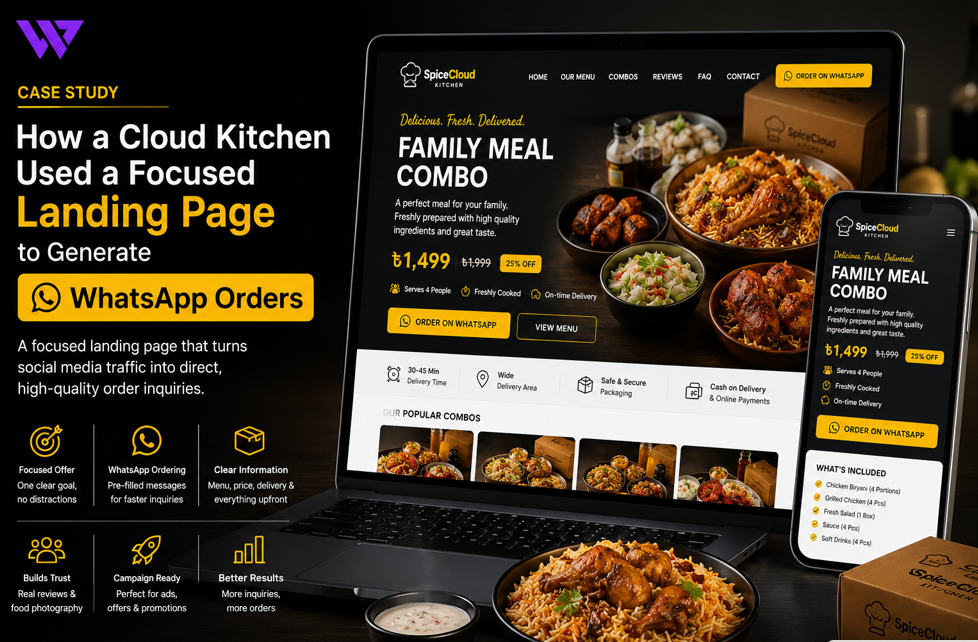
How a Cloud Kitchen Used a Focused Landing Page to Generate WhatsApp Orders

1. Project Overview
A growing cloud kitchen needed a focused online ordering experience that could turn social media visitors into direct WhatsApp order inquiries.
The business did not operate like a traditional dine-in restaurant. Most customers discovered its food through Facebook posts, Instagram content, short videos, paid advertisements, and customer recommendations.
Potential customers usually wanted to know:
- Which meals were available
- What each combo included
- How much the food cost
- Whether delivery was available in their area
- How long preparation and delivery might take
- Whether customization was possible
- How to place an order through WhatsApp
The business already received messages through social media, but the ordering process was inconsistent. Customers often sent incomplete messages, asked repeated questions, or left before confirming an order.
Webnion planned a mobile-first landing page focused on one clear journey:
View the offer → Understand the food → Select an option → Start a structured WhatsApp order inquiry
The goal was to help the cloud kitchen generate more organized direct-order conversations without forcing customers to navigate a large, complicated website.
2. The Business Challenge
Cloud kitchens depend heavily on fast customer decisions.
A customer arriving from an advertisement may leave within seconds if the page does not immediately explain:
- What is being offered
- Why the offer is valuable
- What the price is
- How delivery works
- What action should be taken next
The business faced several common challenges:
- Social media posts contained limited order information
- Customers had to search manually for the WhatsApp number
- The menu was scattered across posts and images
- Promotional prices were not presented consistently
- Customers repeatedly asked about delivery charges
- Order messages often missed quantity or variation details
- Too many unrelated options distracted campaign visitors
- Mobile users had difficulty reading long menu images
- The business could not clearly track which campaigns generated inquiries
- There was no dedicated page for specific offers or meal packages
The cloud kitchen needed a focused landing page that removed unnecessary distractions and made ordering through WhatsApp easier.
3. Project Objectives
The project was planned around the following objectives:
- Create a focused mobile-first landing page
- Present the main food offer immediately
- Make prices and combo contents easy to understand
- Use professional food photography
- Keep WhatsApp ordering visible throughout the page
- Generate prefilled WhatsApp messages
- Reduce repetitive customer questions
- Communicate delivery areas and charges clearly
- Support variations, add-ons, and quantities
- Build confidence through customer proof
- Connect social media advertisements with relevant offers
- Track meaningful customer actions
- Create a reusable structure for future campaigns
Every section was designed to move customers toward a direct and informed order inquiry.
4. Our Strategy
We planned the landing page around one primary customer action:
Order through WhatsApp.
The intended customer journey was:
Open the campaign page → View the main offer → Review food details → Check price and delivery → Select quantity or options → Open WhatsApp with prepared order information
Unlike a full restaurant website, the landing page did not contain several competing menus, blog links, or unrelated services.
It focused on:
- One main offer
- A limited number of related food options
- Clear pricing
- Customer proof
- Delivery information
- Frequently asked questions
- Repeated WhatsApp order actions
This reduced distraction and created a more direct conversion journey.
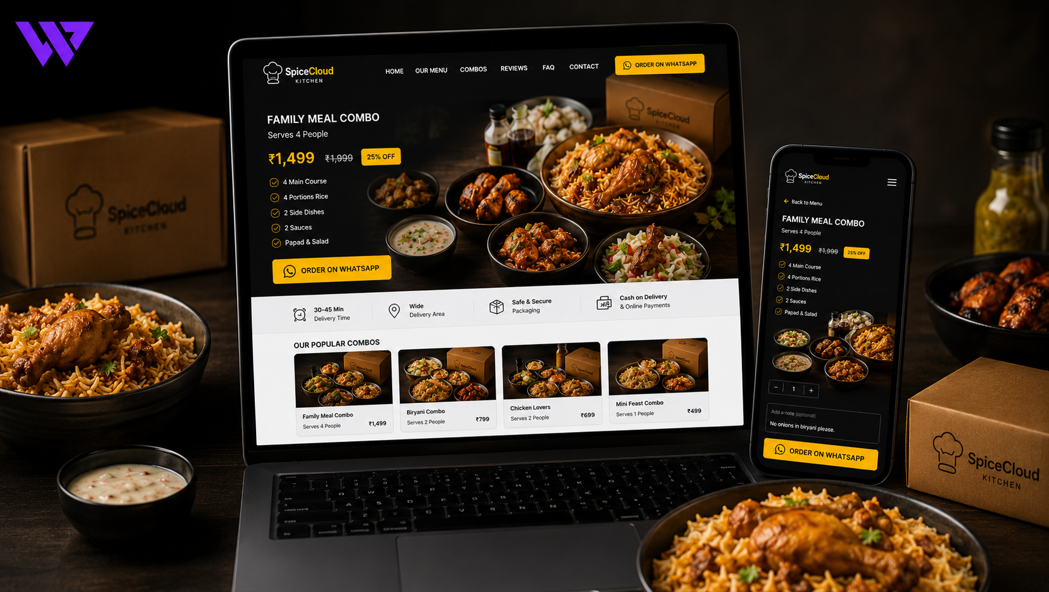
5. Why a Focused Landing Page Was Used
A full restaurant website can be useful for presenting a large menu, company information, reservations, and multiple services.
However, the cloud kitchen needed a faster page for advertising campaigns.
Customers clicking an advertisement for a specific combo should not be sent to a general homepage where they must search for the offer again.
The focused landing page created continuity between:
Advertisement → Offer page → WhatsApp inquiry
This made the customer journey easier to understand.
The landing page could be reused for:
- Lunch packages
- Family meals
- Office lunch offers
- Weekend specials
- Ramadan and Iftar packages
- Couple meals
- Student offers
- New menu launches
- Limited-time campaigns
6. Strong Hero Section
The top section of the landing page needed to communicate the offer immediately.
The hero area could include:
- Main food image
- Offer name
- Short value-focused headline
- Products included
- Current price
- Previous price where applicable
- Delivery information
- WhatsApp order button
For example:
Family Meal Combo for Four
Includes biryani, grilled chicken, salad, sauce, and four drinks.
৳1,499
Order directly through WhatsApp.
Customers could understand the main offer without scrolling through the entire page.
7. Clear Offer Positioning
The landing page explained why the offer might be useful.
Depending on the campaign, the content could focus on:
- Convenient family meals
- Affordable office lunches
- Ready-to-order group packages
- Weekend dinner options
- Celebration meals
- Time-saving food delivery
- Complete meals within a clear budget
The page avoided vague promotional claims.
It explained the actual contents, quantity, serving guidance, and price so customers could judge the offer confidently.
8. Professional Food Photography
Food images were treated as an important conversion element.
The landing page could include:
- Main meal presentation
- Individual food items
- Close-up texture
- Packaging
- Combo contents
- Portion reference
- Real delivery presentation
- Customer serving examples
The images needed to reflect the actual food as closely as possible.
Consistent lighting and styling made the cloud kitchen appear more professional and helped customers understand what they would receive.
9. Clear Combo Contents
Customers needed to know exactly what was included before ordering.
Each offer could display:
- Main dish
- Side dishes
- Drinks
- Sauces
- Number of portions
- Number of pieces
- Available variations
- Optional add-ons
For example:
Family Combo Includes:
- Four portions of chicken biryani
- Four pieces of grilled chicken
- One family salad
- Four sauces
- Four soft drinks
This reduced confusion and made the offer easier to compare with individual menu items.
10. Portion and Serving Guidance
Customers often asked whether a combo would be enough for their group.
The landing page could include realistic serving guidance such as:
- Suitable for one person
- Recommended for two people
- Designed for three to four people
- Family-sized portion
- Office package for ten people
Serving guidance was presented as an estimate because individual appetite and serving preferences may vary.
This helped customers select the right package without repeatedly contacting the business.
11. Transparent Pricing
The offer section could clearly display:
- Regular price
- Campaign price
- Discount amount
- Add-on prices
- Delivery charge
- Minimum order
- Final estimated total
The page avoided hiding additional charges until the customer entered WhatsApp.
Transparent pricing helped reduce abandoned conversations caused by unexpected costs.
It also ensured that the campaign message remained consistent across advertisements, landing pages, and sales conversations.
12. Food Variations and Add-ons
Some offers included selectable options such as:
- Chicken or beef
- Regular or spicy
- Rice variation
- Drink choice
- Additional sauce
- Extra meat
- Dessert
- Larger portion
- Premium packaging
Customers could select these options before opening WhatsApp.
The prepared order message could then include the selected choices.
This reduced the number of follow-up questions required to confirm the order.
13. Primary WhatsApp Order Action
WhatsApp was used as the main ordering channel.
The landing page could include the order button:
- In the hero section
- Below the offer details
- After customer reviews
- Near delivery information
- After frequently asked questions
- Inside a sticky mobile bar
The button label clearly explained the action:
- Order on WhatsApp
- Send Order Inquiry
- Confirm Availability on WhatsApp
- Order This Combo
A clear text label was more useful than displaying only a WhatsApp icon.
14. Prefilled WhatsApp Order Messages
A basic WhatsApp button may open an empty conversation.
That still requires customers to type the product name, quantity, and other details manually.
The improved journey could generate a prepared message such as:
Hello, I would like to order this offer.
Offer: Family Biryani Combo
Quantity: 1
Protein Option: Chicken
Spice Level: Medium
Extra Sauce: 2
Delivery Area: Mirpur
Offer Link: [landing page]
Please confirm availability, delivery charge, and final total.
This gave the cloud kitchen useful order context immediately.
It also reduced mistakes when several campaigns were running at the same time.
15. Multi-Item Inquiry Support
Some customers wanted to add more than one item.
The landing page could allow visitors to build a simple inquiry summary containing:
- Main offer
- Additional food items
- Quantities
- Variations
- Add-ons
- Special instructions
The complete summary could then be sent through one WhatsApp message.
This was easier than asking customers to send multiple screenshots or type every menu item manually.
16. Sticky Mobile Order Button
Most campaign visitors arrived from smartphones.
As they scrolled through food details, reviews, and delivery information, the primary ordering action needed to remain accessible.
A sticky mobile bar could include:
- Order on WhatsApp
- Call Now
- View Selected Items
The sticky element was designed carefully so it did not cover important content.
This reduced the need for customers to return to the top of the page before ordering.
17. Delivery Area Information
Delivery availability was one of the most common customer questions.
The landing page could show:
- Supported delivery areas
- Delivery charge by location
- Minimum order value
- Free-delivery conditions
- Pickup availability
- Estimated delivery time
- Same-day delivery conditions
- Areas outside the standard delivery zone
Customers could check the basic delivery information before starting an inquiry.
This helped the kitchen receive more relevant conversations from supported locations.
18. Preparation and Delivery Time
The page could explain:
- Average preparation time
- Estimated delivery time
- Busy-period delays
- Pre-order requirements
- Last order time
- Campaign delivery schedule
For example:
Average preparation time: 25–35 minutes
Estimated delivery: 30–60 minutes depending on location and traffic
The website avoided guaranteeing exact delivery times when conditions could change.
Realistic information helped manage customer expectations.
19. Opening Hours and Order Availability
The landing page could display:
- Order-opening time
- Last order time
- Weekly closing day
- Campaign availability
- Pre-order deadline
- Holiday schedule
Where technically supported, the page could show whether the kitchen was currently accepting orders.
Customers could then avoid sending urgent inquiries outside operating hours.
20. Honest Campaign Urgency
Campaign landing pages may use urgency when the deadline or stock limit is genuine.
Examples included:
- Offer available until Friday
- Pre-order before 5 PM
- Limited number of meal packages
- Available while campaign stock lasts
- Order before a specific date for event delivery
The page avoided fake countdown timers that restarted automatically.
Honest urgency helped customers understand real ordering deadlines without creating misleading pressure.
21. Customer Reviews and Food Proof
Potential customers wanted evidence that the food and service were reliable.
The landing page could include:
- Written customer reviews
- Food photos from customers
- Delivery feedback
- Packaging reviews
- Social media comments
- Video testimonials
- Repeat-order feedback
Reviews related to the promoted meal or a similar package were more useful than generic testimonials.
The business needed customer permission before publishing private messages or personal images.
22. Trust-Building Information
The landing page could strengthen confidence through:
- Business name
- Contact number
- Kitchen location or service area
- Real food photography
- Clear pricing
- Customer reviews
- Delivery information
- Payment methods
- Support availability
- Replacement or complaint process
Any hygiene, certification, or food-quality claim needed valid supporting information.
The page avoided using unsupported badges simply to create trust.
23. Food and Allergen Information
Where verified information was available, the page could display:
- Main ingredients
- Spice level
- Vegetarian status
- Contains dairy
- Contains nuts
- Contains seafood
- Contains gluten
- Halal information where verified
Customers with serious allergies were encouraged to contact the kitchen directly.
The landing page avoided guaranteeing that food was completely allergen-free when it was prepared in a shared kitchen.
24. Frequently Asked Questions
A focused FAQ section could answer:
- What is included in the offer?
- How many people can it serve?
- Can the spice level be changed?
- Are add-ons available?
- Which areas receive delivery?
- What is the delivery charge?
- How long does delivery take?
- Which payment methods are accepted?
- Can the order be scheduled?
- Can the offer be customized?
This reduced repetitive questions while keeping the page concise.
25. Mobile-First Design
The landing page was planned primarily for mobile visitors.
The mobile experience used:
- Large food images
- Short content sections
- Clear pricing
- Readable typography
- Large order buttons
- Simple variation selectors
- Expandable FAQ areas
- Sticky WhatsApp actions
- Compact forms
- Fast-loading sections
Customers could review the offer and start an inquiry without zooming or navigating a complicated menu.
26. Fast Page Performance
Paid advertising traffic can be wasted when a landing page loads slowly.
The website was planned with attention to:
- Optimized WebP food images
- Responsive image sizes
- Lazy loading
- Reduced unnecessary scripts
- Lightweight animations
- Efficient font loading
- Clean front-end code
- Browser caching
Faster loading helped visitors reach the offer before losing interest.
This was especially important for mobile customers using slower internet connections.
27. Advertisement and Landing Page Continuity
The landing page needed to match the message used in the advertisement.
If an advertisement promoted a family biryani package, the landing page needed to show:
- The same offer
- Similar visual presentation
- The same price
- The same products
- The same campaign deadline
- A clear order action
Sending visitors to an unrelated homepage could create confusion.
Message consistency helped customers feel that they had reached the correct offer.
28. Campaign-Specific Landing Pages
The cloud kitchen could create separate pages for:
- Family combo
- Office lunch
- Iftar package
- Weekend meal
- Couple dinner
- Birthday food package
- Corporate order
- New menu launch
Each page could focus on one audience and one ordering goal.
This allowed the business to run different advertisements without mixing every offer on one page.
29. Dynamic Campaign Management
Authorized staff could manage landing-page content from an administration panel.
They could update:
- Offer title
- Food images
- Price
- Included products
- Add-ons
- Delivery information
- Campaign start date
- Campaign end date
- WhatsApp number
- Customer reviews
- Active status
This allowed the kitchen to launch future campaigns without rebuilding the page from the beginning.
30. WhatsApp Inquiry Tracking
The website could track when customers clicked the WhatsApp order button.
Additional actions could include:
- Landing-page visits
- Offer-section views
- Variation selections
- Add-to-inquiry actions
- WhatsApp clicks
- Call-button clicks
- Delivery-section interactions
- FAQ openings
Tracking did not guarantee completed orders.
However, it helped the business understand which campaigns and offers generated customer interest.
31. Order Inquiry Management
Incoming inquiries could be organized using statuses such as:
- New inquiry
- Availability confirmed
- Waiting for delivery information
- Waiting for payment
- Order confirmed
- Preparing
- Dispatched
- Delivered
- Cancelled
The system could record:
- Customer name
- Phone number
- Selected offer
- Quantity
- Add-ons
- Delivery location
- Special notes
- Inquiry source
- Assigned staff member
This created a more organized process than relying only on unstructured WhatsApp chats.
32. Retargeting and Follow-Up Support
Visitors who viewed an offer but did not complete an inquiry could be measured through website tracking when configured with appropriate consent and privacy practices.
The business could use this information to improve:
- Advertisement targeting
- Offer clarity
- Landing-page content
- Follow-up campaigns
- Future food packages
The website avoided making unsupported claims about guaranteed remarketing results.
Tracking was used to support better decisions, not to pressure customers.
33. Design Approach
The visual direction focused on appetite, speed, clarity, and direct action.
The design system included:
- Strong food photography
- Clean light or warm backgrounds
- Brand-focused accent colors
- Clear pricing hierarchy
- Short content blocks
- Visible delivery details
- Customer-proof sections
- Mobile-friendly buttons
- Focused WhatsApp actions
- Responsive layouts
The page avoided unnecessary navigation and decorative elements that could distract customers from the main offer.
34. Key Features Delivered
The cloud-kitchen landing-page solution included:
- Mobile-first landing-page design
- Focused campaign offer
- Strong hero presentation
- Professional food galleries
- Clear combo contents
- Portion and serving guidance
- Transparent pricing
- Food variations and add-ons
- Product-specific WhatsApp actions
- Prefilled WhatsApp messages
- Multi-item inquiry summary
- Sticky mobile order buttons
- Delivery-area information
- Preparation-time guidance
- Opening-hour display
- Honest campaign deadlines
- Customer reviews
- Trust and food-information sections
- Frequently asked questions
- Fast page performance
- Campaign-specific page structure
- Dynamic offer management
- WhatsApp click tracking
- Order-inquiry management
- Reusable landing-page framework
Each feature was selected to improve ordering clarity, campaign consistency, and customer communication.
35. The Outcome
The completed solution created a more focused journey for customers arriving from social media and paid campaigns.
Visitors could understand the food offer, review the contents, check pricing and delivery, select options, and begin a WhatsApp order conversation through one landing page.
The cloud kitchen gained a reusable campaign structure and more organized order information.
No unverified order-growth, conversion, or revenue percentages are being claimed. However, the landing page directly addressed the friction that previously existed between viewing a food advertisement and starting a complete order inquiry.
36. Business Value Created
The landing page helps the cloud kitchen:
- Present campaign offers professionally
- Turn social-media traffic into direct inquiries
- Reduce customer confusion
- Receive more complete order messages
- Reduce repetitive questions
- Communicate pricing transparently
- Promote meal packages and add-ons
- Clarify delivery areas
- Support mobile customers
- Track WhatsApp interest
- Manage order inquiries more clearly
- Launch future campaigns faster
- Reduce dependence on scattered social-media posts
- Build stronger direct customer relationships
The project demonstrates that a focused landing page can become a practical ordering tool when it combines clear information with an easy communication path.
37. Why This Project Matters
Cloud kitchens often attract customers through social media but lose potential orders between the advertisement and the final conversation.
An attractive food post may create interest, but customers still need to know:
- What is included
- How much it costs
- Whether delivery is available
- How to customize the order
- Which message to send
A focused landing page connects:
Advertisement → Offer details → Trust → Delivery information → WhatsApp order inquiry
This creates a smoother journey than asking customers to gather information from several posts or send screenshots manually.
The landing page becomes a direct campaign-to-order bridge.
38. Frequently Asked Questions
Why does a cloud kitchen need a landing page?
A focused landing page brings food details, pricing, delivery information, customer proof, and WhatsApp ordering into one clear journey.
Can every campaign have a separate landing page?
Yes. Separate pages can be created for family meals, office lunches, Iftar packages, weekend offers, and other campaigns.
Can customers select quantities and add-ons?
Yes. The page can collect quantities, variations, add-ons, and special instructions before opening WhatsApp.
Can the WhatsApp message include product information automatically?
Yes. The prepared message can include the offer name, quantity, variations, delivery area, and page link.
Can customers select several food items?
Yes. A simple inquiry basket can collect multiple items and create one organized WhatsApp summary.
Can delivery charges be shown on the page?
Yes. Delivery zones, charges, minimum orders, and estimated times can be presented clearly.
Can campaign offers expire automatically?
Yes. Start and end dates can control campaign visibility when supported by the system.
Can WhatsApp button clicks be tracked?
Yes. Analytics can measure clicks and other meaningful landing-page interactions.
Is the landing page optimized for mobile users?
Yes. The page can be designed primarily for customers arriving from Facebook, Instagram, TikTok, and mobile advertisements.
Can the same layout be reused later?
Yes. The structure can support future campaigns by changing the offer, images, pricing, content, and dates.
39. Need a WhatsApp Order Landing Page for Your Cloud Kitchen?
A cloud-kitchen campaign should not end with an attractive food advertisement.
Customers need a clear destination where they can understand the offer and begin an organized order conversation.
Webnion designs and develops focused landing pages for:
- Cloud kitchens
- Restaurants
- Food delivery businesses
- Home-based food brands
- Catering services
- Bakeries
- Meal-preparation businesses
- Growing food brands
We create mobile-first landing pages that connect food presentation, campaign pricing, delivery information, customer trust, and WhatsApp order inquiries.
Build a focused food landing page that turns campaign interest into clearer direct-order conversations.