Details
How a Diagnostic Center Organized Services, Tests, and Booking Requests Online
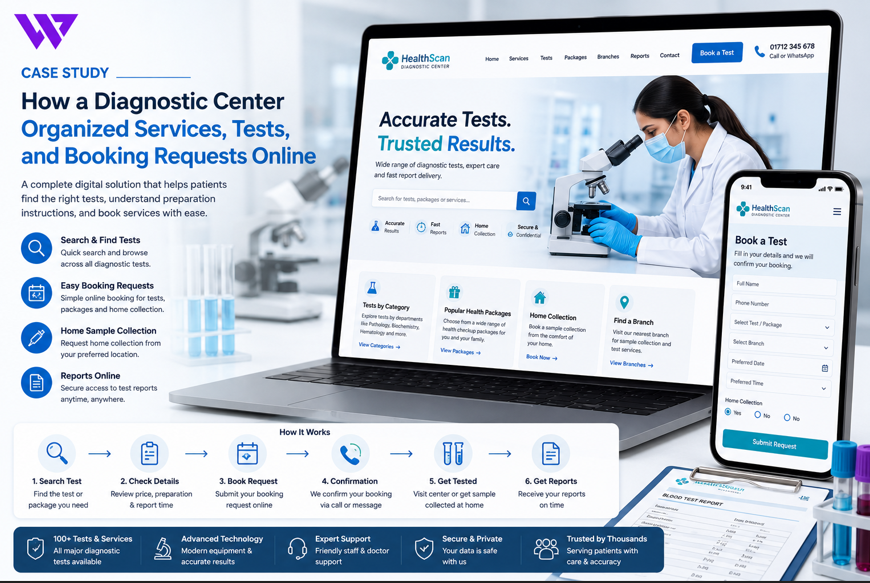
How a Diagnostic Center Organized Services, Tests, and Booking Requests Online

1. Project Overview
A growing diagnostic center needed a professional website that could help patients understand available tests, find the right service, review preparation instructions, and submit booking requests from a mobile device.
The center provided pathology, imaging, screening, health packages, home sample collection, and specialist diagnostic services.
Before the website project, patients often depended on phone calls, Facebook messages, WhatsApp conversations, printed leaflets, and in-person visits to ask about:
- Available diagnostic tests
- Test prices
- Required preparation
- Fasting instructions
- Sample collection times
- Doctor referral requirements
- Report delivery times
- Home sample collection
- Branch locations
- Booking availability
This created repeated work for reception staff and made the process difficult for patients who needed information outside business hours.
Webnion planned a responsive diagnostic center website focused on clear service organization, searchable tests, structured booking requests, mobile usability, and responsible healthcare communication.
The goal was to help patients find verified service information and request appointments with fewer steps while giving the center a more organized way to manage inquiries.
2. The Business Challenge
Diagnostic centers often provide a large number of services across different departments.
A patient may know the exact name of a test, while another may only have a doctor’s prescription or a general test category.
The center faced several common challenges:
- Tests were not organized into clear departments
- Patients repeatedly called to ask about prices
- Preparation instructions were difficult to find
- Similar test names created confusion
- Home collection requests arrived with incomplete information
- Branch-specific service availability was unclear
- Patients could not easily understand report-delivery timelines
- Mobile visitors struggled with long service lists
- Booking messages were scattered across several channels
- Staff had to answer the same questions repeatedly
- Patients sometimes assumed that submitting a request meant the booking was confirmed
- The website lacked a scalable structure for adding future tests and packages
The business needed a digital platform that could organize complex service information without overwhelming patients.
3. Project Objectives
The project was planned around the following objectives:
- Organize tests and diagnostic services clearly
- Help patients search for specific tests
- Display preparation instructions responsibly
- Make prices easier to understand where approved
- Support branch-based service availability
- Simplify booking requests
- Create a structured home sample collection process
- Reduce repetitive reception calls
- Improve mobile usability
- Communicate report-delivery information clearly
- Protect sensitive patient information
- Strengthen local search visibility
- Create a scalable structure for future services
Every section was designed around clarity, privacy, accessibility, and responsible healthcare communication.
4. Our Strategy
We planned the patient journey around one central need:
Find the correct diagnostic service and understand the booking process without confusion.
The intended journey was:
Search for a test → Review service information → Check preparation requirements → Select branch or collection type → Submit a booking request → Receive confirmation from the diagnostic center
The website was not designed to recommend tests based on symptoms or replace professional medical guidance.
It presented approved service information and helped patients follow instructions already provided by qualified healthcare professionals.
This created a responsible balance between digital convenience and medical boundaries.
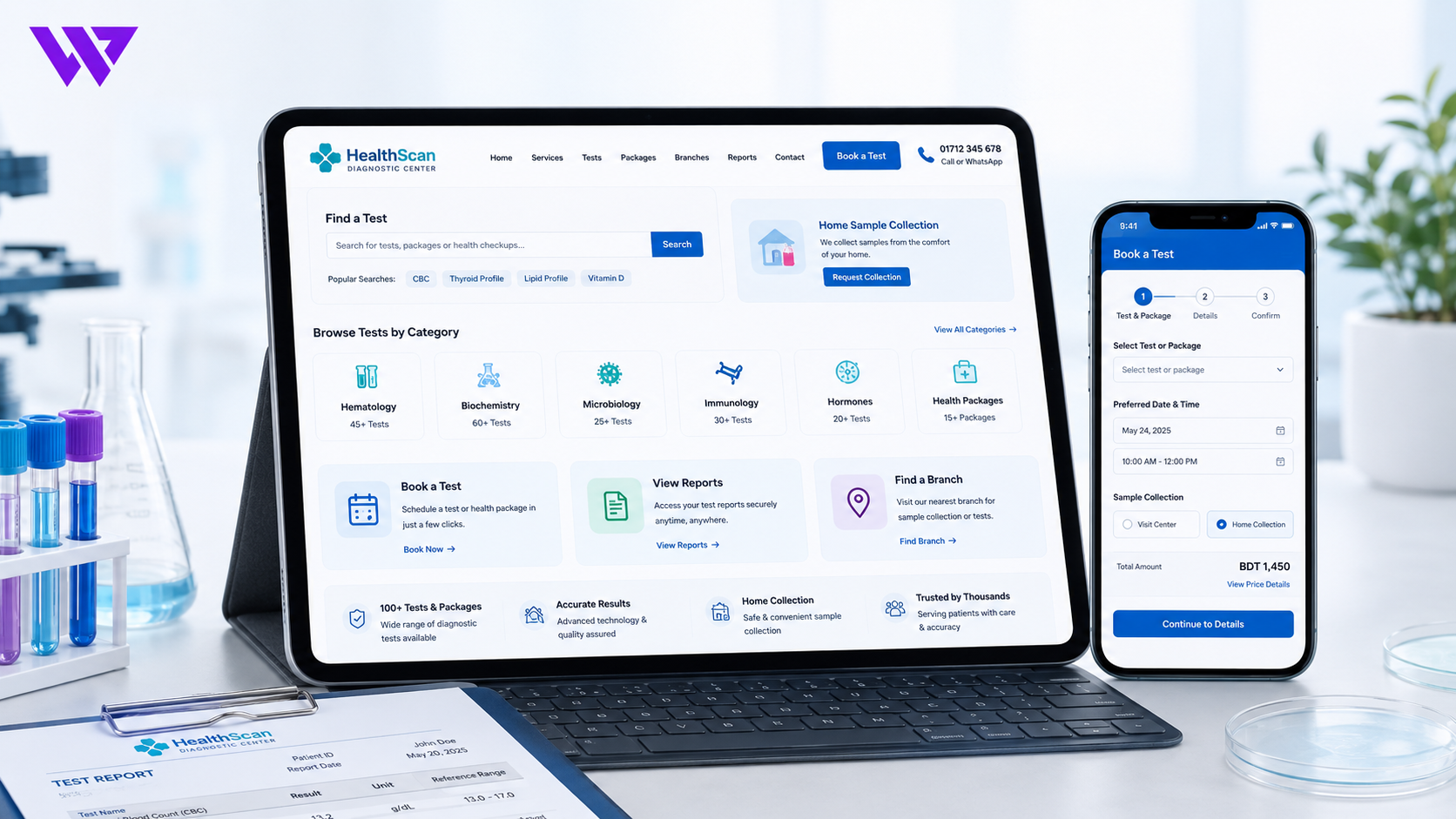
5. Mobile-First Website Structure
Many patients accessed the website through smartphones.
They often arrived from:
- Google Search
- Google Maps
- Doctor referrals
- Hospital recommendations
- Online advertisements
- Family referrals
The mobile experience prioritized:
- Search Tests
- Test Categories
- Health Packages
- Book a Test
- Home Sample Collection
- Branch Locations
- Call Center
- WhatsApp Support
- Report Information
Buttons were large enough to tap comfortably, text remained readable, and important actions were easy to find.
The mobile navigation avoided complicated menus and unnecessary animation.
6. Organizing Diagnostic Departments
The center’s services were grouped into clear departments.
Depending on the facility, these could include:
- Pathology
- Hematology
- Biochemistry
- Microbiology
- Immunology
- Hormone Testing
- Radiology and Imaging
- Ultrasound
- X-ray
- CT Scan
- MRI
- Cardiology Diagnostics
- Health Screening
- Home Sample Collection
Each department page could explain:
- Available services
- General test types
- Branch availability
- Booking requirements
- Preparation guidance
- Contact information
The department content remained informational and avoided suggesting which test a patient should choose without professional advice.
7. Searchable Test Directory
A visible test search system helped patients find services quickly.
Patients could search using:
- Test name
- Test code
- Department
- Common abbreviation
- Health package
- Service type
Examples could include:
- CBC
- Blood glucose
- Lipid profile
- Thyroid profile
- Liver function test
- Ultrasound
- X-ray
- MRI
- ECG
- Vitamin D
Search suggestions could display matching tests and categories while the user typed.
This reduced the need to scroll through a long list of services.
8. Test Profile Pages
Every test could have its own structured information page.
A test page could include:
- Test name
- Department
- Sample type
- General purpose
- Preparation requirements
- Fasting guidance where approved
- Report-delivery estimate
- Branch availability
- Home collection eligibility
- Price where approved for display
- Booking request action
- Important notes
The information was based on verified instructions provided by the diagnostic center.
The page did not interpret results or recommend the test for individual symptoms.
9. Responsible Test Explanations
Patients often need a simple explanation of what a test generally measures.
The website could explain this in plain language.
For example:
“This test measures several components of the blood and is commonly requested by healthcare professionals as part of a general health assessment.”
The content avoided statements such as:
- This test confirms a disease
- You definitely need this test
- A normal result guarantees good health
- This test replaces a doctor’s evaluation
Test interpretation remained the responsibility of qualified healthcare professionals.
10. Preparation Instructions
Preparation information was one of the most important parts of the website.
Depending on the service, instructions could include:
- Fasting requirement
- Water intake guidance
- Medication-related instructions approved by the center
- Sample collection timing
- Clothing guidance
- Previous reports to bring
- Pregnancy-related notification
- Arrival time
- Referral or prescription requirements
The website did not create medical preparation instructions independently.
Every instruction needed to be reviewed and approved by qualified diagnostic-center staff.
11. Clear Fasting Information
Patients often become confused about fasting requirements.
The website could clearly state:
- Whether fasting was required
- Recommended fasting duration
- Whether water was allowed
- Whether the instruction applied to all patients
- When the patient should contact the center for clarification
The page avoided advising patients to stop medication without professional guidance.
Where medication could affect preparation, patients were instructed to speak with their doctor or the diagnostic center.
12. Sample-Type Information
Patients could review which sample type was generally required.
Examples included:
- Blood
- Urine
- Stool
- Swab
- Sputum
- Tissue
- Imaging
- Non-invasive measurement
The page could explain whether the sample was collected at the center or could be collected at home.
Sensitive or complex samples required clear professional instructions.
13. Test Price Presentation
Where the center approved public pricing, the website could display:
- Regular price
- Package price
- Branch-specific price
- Home collection charge
- Additional service charge
- Offer validity
- Final estimated cost
The website clarified that prices could change and that the center would confirm the final amount.
For tests requiring additional procedures or professional review, the displayed amount could be marked as an estimate.
Transparent pricing helped reduce repetitive calls and unexpected costs.
14. Health Checkup Packages
The diagnostic center could present organized screening packages such as:
- Basic health screening
- Executive health checkup
- Women’s wellness package
- Men’s wellness package
- Senior health package
- Diabetes monitoring package
- Cardiac screening package
- Pre-employment screening
- Corporate health package
Each package could show:
- Tests included
- Number of services
- Preparation requirements
- Package price
- Branch availability
- Booking method
- Report timeline
The website avoided claiming that a package could diagnose every condition or guarantee a health outcome.
15. Package Comparison
Patients could compare health packages using factual information.
The comparison could include:
- Included tests
- Preparation requirements
- Available branches
- Home collection eligibility
- Price
- Report timeline
- Booking options
This helped patients understand the difference between packages without opening several pages repeatedly.
Patients were encouraged to follow professional recommendations when choosing medically necessary tests.
16. Structured Test Booking Form
The booking form collected only the information needed to process a request.
Fields could include:
- Patient name
- Phone number
- Email address where needed
- Selected test or package
- Preferred branch
- Preferred date
- Preferred time
- Home collection request
- Patient age group
- Prescription upload where supported
- Short note
- Consent confirmation
The form avoided collecting detailed medical history unless the center had a secure and approved workflow.
17. Simple Booking Journey
The booking experience followed a clear sequence:
- Search or select a test
- Review preparation information
- Choose a branch or home collection
- Select a preferred date and time
- Enter patient details
- Submit the booking request
- Wait for confirmation
This step-by-step structure reduced long and confusing forms.
Patients could clearly understand what information was required before submitting the request.
18. Booking Request Versus Confirmed Appointment
The website clearly explained that a submitted request was not automatically confirmed.
After submission, the page could display:
“Your booking request has been received. The diagnostic center will contact you to confirm the date, time, preparation requirements, and final cost.”
This prevented patients from arriving without confirmation.
The center could confirm bookings through:
- Phone call
- SMS
- Patient portal where available
19. Branch-Based Service Availability
Not every branch may provide every test.
The website could show:
- Available branches
- Branch address
- Service hours
- Test availability
- Imaging availability
- Sample collection time
- Report collection process
- Contact number
Patients could select a branch before submitting a booking request.
This reduced situations where patients visited a location that did not provide the required service.
20. Home Sample Collection
The website could support home collection requests for eligible tests.
The request form could collect:
- Patient name
- Phone number
- Address
- Preferred date
- Preferred time
- Selected tests
- Number of patients
- Access instructions
- Prescription upload where supported
- Special notes
The website clearly stated that not every test was eligible for home collection.
The center remained responsible for confirming service availability, preparation, and collection conditions.
21. Home Collection Charges
The home collection page could explain:
- Supported areas
- Collection charge
- Minimum order requirement
- Free-collection conditions
- Available time slots
- Same-day availability
- Additional distance charges
- Cancellation policy
Transparent information helped patients understand the service before submitting a request.
The final charge remained subject to confirmation by the center.
22. Prescription Upload
Where supported securely, patients could upload a doctor’s prescription.
The system could accept approved formats such as:
- JPG
- PNG
The website could explain:
- Maximum file size
- Supported file types
- How the prescription would be used
- Who could access it
- How long it might be retained
Prescription uploads required secure handling because they could contain sensitive health information.
23. WhatsApp-Assisted Booking
Some patients preferred WhatsApp.
The website could prepare a message such as:
Hello, I would like to request a diagnostic test booking.
Patient Name:
Test: Thyroid Profile
Preferred Branch: Dhanmondi
Preferred Date:
Preferred Time:
Home Collection: No
Test Page: [link]
Please confirm availability, preparation instructions, and final cost.
Patients were advised not to send highly sensitive medical information through unsecured channels unless the center specifically instructed them to do so.
24. Click-to-Call Support
A visible click-to-call option helped patients who preferred direct communication.
The call action could appear:
- In the header
- On test pages
- On the booking page
- Near branch information
- In the mobile sticky bar
- On the contact page
This was especially useful for older patients and people needing clarification about preparation or availability.
25. Report Delivery Information
Patients often wanted to know when and how reports would be available.
The website could explain:
- Estimated report time
- Same-day report availability
- Multi-day test timelines
- Branch report collection
- Online report availability
- SMS notification
- Email notification
- Required receipt or reference number
The page clarified that report timelines were estimates and could change depending on test complexity, quality checks, or laboratory conditions.
26. Online Report Access
Where supported securely, patients could access reports online.
The system could require:
- Patient ID
- Report number
- Phone verification
- Secure password
- One-time verification code
Reports contained sensitive information and required appropriate security controls.
The website avoided displaying report details publicly or through easily guessable links.
27. Report Interpretation Boundaries
The website clearly explained:
“Diagnostic reports should be reviewed by a qualified healthcare professional. The website does not interpret results or provide medical advice.”
The diagnostic center could provide report-delivery services without turning the website into a diagnosis platform.
Patients with questions about results were directed to their doctor or an authorized medical professional.
28. Imaging Service Information
Imaging service pages could include:
- Service name
- Available machine or modality
- General preparation instructions
- Referral requirements
- Contrast-related notes where approved
- Branch availability
- Estimated duration
- Report-delivery time
- Booking request action
The website avoided advising patients to select imaging services without professional guidance.
29. Emergency and Urgent Guidance
The website included a clear notice:
“This website and booking system are not intended for medical emergencies. In an emergency, contact the appropriate local emergency service or visit the nearest emergency facility.”
Patients were not advised to wait for an online booking response during an urgent medical situation.
This was important because booking requests might not be reviewed immediately.
30. Clinic and Branch Locations
Each branch page could include:
- Full address
- Map
- Landmark
- Contact number
- Opening hours
- Available departments
- Home collection coverage
- Parking information
- Get Directions action
Mobile users could open the location directly in a map application.
Clear directions reduced missed appointments and repeated calls.
31. Service and Collection Hours
The website could display:
- Reception hours
- Sample collection hours
- Imaging hours
- Report collection hours
- Home collection schedule
- Weekly closing day
- Holiday changes
- Last booking time
Temporary notices could be added for:
- Public holidays
- Equipment maintenance
- Branch closure
- Schedule changes
- Service interruptions
This helped patients plan visits more accurately.
32. Patient Preparation Checklist
A general preparation checklist could remind patients to:
- Review the test instructions
- Confirm fasting requirements
- Bring a prescription where required
- Bring identification
- Carry previous reports where relevant
- Arrive at the confirmed time
- Inform staff about pregnancy where relevant
- Contact the center if unsure
The checklist remained general and did not replace test-specific instructions.
33. Accessibility Considerations
A diagnostic center website needs to serve people with different abilities and digital experience levels.
The design considered:
- Readable font sizes
- Strong contrast
- Clear labels
- Keyboard-friendly forms
- Descriptive buttons
- Large touch targets
- Error messages near fields
- Simple navigation
- Alternative text for useful images
Important information was not placed only inside decorative graphics.
This made the booking process easier for a wider range of patients.
34. Multilingual Content
Where the center served a multilingual community, important information could be translated.
Suitable content included:
- Test names
- Booking instructions
- Preparation guidance
- Branch details
- Home collection information
- Report instructions
- Emergency notice
- Privacy information
Translations needed review by the center to ensure that medical and administrative wording remained accurate.
35. Privacy and Patient Data Protection
Diagnostic booking data can be sensitive.
The website needed clear privacy practices covering:
- Information collected
- Purpose of collection
- Authorized access
- Data retention
- Third-party services
- Communication channels
- Correction or deletion requests
- Prescription and report handling
Access to booking information was limited to authorized staff.
The website avoided collecting unnecessary sensitive information through ordinary forms.
36. Secure Form Handling
The booking system could include:
- Encrypted website connection
- CSRF protection
- Input validation
- Spam protection
- Secure file uploads
- Restricted administrator access
- Activity logging
- Scheduled backups
- Controlled data export
No website can promise absolute security.
However, appropriate technical and operational protections reduced unnecessary risk.
37. Frequently Asked Questions
The website could answer common questions such as:
- How do I search for a test?
- Is a prescription required?
- Do I need to fast?
- Can I book home collection?
- Is my booking confirmed immediately?
- Can I choose a branch?
- How long will the report take?
- Can I access reports online?
- Can I reschedule my booking?
- What should I do if I am unsure about preparation?
This reduced repetitive calls while keeping the service process understandable.
38. Local Search Engine Optimization
The website structure supported local SEO through pages focused on:
- Diagnostic center in the target location
- Blood test services
- Pathology laboratory
- MRI booking
- CT scan booking
- Ultrasound services
- Home sample collection
- Health checkup packages
- Diagnostic center branches
The website could use:
- Accurate business name
- Consistent address and phone number
- Descriptive titles
- Meta descriptions
- Department pages
- Test pages
- Map integration
- Image alt text
- Internal links
Local SEO supported discoverability but did not guarantee rankings.
39. SEO-Friendly Test and Service Pages
Each important service could have its own search-friendly page.
A page could include:
- Test or service name
- General description
- Preparation instructions
- Sample type
- Branch availability
- Report timeline
- Booking request
- Frequently asked questions
Content was written for patients first and avoided unnatural keyword repetition.
The website did not use SEO content to provide diagnosis or treatment advice.
40. Internal Linking
Internal links connected departments, tests, packages, and booking pages.
For example:
- A thyroid test page could link to hormone testing
- A health package could link to included tests
- A branch page could link to available services
- A home collection page could link to eligible tests
- A test page could link to preparation guidance
This helped patients continue their journey without returning to the main menu repeatedly.
It also created a stronger structure for search engines.
41. Booking Administration
Authorized staff could review booking requests through an organized dashboard.
Booking records could include:
- Patient name
- Phone number
- Test or package
- Branch
- Preferred date
- Preferred time
- Collection type
- Request source
- Confirmation status
- Staff notes
Statuses could include:
- New Request
- Under Review
- Confirmed
- Rescheduled
- Sample Collected
- In Progress
- Report Ready
- Completed
- Cancelled
This reduced dependence on notebooks, spreadsheets, and scattered messages.
42. Staff Roles and Permissions
Different staff members required different levels of access.
Roles could include:
- Administrator
- Receptionist
- Booking Coordinator
- Laboratory Staff
- Home Collection Team
- Branch Manager
- Report Coordinator
A receptionist could manage bookings without accessing unrelated website settings.
Laboratory staff could access only the operational information required for their responsibilities.
Role-based access reduced accidental changes and unnecessary exposure of patient data.
43. Dynamic Service Management
Authorized staff could manage:
- Test names
- Categories
- Prices
- Preparation instructions
- Report timelines
- Branch availability
- Home collection eligibility
- Active status
- Package contents
- Offer dates
This allowed the center to update service information without editing page code manually.
It also created a scalable structure for future tests and branches.
44. Booking Notifications
The system could notify staff when a new request was submitted.
Notifications might be sent through:
- Administration dashboard
- SMS
- Approved messaging integration
Patients could receive notifications after:
- Booking confirmation
- Rescheduling
- Sample collection scheduling
- Report readiness
- Cancellation
Messages remained concise and avoided unnecessary medical details.
45. Analytics and User Behavior
The website could track actions such as:
- Test searches
- Test-page views
- Preparation-section interactions
- Package comparisons
- Booking submissions
- Home collection requests
- WhatsApp clicks
- Phone clicks
- Branch direction clicks
This helped the business understand which tests and services generated interest.
No unverified booking-growth, revenue, or healthcare outcome statistics were claimed.
46. Design Approach
The visual direction focused on cleanliness, calmness, accessibility, and professional trust.
The design system included:
- Clean light backgrounds
- Calm healthcare colors
- Readable typography
- Clear test cards
- Organized department pages
- Mobile-friendly forms
- Visible preparation notes
- Accessible buttons
- Responsible emergency notices
- Consistent layouts
The website avoided frightening medical imagery, excessive animation, and unsupported trust badges.
Service discovery and booking remained the main priorities.
47. Key Features Delivered
The diagnostic center solution included:
- Responsive healthcare website design
- Mobile-first navigation
- Organized diagnostic departments
- Searchable test directory
- Structured test profile pages
- Preparation instructions
- Fasting guidance
- Sample-type information
- Test pricing where approved
- Health package presentation
- Package comparison
- Structured booking forms
- Branch selection
- Home sample collection requests
- Prescription upload where supported
- WhatsApp-assisted booking
- Click-to-call support
- Report-delivery information
- Secure online report access where supported
- Imaging service pages
- Emergency guidance
- Branch maps and directions
- Service-hour management
- Accessibility improvements
- Multilingual support
- Privacy-focused form design
- Secure file handling
- SEO-friendly test pages
- Booking administration
- Staff roles and permissions
- Dynamic service management
- Notification support
- User-behavior tracking
- Scalable test and branch structure
Each feature was selected to improve patient access, booking clarity, staff efficiency, and responsible data handling.
48. The Outcome
The completed solution created a clearer online journey for patients searching for diagnostic services.
Visitors could search for tests, review approved preparation instructions, compare health packages, select a branch, request home collection, and submit booking information without contacting several different channels.
The diagnostic center gained a more organized system for managing tests, services, branches, booking requests, and future expansion.
No unverified booking, revenue, patient-growth, or medical outcome statistics are being claimed. However, the website directly addressed common communication and usability problems that previously made diagnostic booking difficult.
49. Business Value Created
The website helps the diagnostic center:
- Organize a large test catalog
- Make services easier to search
- Reduce repetitive reception calls
- Present preparation instructions clearly
- Support branch-based availability
- Receive more complete booking requests
- Manage home collection inquiries
- Communicate report timelines
- Improve mobile patient access
- Protect sensitive information
- Update services dynamically
- Strengthen local search foundations
- Track meaningful patient actions
- Add future tests, packages, and branches more easily
The project demonstrates that a diagnostic website becomes more useful when complex service information is organized around the patient journey.
50. Why This Project Matters
Patients should not need to search across social media posts, paper leaflets, and phone conversations to understand a diagnostic service.
They need clear information about:
- What the service is
- How to prepare
- Where it is available
- How much it may cost
- How to request a booking
- When the report may be ready
A well-structured diagnostic center website connects:
Test discovery → Preparation → Branch selection → Booking request → Confirmation → Report information
The website becomes a practical digital service desk.
It helps patients prepare more confidently while giving staff a clearer process for managing requests.
51. Frequently Asked Questions
Can patients search for a specific diagnostic test?
Yes. A searchable test directory can help patients find services by name, department, code, or abbreviation.
Can preparation instructions be displayed?
Yes. Verified preparation, fasting, sample, and arrival instructions can be presented on each service page.
Does submitting a booking request confirm the appointment?
Not necessarily. The website should clearly explain that the diagnostic center will confirm the booking.
Can patients request home sample collection?
Yes, for eligible tests and supported locations.
Can prescriptions be uploaded?
Yes, when the website has a secure and approved file-upload process.
Can patients access reports online?
Yes, where the center provides secure report access and identity verification.
Can each branch show separate services?
Yes. Every branch can have its own tests, hours, contact information, and availability.
Can test prices be updated dynamically?
Yes. Authorized staff can manage prices, package offers, and availability from the administration panel.
Does the website interpret diagnostic results?
No. Reports should be reviewed by qualified healthcare professionals.
What should patients do during an emergency?
They should contact the appropriate local emergency service or visit the nearest emergency facility instead of waiting for an online booking response.
52. Need a Professional Website for Your Diagnostic Center?
A diagnostic center website should do more than display a phone number and a list of tests.
It should help patients understand services, follow approved preparation instructions, choose a branch, and request a booking without unnecessary confusion.
Webnion designs and develops responsive websites for:
- Diagnostic centers
- Pathology laboratories
- Imaging centers
- Hospitals
- Medical clinics
- Home sample collection services
- Health screening providers
- Multi-branch healthcare businesses
We create patient-focused platforms that combine test directories, service pages, booking requests, branch information, home collection workflows, privacy-conscious forms, and local search foundations.
Build a diagnostic center website that makes services easier to find and daily booking management more organized.