Details
How a Medical Clinic Simplified Appointment Booking with a Mobile-Friendly Website
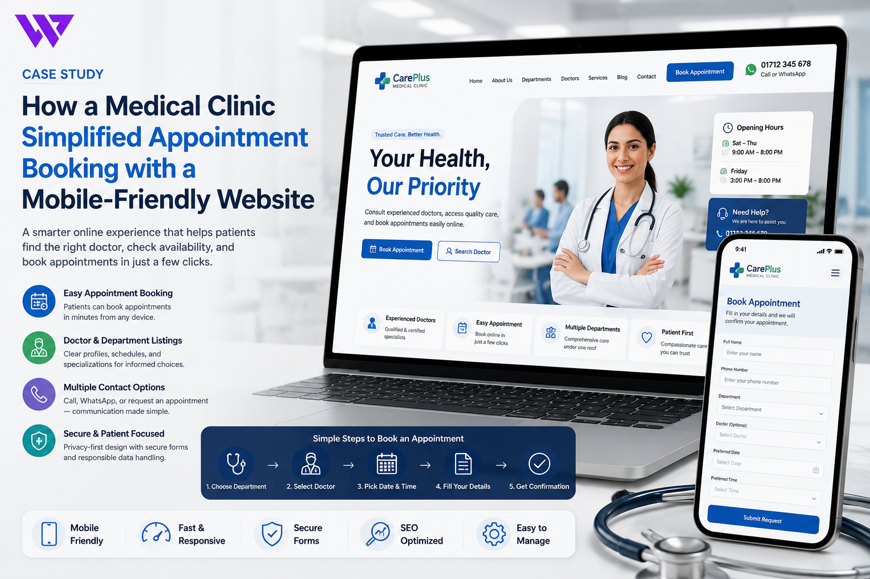
How a Medical Clinic Simplified Appointment Booking with a Mobile-Friendly Website

1. Project Overview
A growing medical clinic needed a professional website that could help patients find the right doctor, understand available services, and request appointments easily from a smartphone.
The clinic offered consultations across multiple departments and served patients with different schedules, medical needs, and levels of digital experience.
Before the website project, many patients depended on phone calls, Facebook messages, WhatsApp conversations, and in-person visits to ask about:
- Available doctors
- Consultation schedules
- Appointment fees
- Clinic opening hours
- Available departments
- Required documents
- Clinic location
- Appointment confirmation
This created repeated work for reception staff and made the booking process difficult for patients outside business hours.
Webnion planned a responsive, mobile-friendly clinic website focused on clear doctor information, structured appointment requests, accessible contact options, and responsible healthcare communication.
The goal was to help patients request appointments with fewer steps while giving the clinic a more organized way to manage inquiries.
2. The Business Challenge
Patients often visit a clinic website while they are already concerned, uncomfortable, or trying to help a family member.
They need information quickly and should not be forced to browse through complicated menus or long promotional pages.
The clinic faced several common challenges:
- Doctor schedules were difficult to find
- Patients repeatedly called to ask about availability
- Appointment requests arrived through multiple channels
- Reception staff received incomplete patient information
- Department names were not organized clearly
- Mobile visitors struggled with small buttons and long forms
- Clinic location and opening hours were not visible enough
- Patients could not distinguish between appointment requests and confirmed bookings
- Changes in doctor schedules were difficult to communicate
- The website lacked a clear path for urgent and non-urgent situations
The clinic needed a website that improved access to information without presenting itself as a replacement for professional medical care.
3. Project Objectives
The project was planned around the following objectives:
- Make appointment requests easier from mobile devices
- Present doctors and departments clearly
- Display consultation schedules in an understandable format
- Reduce repetitive calls to reception
- Collect complete appointment information
- Communicate confirmation steps clearly
- Make clinic contact and location details easy to find
- Improve accessibility for different types of patients
- Protect sensitive patient information
- Support schedule updates from the administration panel
- Improve local search visibility
- Create a scalable structure for future doctors and services
Every section was designed around clarity, trust, privacy, and practical patient access.
4. Our Strategy
We planned the patient journey around one primary need:
Find the right medical service and request an appointment without confusion.
The intended journey was:
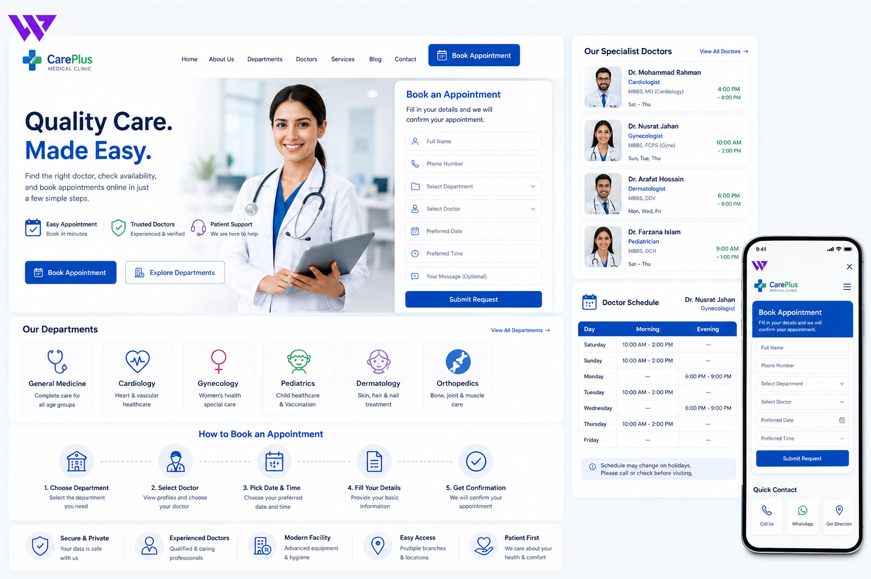
Choose a department → Review available doctors → Check consultation details → Select a preferred date or time → Submit appointment information → Receive confirmation from the clinic
The website separated general information from medical advice.
It helped patients understand available services and booking procedures, but it did not diagnose conditions, recommend treatments, or guarantee medical outcomes.
This created a responsible balance between accessibility and professional healthcare boundaries.
5. Mobile-First Website Structure
Many patients accessed the clinic website through smartphones.
They could arrive from:
- Google Search
- Google Maps
- Online advertisements
- Doctor recommendations
- Family referrals
The mobile experience therefore prioritized:
- Doctor Search
- Departments
- Appointment Booking
- Call Clinic
- Location
- Opening Hours
- Emergency Guidance
Buttons were large enough to tap comfortably, text remained readable, and important actions appeared without excessive scrolling.
The mobile navigation avoided complicated dropdowns and unnecessary visual effects.
6. Clear Department Organization
The clinic’s services were organized into understandable departments.
Depending on the clinic, these could include:
- General Medicine
- Pediatrics
- Gynecology
- Cardiology
- Dermatology
- Orthopedics
- ENT
- Neurology
- Gastroenterology
- Physiotherapy
- Diagnostic Services
- Dental Care
Each department page could explain:
- Available doctors
- Consultation days
- General services
- Appointment process
- Clinic contact information
- Important patient instructions
Descriptions remained general and informational.
The website avoided suggesting that a department or doctor could guarantee a particular medical result.
7. Doctor Profile Pages
Every doctor received a structured profile page.
The page could include:
- Doctor’s name
- Professional title
- Department
- Qualifications
- Special areas of practice
- Consultation location
- Available days
- Consultation hours
- Appointment fee where approved for display
- Languages spoken
- Appointment action
This helped patients choose the correct doctor without calling the clinic for basic information.
Qualifications and professional claims were displayed only when verified by the clinic.
8. Doctor Search and Filtering
Patients could search for a doctor using:
- Doctor name
- Department
- Specialty
- Consultation day
- Clinic branch
- Availability status
A parent looking for a pediatrician or a patient looking for a dermatologist could reach relevant profiles faster.
The search system supported discovery but did not recommend a doctor based on symptoms.
Patients who were unsure which service they needed were encouraged to contact the clinic directly.
9. Consultation Schedule Presentation
Doctor availability was presented through a simple schedule.
The schedule could show:
- Consultation days
- Start time
- End time
- Available branch
- Online or in-person consultation
- Temporary unavailability
- Holiday changes
- Next available date
The website clearly explained that displayed schedules could change because of emergencies, holidays, or professional responsibilities.
An appointment request was not treated as confirmed until the clinic approved it.
10. Structured Appointment Form
The appointment form collected only the information required to process the request.
Fields could include:
- Patient name
- Phone number
- Email address where needed
- Preferred doctor
- Department
- Preferred date
- Preferred time
- Appointment type
- New or returning patient
- Short note
- Consent confirmation
The form avoided requesting unnecessary medical details.
Patients were advised not to submit highly sensitive medical information unless the clinic had a secure and approved process for receiving it.
11. Simple Booking Journey
The booking experience followed a clear sequence:
- Select department
- Select doctor
- Choose preferred date
- Choose an available time or preferred time range
- Enter patient details
- Submit appointment request
- Wait for clinic confirmation
This step-by-step approach prevented long and confusing forms.
Patients could understand their progress and return to an earlier step if they selected the wrong doctor or date.
12. Appointment Request Versus Confirmation
One of the most important improvements was explaining the difference between requesting and confirming an appointment.
After form submission, the website could display:
“Your appointment request has been received. The clinic will contact you to confirm availability.”
This prevented patients from assuming that the selected time had already been reserved.
The clinic could confirm appointments through:
- Phone call
- SMS
- Patient portal where available
Clear confirmation language reduced misunderstandings and missed visits.
13. Available Time Slots
Where the clinic supported schedule-based booking, patients could view available time slots.
Time slots could reflect:
- Doctor schedule
- Existing bookings
- Break periods
- Clinic holidays
- Appointment duration
- Branch availability
Unavailable times could not be selected.
Where real-time scheduling was not supported, the website collected a preferred time and allowed reception staff to confirm the closest available appointment.
14. WhatsApp-Assisted Appointment Requests
Some patients preferred WhatsApp over online forms.
The website could prepare a message containing:
Hello, I would like to request an appointment.
Patient Name:
Department: Dermatology
Preferred Doctor: Dr. [Name]
Preferred Date:
Preferred Time:
Clinic Branch:
Doctor Profile: [page link]
Please confirm the available appointment time.
This gave reception staff useful context from the beginning.
Patients were advised not to send private medical records or sensitive information through unsecured messaging unless the clinic specifically instructed them to do so.
15. Click-to-Call Support
Some patients, especially older visitors or people needing immediate assistance, preferred phone communication.
A visible click-to-call button appeared in important areas such as:
- Website header
- Doctor profile
- Appointment page
- Contact page
- Mobile sticky bar
- Clinic-hours section
This provided an alternative for patients who were uncomfortable using forms or WhatsApp.
The website clearly separated general appointment calls from emergency services.
16. Emergency Guidance
The website included responsible emergency guidance.
A clear notice could explain:
“This website and appointment form are not intended for medical emergencies. In an emergency, contact the appropriate local emergency service or visit the nearest emergency facility immediately.”
The website did not attempt to assess emergency symptoms or advise patients to wait for an online response.
This was important because appointment forms may not be monitored continuously.
17. Clinic Location and Directions
Patients needed to find the clinic without difficulty.
The contact section could include:
- Full clinic address
- Map
- Landmark
- Parking information
- Public transport guidance
- Branch selection
- Click-to-call number
- Get Directions button
Mobile users could open the location directly in a map application.
Accurate location information reduced late arrivals and repetitive direction calls.
18. Opening Hours
The website displayed:
- Regular clinic hours
- Doctor consultation hours
- Reception hours
- Diagnostic service hours
- Weekly closing day
- Holiday schedule
- Last appointment time
Where appropriate, temporary notices could be shown for:
- Public holidays
- Doctor leave
- Branch closure
- Schedule changes
- Maintenance periods
This helped patients understand when staff were available to confirm appointments.
19. New and Returning Patient Journeys
New patients and returning patients may require different information.
New patients could receive guidance about:
- Registration process
- Required identification
- Previous medical records
- Arrival time
- Payment options
- Clinic policies
Returning patients could use a shorter appointment request process where appropriate.
The website avoided publicly exposing patient history or previous appointment details.
20. Appointment Preparation Information
A doctor or department page could provide general appointment preparation instructions approved by the clinic.
These might include:
- Arrive a stated number of minutes early
- Bring identification
- Bring previous prescriptions
- Bring relevant reports
- Follow department-specific preparation guidance
- Contact the clinic if unsure
The website did not create medical preparation instructions independently.
Any test, fasting, medication, or procedure-related guidance needed approval from qualified clinic staff.
21. Diagnostic Service Booking
Where the clinic offered diagnostic services, the website could present:
- Available tests
- Service hours
- Branch availability
- Booking requirements
- Home collection availability
- Report collection process
- Contact information
Medical test pages avoided interpreting results or suggesting that a test was suitable for a specific person without professional advice.
Patients were encouraged to follow instructions from their healthcare provider.
22. Telemedicine or Online Consultation
Where legally and operationally supported, the website could include online consultation requests.
The page could explain:
- Eligible consultation types
- Available doctors
- Required technology
- Payment process
- Consultation platform
- Identity verification
- Prescription policy
- Limitations of online consultation
The website did not imply that every medical concern could be handled remotely.
The clinic remained responsible for determining whether an in-person visit was required.
23. Appointment Reminder Support
The clinic could send appointment reminders through approved communication channels.
Reminders could include:
- Doctor name
- Appointment date
- Appointment time
- Clinic branch
- Contact number
- Rescheduling instructions
Sensitive medical details were excluded from ordinary reminders.
The reminder system could help reduce missed appointments without exposing private patient information.
24. Rescheduling and Cancellation
Patients needed a clear way to change an appointment.
The website could explain:
- How to request rescheduling
- Required notice period
- Cancellation process
- Contact number
- WhatsApp option
- Appointment reference requirements
- Applicable clinic policies
A structured process saved reception staff from searching through unorganized messages.
It also helped make cancelled time slots available to other patients.
25. Privacy and Patient Data Protection
Medical appointment data can be sensitive.
The website needed clear privacy practices covering:
- What information was collected
- Why it was collected
- Who could access it
- How long it could be retained
- How patients could request correction or deletion
- Which communication channels were used
- Whether third-party services were involved
Access to appointment information was restricted to authorized staff.
The website avoided collecting detailed medical histories through ordinary contact forms unless a secure and approved workflow was available.
26. Secure Form Handling
The appointment system could include:
- Encrypted website connection
- CSRF protection
- Input validation
- Spam protection
- Restricted administrator access
- Secure password practices
- Activity logging
- Controlled data export
- Scheduled backups
No website can honestly promise absolute security.
However, appropriate technical and operational protections helped reduce unnecessary risk.
27. Accessibility Considerations
A clinic website needs to serve people with different abilities and levels of digital experience.
The design considered:
- Readable font sizes
- Strong contrast
- Clear labels
- Keyboard-friendly forms
- Descriptive buttons
- Alternative text for useful images
- Error messages near form fields
- Simple navigation
- Sufficient touch-target sizes
The site avoided placing essential information only inside decorative graphics.
This improved usability for a wider range of patients.
28. Multilingual Content
Where the clinic served a multilingual community, important information could be available in multiple languages.
Content suitable for translation included:
- Appointment instructions
- Department names
- Doctor information
- Opening hours
- Address
- Emergency notice
- Privacy information
Translations needed review to ensure medical and administrative wording remained accurate.
This could make the booking experience more accessible for local patients.
29. Patient Reviews and Trust
Patient feedback could help visitors understand the clinic experience.
Reviews could discuss:
- Appointment process
- Reception support
- Cleanliness
- Communication
- Waiting-area experience
- General service quality
The website avoided publishing private diagnoses, treatment details, or other sensitive medical information without clear consent.
Reviews were not presented as evidence that every patient would receive the same medical outcome.
30. Clinic Credentials and Professional Information
Trust-building content could include:
- Clinic registration information where appropriate
- Doctor qualifications
- Professional memberships
- Branch details
- Contact information
- Service policies
- Approved certificates
- Official photographs
Only valid and verifiable credentials were displayed.
The website avoided unsupported terms such as “best doctor” or “guaranteed treatment.”
Trust was built through transparency rather than exaggerated claims.
31. Frequently Asked Questions
The website could answer common questions such as:
- How do I request an appointment?
- Is my appointment confirmed immediately?
- Can I choose a specific doctor?
- Can I reschedule?
- What should I bring?
- Is online consultation available?
- How will the clinic confirm my appointment?
- What happens if a doctor’s schedule changes?
- Can I book for a family member?
- What should I do in an emergency?
This reduced repetitive reception inquiries while keeping the booking process understandable.
32. Local Search Engine Optimization
The website structure supported local SEO through pages focused on:
- Medical clinic in the target location
- Doctor appointments
- Clinic departments
- Specialist consultations
- Diagnostic services
- Clinic opening hours
- Clinic directions
- Online appointment requests
The website could use:
- Accurate business name
- Consistent address and phone number
- Descriptive page titles
- Meta descriptions
- Doctor and department pages
- Map integration
- Structured business information
- Image alt text
- Internal links
Local SEO could improve discoverability, but the website did not claim guaranteed search rankings.
33. Doctor and Department SEO Pages
Each doctor and department page could have a clear SEO structure.
A doctor page could include:
- Doctor name
- Department
- Verified qualifications
- Consultation location
- Schedule
- Appointment link
A department page could include:
- General service overview
- Available doctors
- Clinic hours
- Appointment instructions
- Frequently asked questions
Content remained factual and avoided providing individualized medical advice.
34. Google Business Profile Consistency
Clinic information needed to remain consistent across the website and public business listings.
Important details included:
- Clinic name
- Address
- Phone number
- Opening hours
- Appointment link
- Map location
- Branch information
Consistent information reduced confusion and supported local trust.
Temporary schedule changes also needed timely updates across relevant platforms.
35. Appointment Administration
Authorized staff could review appointment requests through an organized dashboard.
Appointment records could include:
- Patient name
- Phone number
- Doctor
- Department
- Preferred date
- Preferred time
- Appointment type
- Request source
- Confirmation status
- Staff notes
Statuses could include:
- New Request
- Under Review
- Confirmed
- Rescheduled
- Completed
- Cancelled
- No Show
This reduced dependence on notebooks, spreadsheets, and scattered messaging threads.
36. Staff Roles and Permissions
Different clinic staff required different levels of access.
Roles could include:
- Administrator
- Receptionist
- Appointment Coordinator
- Doctor
- Branch Manager
- Support Staff
A receptionist could manage appointment requests without accessing unrelated website settings.
Doctors could view only the information required for their schedules where the clinic’s workflow allowed it.
Role-based access reduced accidental changes and unnecessary exposure of patient information.
37. Schedule Management
Authorized staff could manage:
- Doctor working days
- Consultation times
- Leave dates
- Holidays
- Branch schedules
- Slot duration
- Temporary unavailability
- Maximum bookings
- Online consultation availability
Schedule updates could be reflected on the website without editing page code manually.
This gave the clinic more control over changing availability.
38. Appointment Notifications
The system could notify staff when a new request was submitted.
Notifications might be sent through:
- Administration dashboard
- SMS
- Approved messaging integration
Patient notifications could be sent after confirmation, rescheduling, or cancellation.
Messages were kept concise and avoided unnecessary medical information.
39. Mobile Page Performance
Patients should not need to wait for heavy pages to load before finding a doctor or phone number.
The website was planned with attention to:
- Optimized images
- Responsive image sizes
- Reduced unnecessary scripts
- Efficient fonts
- Clean front-end code
- Lazy loading
- Browser caching
- Lightweight forms
Faster performance supported patients using mobile data or slower internet connections.
40. Conversion-Focused Healthcare Design
For a clinic website, conversion meant helping patients complete an appropriate next step.
Important actions included:
- Request Appointment
- Call Clinic
- Open WhatsApp
- Find a Doctor
- View Departments
- Get Directions
- Reschedule Appointment
The website avoided aggressive sales language.
Calls to action remained calm, clear, and appropriate for a healthcare environment.
41. Design Approach
The visual direction focused on calmness, clarity, accessibility, and professional trust.
The design system included:
- Clean light backgrounds
- Calm brand accents
- Readable typography
- Clear doctor cards
- Organized department pages
- Mobile-friendly forms
- Accessible buttons
- Visible contact information
- Responsible emergency notices
- Consistent layouts
The website avoided excessive animations, frightening medical imagery, and unsupported trust badges.
The booking journey remained the main priority.
42. Key Features Delivered
The mobile-friendly clinic solution included:
- Responsive healthcare website design
- Mobile-first navigation
- Department organization
- Doctor profiles
- Doctor search and filtering
- Consultation schedules
- Structured appointment forms
- Preferred time selection
- Appointment confirmation workflow
- WhatsApp-assisted requests
- Click-to-call support
- Emergency guidance
- Map and directions
- Opening-hour management
- New and returning patient guidance
- Diagnostic service information
- Online consultation requests where supported
- Appointment reminders
- Rescheduling and cancellation guidance
- Privacy-focused form design
- Secure form handling
- Accessibility improvements
- Multilingual content support
- Patient reviews
- Local SEO structure
- Appointment administration
- Staff roles and permissions
- Dynamic schedule management
- Notification support
- Fast mobile performance
- Scalable doctor and department management
Each feature was selected to improve patient access, staff efficiency, privacy, and booking clarity.
43. The Outcome
The completed solution created a clearer appointment journey for mobile patients.
Visitors could explore departments, review verified doctor information, check consultation schedules, request appointments, and contact the clinic without searching through multiple platforms.
Reception staff gained a more organized method for reviewing requests and confirming appointments.
No unverified patient-growth, appointment, revenue, or medical outcome statistics are being claimed. However, the website directly addressed several communication and usability problems that previously made appointment booking difficult.
44. Business Value Created
The website helps the medical clinic:
- Simplify appointment requests
- Improve the mobile patient experience
- Present doctors professionally
- Organize departments clearly
- Reduce repetitive reception calls
- Receive more complete appointment information
- Communicate schedules accurately
- Clarify appointment confirmation
- Make contact and directions easier to access
- Support responsible emergency guidance
- Improve patient data handling
- Manage schedules dynamically
- Strengthen local search visibility
- Add future doctors and services more easily
The project demonstrates that a healthcare website becomes more useful when it focuses on patient access rather than promotional complexity.
45. Why This Project Matters
Patients should not need to struggle with a website to find a doctor, clinic location, or appointment process.
A confusing experience can create unnecessary stress and additional work for clinic staff.
A well-structured medical clinic website connects:
- Department discovery
- Doctor information
- Schedule visibility
- Appointment requests
- Confirmation
- Contact support
- Location guidance
- Privacy
The website becomes a practical digital reception desk.
It supports patients before their visit while allowing clinic staff to manage appointment communication more efficiently.
46. Frequently Asked Questions
Can patients book appointments directly from a mobile phone?
Yes. The appointment journey can be optimized for smartphones with simple doctor selection, date preferences, and patient details.
Is an appointment confirmed immediately after submission?
Not necessarily. The website should clearly state whether the submission is a request or a confirmed appointment.
Can patients select a specific doctor?
Yes. Doctor profiles and schedules can help patients select an available doctor from the relevant department.
Can appointments be requested through WhatsApp?
Yes. A prepared message can include the doctor, department, preferred date, and clinic branch.
Can the clinic update doctor schedules?
Yes. Authorized staff can manage consultation days, times, leave dates, and temporary changes.
Can patients reschedule or cancel appointments?
Yes. The website can provide a structured process using a form, phone call, or WhatsApp.
Can the website support multiple clinic branches?
Yes. Each branch can have separate doctors, schedules, locations, hours, and contact information.
Can online consultations be included?
Yes, where the clinic is legally and operationally able to provide them.
Does the website provide medical advice?
No. The website presents clinic, doctor, service, and appointment information. Medical assessment and advice must come from qualified healthcare professionals.
What should patients do during a medical emergency?
They should contact the appropriate local emergency service or visit the nearest emergency facility rather than waiting for an online appointment response.
47. Need a Mobile-Friendly Website for Your Medical Clinic?
A clinic website should help patients find trusted information and request an appointment without unnecessary difficulty.
Webnion designs and develops responsive websites for:
- Medical clinics
- Specialist chambers
- Diagnostic centers
- Dental clinics
- Physiotherapy centers
- Healthcare groups
- Telemedicine providers
- Multi-branch medical facilities
We create patient-focused websites that combine doctor profiles, department information, mobile appointment requests, privacy-conscious forms, and local search foundations.
Build a medical clinic website that makes appointment access simpler for patients and daily coordination easier for your staff.