Details
How a Home Décor Store Made Product Collections Easier to Browse on Mobile
How a Home Décor Store Made Product Collections Easier to Browse on Mobile

1. Project Overview
A growing home décor store needed an e-commerce website that could present a large collection of decorative products in a clean, organized, and mobile-friendly way.
The business offered products for living rooms, bedrooms, dining spaces, offices, entryways, and other interior areas. Its catalog included wall décor, mirrors, lamps, cushions, rugs, vases, artificial plants, clocks, storage pieces, table décor, and seasonal collections.
Most potential customers discovered the products through Facebook, Instagram, Pinterest, and mobile advertising. They usually opened the website from a smartphone and expected to find relevant items quickly.
However, a large home décor catalog can become difficult to browse on a small screen when categories, styles, colors, and collections are not structured properly.
Webnion planned a mobile-first e-commerce experience that made product collections easier to discover, compare, and purchase.
The goal was to help customers move from inspiration to the right décor product with fewer steps and less confusion.
2. The Business Challenge
Home décor customers often browse without searching for one exact product.
They may begin with a broad goal such as:
- Decorating a living room
- Improving a bedroom
- Finding a statement wall piece
- Creating a modern office
- Choosing products for a gift
- Matching a specific color palette
- Finding items within a budget
- Preparing for a seasonal occasion
This creates a different shopping journey from customers who already know the exact product name.
The store faced several common challenges:
- Too many products appeared in one general catalog
- Mobile visitors could not understand the collection structure quickly
- Product categories required too many taps
- Filters were difficult to use on smaller screens
- Customers struggled to browse by room or style
- Large images slowed down mobile pages
- Product cards did not show enough useful information
- Similar décor products were difficult to compare
- Customers left before finding a suitable collection
- Social media traffic did not have a focused browsing path
The website needed to make inspiration-based shopping feel simple and organized.
3. Project Objectives
The project was planned around the following objectives:
- Improve mobile product discovery
- Organize products into clear collections
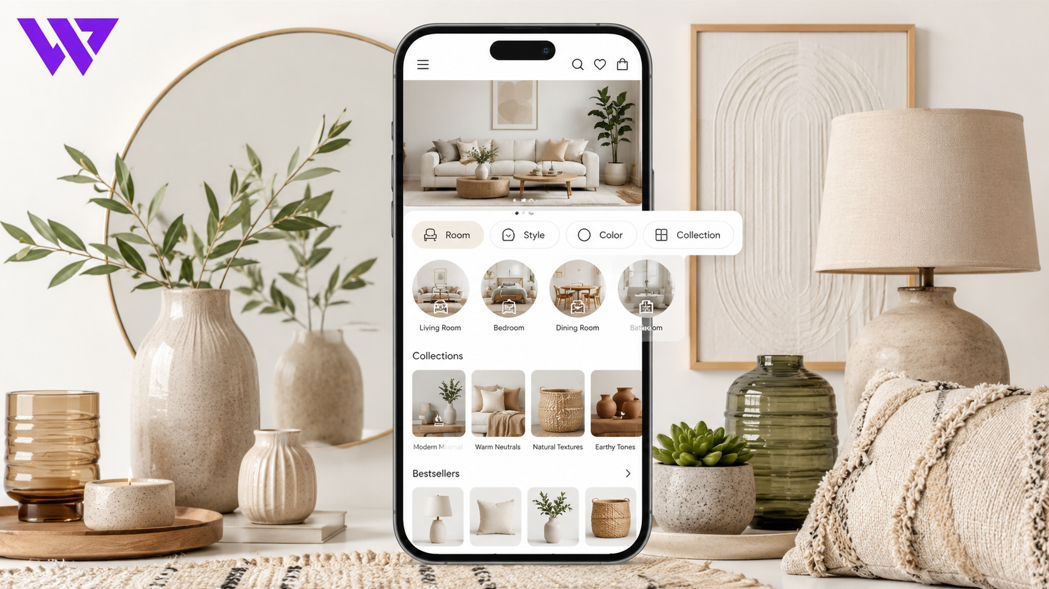
- Allow customers to browse by room
- Support style, color, material, and price filtering
- Make product cards easier to scan
- Improve mobile search
- Reduce the number of steps required to reach a product
- Present collections professionally
- Improve image performance
- Simplify the cart and checkout journey
- Build stronger customer confidence
- Create a scalable structure for future collections
Every section was designed around the way home décor customers naturally explore products.
4. Our Strategy
We planned the customer journey around inspiration rather than only product names.
The intended journey was:
Discover a collection → Browse by room or style → Narrow the products → Open a relevant item → Review details → Add to cart or save for later
Instead of forcing customers to scroll through the entire catalog, the website offered multiple discovery paths.
Customers could browse based on:
- Room
- Product category
- Design style
- Color
- Material
- Budget
- New collection
- Best-selling products
- Seasonal campaign
This created a more flexible and customer-focused browsing experience.
5. Mobile-First Collection Navigation
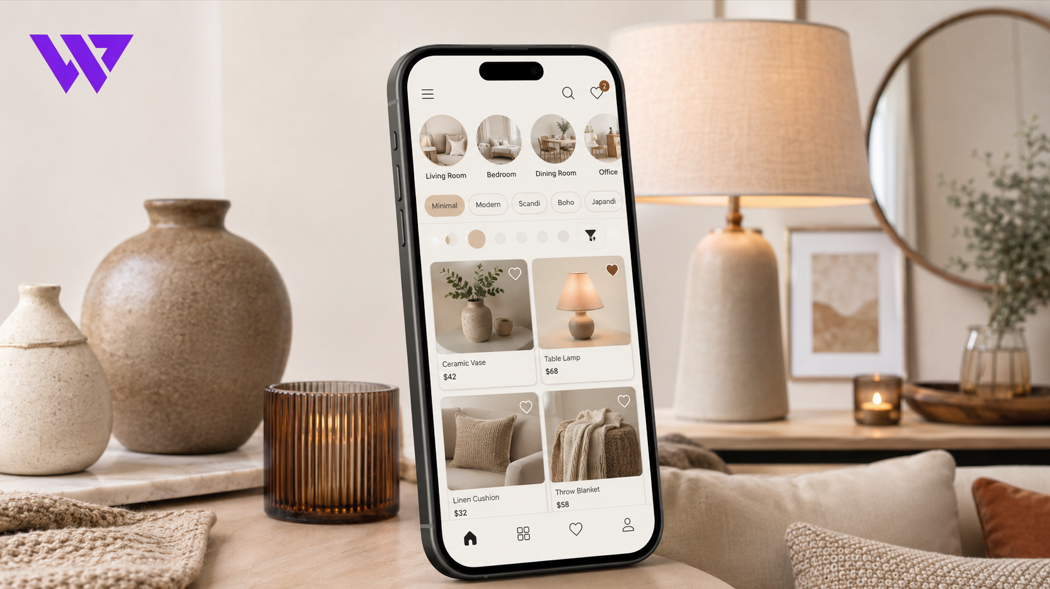
The mobile navigation focused on the most important product-discovery actions.
Customers could quickly access:
- Home
- Shop
- Collections
- Rooms
- New Arrivals
- Best Sellers
- Offers
- Search
- Wishlist
- Cart
The menu was designed to remain compact and easy to use with one hand.
Instead of displaying a large desktop-style navigation system, mobile customers saw clear collection groups and simple subcategory links.
This reduced unnecessary taps and helped visitors reach relevant products faster.
6. Browsing by Room
Many customers choose décor products based on the space they want to improve.
The website could organize collections by room, including:
- Living room
- Bedroom
- Dining room
- Kitchen
- Home office
- Entryway
- Bathroom
- Balcony
- Children’s room
- Commercial space
A customer browsing the living room collection could discover related products such as:
- Wall art
- Cushions
- Rugs
- Table lamps
- Mirrors
- Decorative trays
- Vases
- Artificial plants
This approach helped customers imagine complete spaces rather than viewing every product as an isolated item.
7. Browsing by Product Category
Customers who knew the type of item they needed could browse through clear product categories.
These could include:
- Wall décor
- Mirrors
- Lighting
- Rugs
- Cushions
- Vases
- Clocks
- Artificial plants
- Table décor
- Storage and organizers
- Candles and holders
- Decorative accessories
- Gift items
Category names were kept simple and recognizable.
Visual category cards helped mobile visitors understand the available product range without reading long menus.
8. Browsing by Interior Style
Home décor customers often prefer products that match a specific design direction.
The website could organize collections by style, such as:
- Modern
- Minimal
- Scandinavian
- Bohemian
- Luxury
- Classic
- Rustic
- Contemporary
- Traditional
- Industrial
Style-based collections helped customers find products that worked together visually.
This was especially useful for visitors who wanted a coordinated interior but did not know individual product names.
9. Color-Based Product Discovery
Color plays an important role in home décor shopping.
Customers may want products that match existing furniture, walls, curtains, or flooring.
The mobile filters could help visitors explore products by color, including:
- White
- Black
- Beige
- Brown
- Gold
- Silver
- Green
- Blue
- Pink
- Neutral tones
- Multicolor
Color swatches made these options easier to understand than text-only filters.
This helped customers reduce a large catalog to products that matched their preferred palette.
10. Material-Based Collections
Customers may also choose décor products based on material.
The website could support product discovery by:
- Wood
- Metal
- Glass
- Ceramic
- Fabric
- Rattan
- Marble
- Resin
- Plastic
- Mixed materials
Material information helped customers evaluate appearance, durability, weight, and care requirements.
It also reduced repetitive questions before ordering.
11. Mobile-Friendly Filters
Filters were designed to remain useful without covering the entire browsing experience.
Customers could narrow products using:
- Category
- Room
- Style
- Color
- Material
- Price range
- Availability
- New arrivals
- Best sellers
- Discounted products
- Customer rating
The filter panel opened only when needed and could be closed easily.
Selected filters remained visible so customers understood why certain products were being displayed.
A clear “Reset Filters” action allowed visitors to start again without refreshing the entire page.
12. Faster Product Search
A visible mobile search field helped customers who already had a product or style in mind.
The search experience could support terms such as:
- Gold wall mirror
- Modern table lamp
- Beige cushion
- Living room rug
- Artificial plant
- Wooden wall shelf
- Minimal clock
- Decorative vase
Search suggestions could guide customers toward relevant products and collections while they typed.
This reduced the time required to find specific items.
13. Collection Landing Pages
Each important collection received its own focused landing page.
A collection page could include:
- Collection title
- Short introduction
- Main visual banner
- Featured products
- Related subcategories
- Style guidance
- Best-selling items
- Customer reviews
- Frequently asked questions
For example, a “Modern Living Room Décor” collection could combine wall art, cushions, lamps, rugs, mirrors, and table accessories within one coordinated experience.
Collection pages also created stronger SEO opportunities because they provided useful content around specific product themes.
14. Mobile-Friendly Product Cards
Product cards were designed to help customers understand products quickly.
Each card could display:
- Product image
- Product name
- Current price
- Previous price where applicable
- Discount information
- Available colors
- Stock status
- Customer rating
- Wishlist action
- Product details action
- Add to Cart or Buy Now action
The information remained concise so customers could scan several items without feeling overwhelmed.
Product images received enough space because appearance is one of the strongest factors in home décor decisions.
15. Consistent Product Photography
A home décor catalog can appear unprofessional when images use inconsistent lighting, backgrounds, sizes, or angles.
The website experience supported a consistent visual style through:
- Clean product images
- Similar image proportions
- Neutral backgrounds
- Lifestyle room settings
- Close-up material details
- Scale reference
- Multiple product angles
- Product-in-use photography
Lifestyle images helped customers imagine the product inside a real home.
Clean product images made comparison easier across collection pages.
16. Product Dimensions and Scale
Customers need to understand the actual size of décor items before purchasing.
A wall mirror, rug, vase, or clock may appear larger or smaller in an image than it is in reality.
Product pages could clearly display:
- Width
- Height
- Depth
- Diameter
- Weight
- Package dimensions
- Recommended space
- Installation requirements
Measurement diagrams helped customers understand scale more accurately.
Where appropriate, products were shown beside furniture or everyday objects to create visual size context.
This reduced incorrect expectations and unsuitable purchases.
17. Detailed Product Information
Each product page was structured to provide the information customers needed before ordering.
Product details could include:
- Product name
- Category
- Material
- Color
- Dimensions
- Weight
- Finish
- Package contents
- Installation requirements
- Care instructions
- Stock availability
- Delivery information
- Return or exchange conditions
This helped customers make more informed decisions without contacting the business for every basic question.
18. Product Variations
Home décor products may include several options, such as:
- Size
- Color
- Material
- Finish
- Pattern
- Set quantity
- Frame option
- Cushion cover size
- Rug dimensions
- Lamp style
Each variation could maintain separate:
- Price
- Stock
- SKU
- Product image
- Availability
Customers could select the correct variation before adding the item to the cart.
This reduced incomplete orders and improved inventory accuracy.
19. Product Sets and Coordinated Collections
Some customers wanted several products that worked together.
The store could create coordinated sets such as:
- Cushion sets
- Wall-art combinations
- Vase collections
- Table décor bundles
- Candle-holder sets
- Matching storage baskets
- Living-room décor packages
- Gift bundles
Each set could explain:
- Products included
- Quantities
- Available colors
- Individual value
- Bundle price
- Total savings
- Stock availability
This made coordinated shopping easier and increased the perceived value of the offer.
20. Wishlist and Saved Products
Home décor customers may not purchase immediately.
They often compare several styles, discuss options with family members, or wait until a room is ready.
A wishlist feature allowed visitors to save products for later.
Customers could use it to:
- Compare styles
- Build a room concept
- Save gift ideas
- Return to products later
- Share selections
- Plan a future purchase
This supported a longer decision-making journey without forcing customers to search for the same products again.
21. Related Product Recommendations
Product pages could recommend complementary items.
Examples included:
- Cushion with matching rug
- Mirror with wall shelf
- Vase with artificial flowers
- Lamp with side table
- Wall art with matching clock
- Storage basket with organizer set
Recommendations were based on room, style, color, or collection.
The goal was to help customers complete a décor concept without showing unrelated products.
22. New Arrivals and Trending Collections
Home décor trends change regularly.
Dedicated sections could highlight:
- New arrivals
- Trending products
- Seasonal collections
- Best sellers
- Limited editions
- Staff selections
- Customer favourites
These sections helped returning visitors discover fresh products quickly.
They also gave the business control over which items received more attention during campaigns.
23. Seasonal Campaigns
Home décor businesses often run seasonal campaigns around:
- Eid
- Weddings
- New home celebrations
- Ramadan
- Winter
- Summer
- New Year
- Festivals
- Home renovation periods
A campaign page could combine:
- Seasonal banner
- Selected collections
- Bundle offers
- Gift products
- Customer reviews
- Delivery information
- Purchase actions
This allowed social media and advertising traffic to reach a focused collection instead of a general homepage.
24. Mobile Page Performance
Product-rich décor websites can become slow because of large images.
The website experience was planned with attention to:
- WebP image formats
- Responsive image sizes
- Lazy loading
- Image compression
- Reduced unnecessary scripts
- Clean front-end structure
- Efficient fonts
- Limited heavy animations
- Browser caching
Faster loading helped customers move between collections without unnecessary waiting.
This was especially important for mobile visitors using slower internet connections.
25. Sticky Mobile Actions
Important actions could remain accessible while customers scrolled.
Depending on the page, these actions could include:
- Add to Cart
- Buy Now
- Open Cart
- Save to Wishlist
- Ask on WhatsApp
Sticky actions were designed carefully so they did not cover product information.
Keeping the next step visible reduced friction on longer mobile product pages.
26. Mobile Cart Experience
The cart allowed customers to review their exact product selections.
It could display:
- Product image
- Product name
- Selected color
- Selected size
- Selected variation
- Quantity
- Unit price
- Discount
- Subtotal
Customers could update quantities or remove products without leaving the cart.
A clear summary helped them confirm the order before checkout.
27. Simplified Mobile Checkout
The checkout journey was designed to remain easy to complete from a smartphone.
The form could collect:
- Customer name
- Phone number
- Delivery address
- Shipping area
- Order notes
- Payment method
The checkout also showed:
- Product summary
- Selected variations
- Product total
- Delivery charge
- Discount
- Final payable amount
Fields were kept large enough for mobile interaction.
The process avoided unnecessary steps that could interrupt the purchase journey.
28. Customer Reviews and Home Photos
Customer proof helped potential buyers understand how products looked in real spaces.
The website could display:
- Written reviews
- Customer room photos
- Product-specific ratings
- Unboxing images
- Delivery feedback
- Social media comments
- Video testimonials
Real home images were particularly valuable because they showed product scale, style, and appearance outside a studio environment.
Customer permission should be obtained before publishing personal photos.
29. Trust-Building Information
The website helped strengthen customer confidence through:
- Clear business identity
- Contact information
- Delivery policy
- Return and exchange information
- Product-care guidance
- Customer reviews
- Secure checkout indicators
- Social media links
- Support options
- Consistent product information
A visually attractive décor store still needs transparent business information to support purchasing confidence.
Trust was built through clarity and consistency.
30. Delivery and Fragile Product Information
Some décor products require careful delivery because they may include glass, ceramic, mirrors, lamps, or delicate finishes.
The website could explain:
- Protective packaging
- Delivery coverage
- Estimated delivery time
- Delivery charge
- Fragile-product handling
- Inspection guidance
- Damage-reporting period
- Replacement conditions
Customers could understand what to do if a fragile product arrived damaged.
This reduced uncertainty around ordering delicate décor items online.
31. Search Engine Optimization Structure
The website architecture supported SEO through clear collection and category pages.
Potential search-focused pages could include:
- Home décor online store
- Living room décor collection
- Modern wall décor
- Decorative mirrors
- Bedroom accessories
- Table décor
- Artificial plants
- Home décor gifts
- Rugs and cushions
- Minimal home décor
Each collection page could include:
- Useful introduction
- Relevant products
- Buying guidance
- Internal links
- Customer questions
- Descriptive page titles
- Meta descriptions
- Image alt text
The goal was to make pages useful for customers rather than adding keywords unnaturally.
32. Internal Linking Between Collections
Internal links helped both customers and search engines understand how products and collections were connected.
For example:
- A living room page could link to rugs, cushions, mirrors, and wall art
- A bedroom page could link to lamps, storage, mirrors, and soft furnishings
- A product page could link to its collection, style, and related items
This helped customers continue browsing without returning to the main navigation.
It also strengthened the overall website structure.
33. Analytics and Customer Behavior
The website could track important customer actions such as:
- Collection page visits
- Product searches
- Filter use
- Product views
- Wishlist additions
- Add-to-cart activity
- Checkout starts
- WhatsApp clicks
- Completed orders
This data helped the business understand which collections, styles, and products generated interest.
No unverified sales or conversion results were claimed. However, tracking created a stronger foundation for future marketing and website improvements.
34. Design Approach
The visual direction focused on inspiration, simplicity, product clarity, and comfortable mobile browsing.
The design system included:
- Clean light backgrounds
- Large product imagery
- Neutral color combinations
- Consistent product cards
- Clear typography
- Comfortable spacing
- Visual category navigation
- Mobile-friendly filters
- Simple action buttons
- Responsive collection layouts
The design allowed products to remain the main focus.
It felt creative and inspiring without making navigation difficult.
35. Key Features Delivered
The mobile-focused home décor solution included:
- Responsive e-commerce website design
- Mobile-first collection navigation
- Room-based product discovery
- Category-based browsing
- Style collections
- Color and material filters
- Mobile product search
- Collection landing pages
- Consistent product cards
- Optimized product galleries
- Dimensions and scale information
- Product variations
- Coordinated product sets
- Wishlist functionality
- Related product recommendations
- New arrival and seasonal sections
- Sticky mobile actions
- Mobile-friendly cart
- Simplified checkout
- Customer reviews and room photos
- Delivery and fragile-item information
- SEO-friendly collection structure
- Internal linking
- Customer-action analytics
- Scalable product catalog
Each feature was selected to improve discovery, mobile usability, customer confidence, and online purchasing.
36. The Outcome
The completed solution created a clearer mobile browsing experience for the home décor store.
Customers could explore products by room, category, style, color, material, and budget without searching through an unorganized catalog.
The business gained a scalable collection structure that supported new products, seasonal campaigns, product bundles, and future marketing activities.
No unverified sales, traffic, or conversion percentages are being claimed. However, the website directly addressed common mobile usability problems that can prevent customers from discovering relevant décor products.
37. Business Value Created
The website helps the home décor store:
- Make product collections easier to browse
- Improve mobile product discovery
- Organize a large catalog clearly
- Support inspiration-based shopping
- Reduce repetitive product questions
- Present product dimensions accurately
- Promote coordinated product sets
- Support seasonal campaigns
- Improve product-image performance
- Build trust through customer proof
- Simplify mobile checkout
- Strengthen collection-level SEO
- Understand customer browsing behavior
- Add future products more easily
The project demonstrates that mobile navigation and collection structure directly influence how customers experience a home décor store.
38. Why This Project Matters
Home décor shopping is often driven by inspiration rather than one exact product search.
Customers may know how they want a room to feel but not know which items will create that result.
A poorly organized catalog makes this journey difficult.
A mobile-first home décor website connects:
- Room inspiration
- Product collections
- Visual browsing
- Filters
- Product details
- Related items
- Wishlist
- Simple purchasing actions
This turns a large product catalog into a guided shopping experience.
The website helps customers move from an idea to a coordinated group of products more confidently.
39. Frequently Asked Questions
Why is mobile browsing important for a home décor store?
Many customers discover décor products through social media and open the website from smartphones. Mobile-friendly collections help them find relevant products more easily.
Can products be organized by room?
Yes. Collections can be created for living rooms, bedrooms, dining rooms, offices, entryways, and other spaces.
Can customers browse by style or color?
Yes. Filters and collection pages can help customers browse products by design style, color, material, and price.
Can the website show exact product dimensions?
Yes. Product pages can include width, height, depth, diameter, weight, and visual measurement guides.
Can different sizes and colors have separate stock?
Yes. Each product variation can maintain its own price, stock, SKU, image, and availability.
Can customers save products for later?
Yes. A wishlist allows customers to save products, compare options, and return when they are ready to purchase.
Can the store create product bundles?
Yes. Coordinated décor sets can display included products, prices, variations, and total savings.
Can customers upload room photos?
This can be added for consultation or product-recommendation requests when the business wants to offer that service.
Is the checkout optimized for mobile devices?
Yes. Customer details, order summaries, delivery options, and payment methods can be presented through a mobile-friendly checkout.
Can the website support future collections?
Yes. The structure can support new categories, rooms, styles, seasonal campaigns, and product lines.
40. Need a Mobile-Friendly E-commerce Website for Your Home Décor Store?
A home décor website should help customers discover products according to their room, style, color, and budget.
Webnion designs and develops responsive e-commerce websites for:
- Home décor stores
- Interior accessory brands
- Furniture businesses
- Lighting stores
- Gift shops
- Lifestyle retailers
- Wall décor businesses
- Growing online product brands
We create mobile-first shopping experiences that organize collections clearly, improve product discovery, and guide customers toward confident purchasing decisions.
Build a home décor website that turns product inspiration into a simpler and more enjoyable shopping journey.