Details
How a Clothing Store Improved Mobile Shopping with Faster Product Discovery
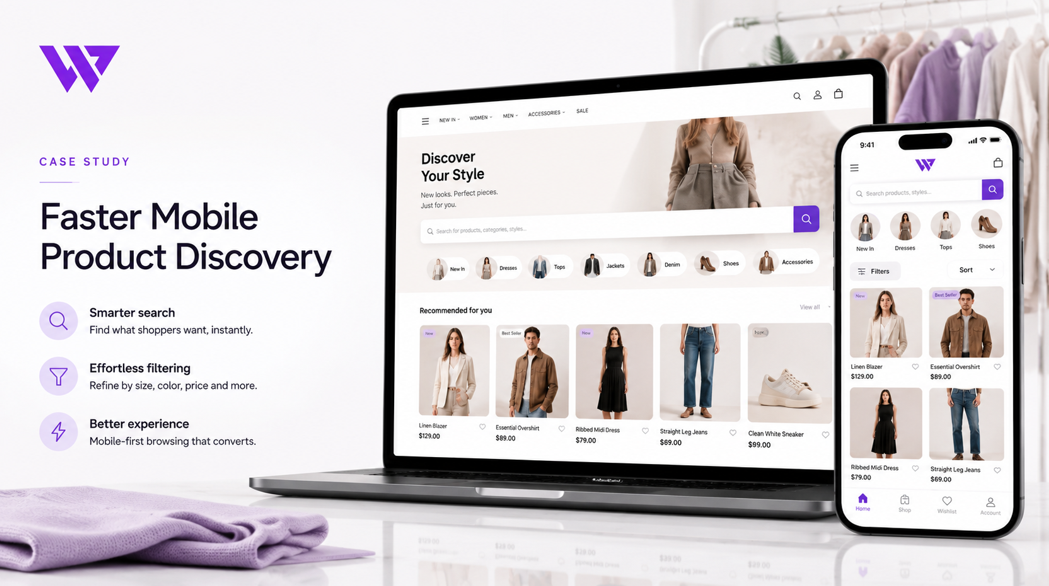
How a Clothing Store Improved Mobile Shopping with Faster Product Discovery

1. Project Overview
A growing clothing store needed an e-commerce website that could help mobile customers discover products quickly, understand available options, and move toward ordering without unnecessary steps.
The business offered products across different clothing categories, collections, sizes, colors, and price ranges. However, presenting a large fashion catalog on a small mobile screen created a major usability challenge.
Customers arriving from Facebook, Instagram, Messenger, and mobile advertisements needed to find relevant products within a few moments. If the navigation was confusing or product pages loaded slowly, they could leave before discovering what the store offered.
Webnion planned and developed a mobile-focused e-commerce experience designed around faster product discovery, clear product presentation, and simpler shopping actions.
The project focused on helping visitors move from interest to the right product with less searching and fewer distractions.
2. The Business Challenge
Mobile customers often shop differently from desktop users.
They usually have limited screen space, shorter attention spans, and less patience for complicated navigation. They may also arrive directly from a social media post without knowing the full range of products available.
The clothing store faced several common challenges:
- Too many products competing for attention
- Categories that were difficult to browse on mobile
- Long pages without clear product grouping
- Product cards showing too much or too little information
- Slow access to search and filters
- Difficulty finding specific styles, sizes, or collections
- Important buttons appearing too far from the customer
- Inconsistent product layouts across devices
- Customers leaving before reaching relevant products
- Repetitive questions about available items
The website needed to make product discovery faster without making the interface feel crowded.
3. Project Objectives
The project was planned around several important objectives:
- Improve product discovery on mobile devices
- Make categories easier to understand
- Reduce the number of steps required to find a product
- Present products clearly within limited screen space
- Keep search, filters, and navigation accessible
- Help customers compare products quickly
- Make product details and prices easy to scan
- Create a smoother path toward ordering
- Support future product and category expansion
- Build a consistent mobile and desktop experience
Every design and development decision was evaluated based on how it supported these goals.
4. Our Strategy
We planned the website around the way fashion customers naturally browse.
The intended mobile journey was:
Arrive on the website → Understand the available collections → Browse a relevant category → Scan products → Open a product → Review options → Add to cart
The experience needed to help customers make progress at every stage.
Instead of displaying everything at once, we focused on visual hierarchy and progressive product discovery.
The most important categories, products, and actions were made easier to identify, while secondary information remained available without overwhelming the interface.
5. Mobile-First Navigation
Navigation plays a major role in product discovery.
On mobile devices, a large desktop menu can become difficult to use. Customers need simple access to the most important areas without opening several layers of navigation.
The mobile navigation was structured around essential actions such as:
- Home
- Categories
- Products
- Search
- Cart
- Customer account
The menu was kept compact and easy to open with one hand.
Important shopping destinations remained visible so customers could move between product discovery, category browsing, and the cart without returning to the top of the page repeatedly.
6. Clear Clothing Category Structure
A clothing store may sell products across several categories, including:
- Men’s clothing
- Women’s clothing
- Kids’ clothing
- Shirts
- T-shirts
- Pants
- Dresses
- Traditional wear
- Seasonal collections
- New arrivals
- Discounted products
When these categories are not structured clearly, customers may browse several pages before finding what they need.
The website organized product categories into recognizable groups using clear names and visual previews.
This helped customers understand the available product range before opening individual items.
The structured category system also gave the business greater flexibility to add future collections without redesigning the entire website.
7. Faster Product Search
Search is especially important for customers who already know what they want.
A visible and easy-to-use search field was included to help visitors find products by name, type, keyword, or category.
This supports customers searching for specific items such as:
- Cotton shirt
- Black T-shirt
- Women’s dress
- Kids’ clothing
- Panjabi
- Denim pants
- New collection
A faster search experience reduces the need to browse through multiple categories and helps high-intent customers reach relevant products sooner.
8. Product Filters for Faster Decisions
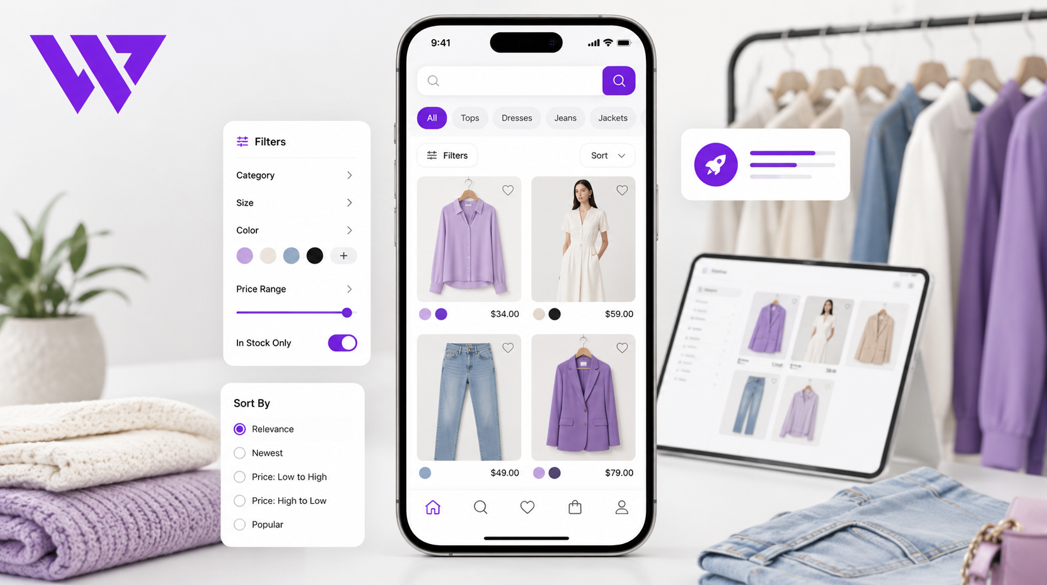
Customers may want to narrow the product catalog based on specific preferences.
Depending on the store structure, filtering can support:
- Category
- Size
- Color
- Price range
- Availability
- New arrivals
- Best-selling products
- Discounted items
- Brand
- Product type
The filters were planned to remain simple and mobile-friendly.
Instead of taking over the entire screen, filtering options could be opened when needed and applied without making the shopping journey confusing.
This helps customers reduce a large catalog into a smaller group of relevant products.
9. Mobile-Friendly Product Cards
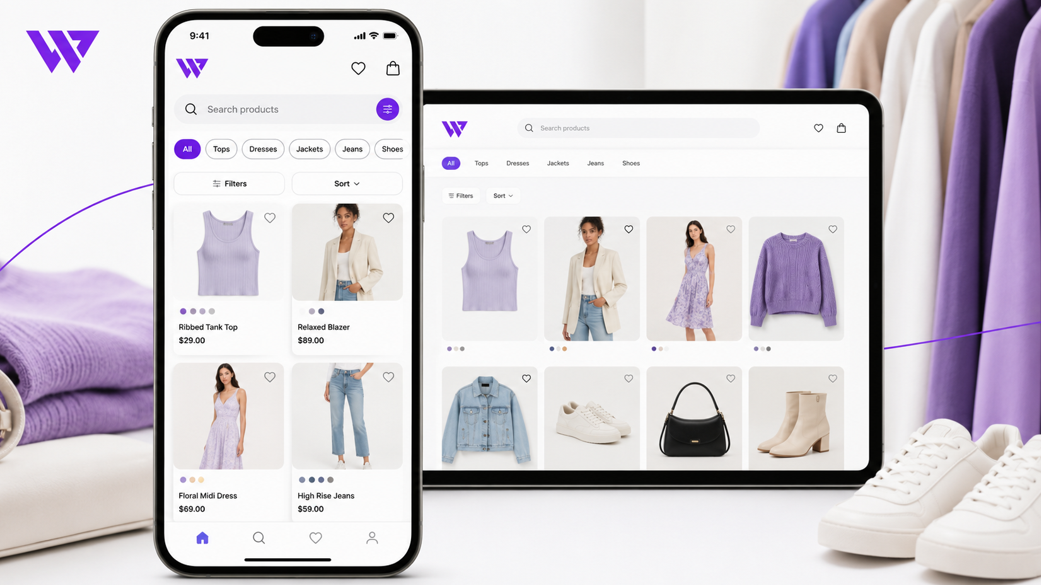
Product cards are often the first point where customers decide whether an item is worth exploring.
The mobile product cards were designed to show the most important information clearly:
- Product image
- Product name
- Current price
- Previous price where applicable
- Discount information
- Availability indicator
- Product details action
- Direct purchase action where appropriate
The content was kept concise so customers could scan several products quickly.
Images received enough space to communicate style and appearance, while prices and actions remained easy to identify.
10. Faster Access to New and Popular Products
Many clothing customers are interested in new arrivals, trending items, and current offers.
Dedicated product sections can highlight:
- New arrivals
- Best sellers
- Featured products
- Trending styles
- Seasonal collections
- Limited-time discounts
These sections reduce the amount of searching required for customers who want to see the store’s most relevant products first.
They also give the business greater control over which items receive more visibility during campaigns.
11. Visual Product Discovery
Fashion customers often make their first decision based on appearance.
The website used clear product imagery to make browsing more visual and engaging.
Product images were presented consistently so customers could compare items more easily.
Where appropriate, the product experience could include:
- Front view
- Back view
- Close-up details
- Fabric texture
- Available colors
- Lifestyle presentation
- Variation-specific images
Better visual presentation helps customers understand the product before opening the complete details page.
12. Simplified Product Detail Pages
After discovering a relevant item, the customer needs enough information to make a purchase decision.
The product detail page was structured around the most important information:
- Product title
- Product images
- Current price
- Discount information
- Product description
- Available sizes
- Available colors
- Stock status
- Quantity selector
- Add to Cart or Buy Now action
The layout avoided unnecessary content above the main purchasing controls.
This helped customers review options and take action without scrolling through unrelated sections first.
13. Clear Size and Color Selection
Clothing customers need to confirm size and color before ordering.
The product page presented these options as visible and easy-to-use selectors.
Available choices remained selectable, while unavailable combinations could be disabled or identified clearly.
This reduced confusion and helped prevent incorrect or incomplete orders.
It also reduced repetitive customer questions about which sizes and colors were currently available.
14. Mobile Performance and Page Speed
A visually attractive clothing website can still lose customers if pages take too long to load.
Mobile users may browse using slower internet connections, making performance especially important.
The website experience was planned with attention to:
- Optimized product images
- Efficient page structure
- Reduced unnecessary scripts
- Responsive image loading
- Clean front-end components
- Better mobile rendering
- Lightweight product grids
Faster pages help customers move between categories and products without unnecessary waiting.
Speed also supports a smoother experience for customers arriving from paid advertising and social media.
15. Sticky and Accessible Shopping Actions
On mobile devices, important buttons can move out of view as the customer scrolls.
Where suitable, key shopping actions were kept easily accessible.
These could include:
- Add to Cart
- Buy Now
- Open Cart
- Contact through WhatsApp
- Return to categories
Keeping the next action clear reduces friction and helps customers continue the shopping journey.
16. Shopping Cart Experience
The cart was designed to confirm the customer’s choices clearly.
It could display:
- Product image
- Product name
- Selected size
- Selected color
- Unit price
- Quantity
- Product subtotal
- Order total
Customers could review their selections before checkout and make necessary quantity changes.
A clear cart reduces order mistakes and provides greater confidence before the customer submits personal and delivery information.
17. Mobile Checkout Experience
Checkout is one of the most important stages of an e-commerce website.
A complicated mobile checkout can cause customers to leave after they have already decided to purchase.
The checkout journey was structured to collect only the necessary information in a clear order.
This could include:
- Customer name
- Phone number
- Delivery address
- Shipping area
- Order summary
- Payment method
- Final order action
Form fields, shipping options, and product summaries were adapted for mobile screens.
The goal was to make completing an order feel simple and predictable.
18. Design Approach
The website design was developed around clean fashion presentation and effortless mobile browsing.
The visual approach included:
- Clean backgrounds
- Strong product photography
- Simple typography
- Consistent product cards
- Comfortable spacing
- Clear category sections
- Visible pricing
- Easy-to-identify buttons
- Responsive layouts
- Minimal unnecessary decoration
The design kept products at the center of the experience.
Instead of using excessive visual effects, the interface focused on helping customers discover products and make decisions faster.
19. Key Features Delivered
The mobile-focused clothing e-commerce solution included:
- Responsive e-commerce website design
- Mobile-first navigation
- Organized clothing categories
- Product search functionality
- Mobile-friendly filters
- Clear product cards
- New arrival sections
- Featured and trending product sections
- Product pricing and discounts
- Multiple product images
- Size and color selectors
- Product availability information
- Mobile-friendly quantity controls
- Add-to-cart functionality
- Clear cart summary
- Simplified mobile checkout
- Accessible purchase actions
- Scalable product and category structure
Each feature was selected to support faster discovery, easier decisions, and a smoother shopping experience.
20. The Outcome
The completed solution created a clearer and more efficient mobile shopping journey for the clothing store.
Customers could understand the product categories, search for specific items, narrow the catalog, scan products, and reach relevant details with fewer unnecessary steps.
The business gained a more organized platform for presenting clothing collections and supporting customers arriving from social media and digital campaigns.
No unverified traffic, sales, or conversion percentages are being claimed. However, the website directly addressed important usability barriers that can prevent mobile customers from discovering and purchasing products.
21. Business Value Created
The website helps the clothing store:
- Make products easier to discover
- Improve the mobile shopping experience
- Organize clothing categories clearly
- Reduce repetitive product inquiries
- Highlight important products and collections
- Support social media traffic
- Present prices and discounts professionally
- Simplify size and color selection
- Reduce friction before checkout
- Maintain consistent branding
- Add future products more easily
- Create a stronger foundation for online sales
The project demonstrates that product discovery is not only a navigation issue. It directly influences how quickly customers understand the store and whether they continue toward a purchase.
22. Why This Project Matters
Many clothing stores attract visitors through Facebook and Instagram but lose potential customers after they reach the website.
The problem may not be the products.
The problem may be that customers cannot quickly find relevant categories, styles, sizes, or offers on a mobile screen.
A mobile-focused e-commerce experience helps connect customer interest with the right product.
It reduces searching, presents important information clearly, and keeps purchasing actions accessible.
The website becomes a practical sales platform rather than an online catalog that customers struggle to navigate.
23. Frequently Asked Questions
Why is mobile product discovery important for a clothing store?
Many fashion customers browse through smartphones. Faster product discovery helps them find relevant categories and products without navigating through complicated pages.
How can product categories improve mobile shopping?
Clear categories reduce the number of products customers need to review and help them reach the right collection more quickly.
Can customers search for specific clothing products?
Yes. Product search can help customers find items using product names, types, or relevant keywords.
Can the website support filters?
Yes. Filters can help customers narrow products by size, color, price, category, availability, or other relevant attributes.
Does the website support size and color variations?
Yes. Products can include selectable sizes, colors, stock conditions, and variation-specific information.
Can the store add more clothing categories later?
Yes. The category and product structure can support future collections, product types, and promotional sections.
Is the checkout suitable for mobile devices?
Yes. The checkout can be optimized with clear fields, order summaries, shipping options, and accessible action buttons.
24. Need a Mobile-Friendly E-commerce Website for Your Clothing Store?
A successful fashion website should help customers find the right product before asking them to purchase.
Webnion designs and develops responsive e-commerce websites for:
- Clothing stores
- Fashion brands
- Boutique businesses
- Traditional clothing sellers
- Footwear stores
- Lifestyle brands
- Multi-category retailers
- Online fashion businesses
We create shopping experiences that improve product discovery, simplify size and color selection, support mobile customers, and help businesses manage growing product catalogs.
Build a clothing e-commerce website that makes it easier for customers to discover products, understand their options, and complete an order.