
How an Electronics Retailer Connected POS and Online Inventory in One System
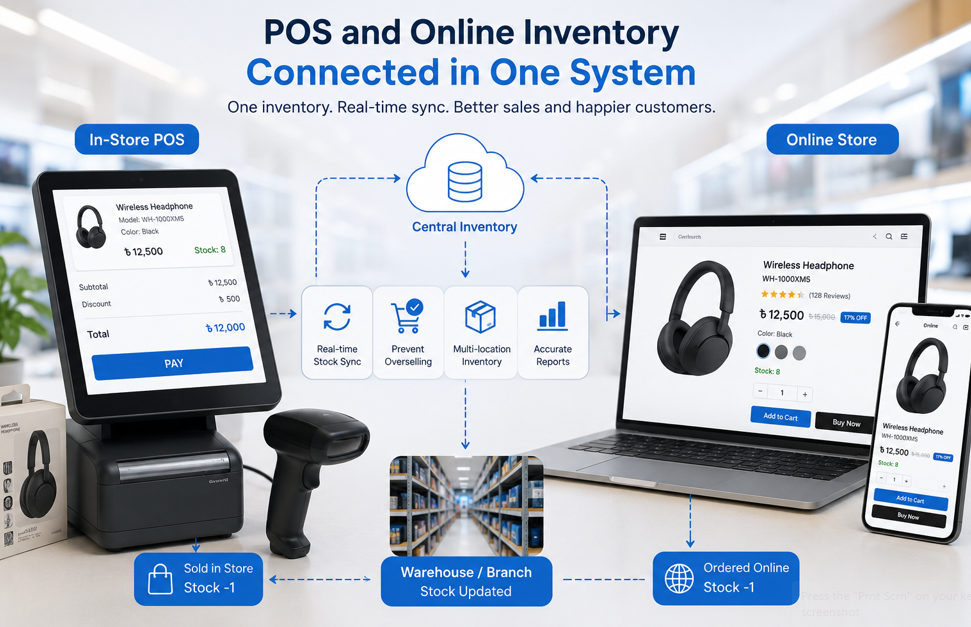
How an Electronics Retailer Connected POS and Online Inventory in One System

1. Project Overview
A growing electronics retailer was selling products through both a physical showroom and an online store.
The business offered smartphones, accessories, headphones, chargers, smart devices, computer products, and other electronics. Although having two sales channels created more opportunities, the store faced a major operational problem: the physical POS and online inventory were managed separately.
When a product sold in the showroom, the online stock did not always update immediately. Similarly, online orders were not consistently reflected in the physical store’s inventory records.
This created stock mismatches, manual work, delayed order confirmation, and the risk of accepting orders for unavailable products.
Webnion planned a connected retail system that brought POS sales, online orders, product variations, and inventory updates into one centralized platform.
The goal was to give the business a more accurate view of stock while creating a smoother experience for customers and staff.
2. The Business Challenge
Electronics retailers often manage products with multiple models, colors, storage capacities, serial numbers, prices, and stock quantities.
A single smartphone could include variations such as:
- 128 GB or 256 GB storage
- Black, blue, or silver color
- Official or unofficial version
- Different warranty options
- Separate showroom and warehouse quantities
Managing this information in disconnected systems created several challenges:
- Showroom sales did not immediately reduce online stock
- Online orders could reserve products already sold offline
- Staff needed to update inventory manually
- Product variations were difficult to track accurately
- Low-stock products were not always identified in time
- Online customers could order unavailable items
- Management lacked a complete inventory view
- Sales reports were divided across separate systems
- Order confirmation required manual stock checking
- Stock transfers were difficult to monitor
The business needed one system that could keep every sales channel connected.
3. Project Objectives
The project was planned around the following objectives:
- Connect physical POS and online store inventory
- Maintain one central stock record
- Update stock after every sale
- Track product variations separately
- Reduce manual inventory adjustments
- Prevent overselling
- Improve order-processing accuracy
- Provide real-time stock visibility
- Support multiple stock locations
- Simplify sales and inventory reporting
- Improve staff efficiency
- Create a scalable foundation for future growth
Every feature was selected to improve both operational control and customer experience.
4. Our Strategy
We planned the solution around one central principle:
Every sale must update the same inventory source.
The connected journey was designed as:
Product created → Stock added → Product sold through POS or website → Central inventory updated → Remaining stock shown across all channels
Instead of maintaining separate product quantities for the showroom and online store, both systems were connected to one inventory structure.
This allowed the business to manage products, variations, orders, and stock from a centralized dashboard.
5. Creating a Central Product Database
The first step was to create one product database shared by both POS and e-commerce operations.
Each product could include:
- Product name
- Category
- Brand
- SKU
- Barcode
- Selling price
- Purchase price
- Discount price
- Stock quantity
- Product images
- Warranty information
- Product variations
- Availability status
This reduced duplicate product entry and helped ensure that staff and customers were viewing consistent information.
When product details changed, the update could be reflected across the connected system.
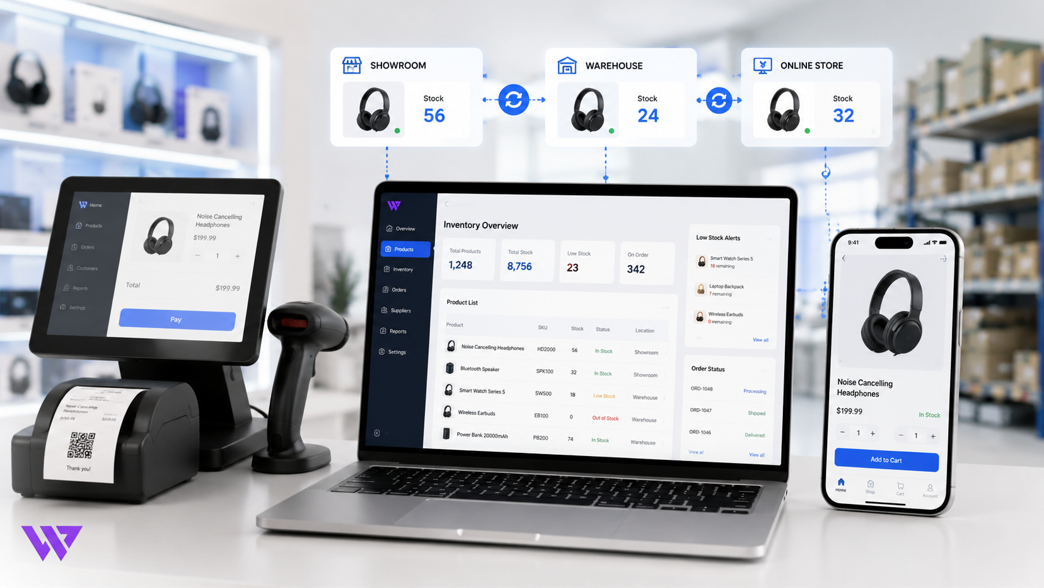
6. Connecting POS Sales with Online Stock
When a product was sold through the physical POS, the system reduced the available inventory automatically.
For example, if the store had ten wireless headphones and two were sold at the showroom, the online store could show the remaining eight units.
This connection helped prevent situations where online customers ordered products that were no longer physically available.
The POS sale could also record:
- Product
- Variation
- Quantity
- Unit price
- Discount
- Payment method
- Staff member
- Customer information
- Sale time
Each transaction contributed to the same inventory and reporting system.
7. Connecting Online Orders with POS Inventory
The same process applied when a customer placed an order through the website.
The system could reduce or reserve the relevant stock based on the order workflow.
Online order details could include:
- Product name
- Selected variation
- Quantity
- Customer details
- Delivery information
- Payment method
- Order status
- Shipping charge
- Final total
Because online and offline sales used the same inventory source, showroom staff could see that the stock had already changed.
This reduced the risk of selling an online-reserved product to another customer.
8. Variation-Level Inventory Management
Electronics products frequently include several variations.
Examples include:
- Storage capacity
- Color
- Model
- Connector type
- Cable length
- Product generation
- Regional version
- Warranty type
Each variation needed its own stock record.
For example:
- Smartphone X, 128 GB, Black — 5 units
- Smartphone X, 128 GB, Blue — 2 units
- Smartphone X, 256 GB, Black — 3 units
The system tracked these combinations separately rather than using one general stock quantity.
This helped customers see the correct availability and allowed staff to sell the exact variation from the POS.
9. Preventing Overselling
Overselling occurs when the same product appears available in more than one sales channel, even though the actual stock is insufficient.
The connected system reduced this risk by updating central inventory after each transaction.
When stock reached zero, the product or variation could be marked unavailable.
This helped the business:
- Avoid accepting impossible orders
- Reduce order cancellations
- Improve customer communication
- Protect brand credibility
- Prevent manual stock confusion
- Reduce unnecessary refunds
- Maintain more accurate product availability
Accurate inventory became part of the customer experience, not only an internal operation.
10. Barcode-Based POS Operations
Electronics retailers often manage a large catalog where manually searching for every product can slow down checkout.
Barcode support helped staff locate products quickly at the POS.
The process could include:
- Scan the product barcode
- Load product and variation information
- Confirm price and stock
- Add quantity
- Apply an approved discount
- Select payment method
- Complete the sale
- Update inventory automatically
This created a faster and more reliable showroom checkout experience.
It also reduced the risk of selecting the wrong product manually.
11. Multiple Stock Locations
The retailer could have stock across several locations, such as:
- Main showroom
- Secondary branch
- Warehouse
- Online fulfillment area
- Reserved stock location
The inventory structure could track quantities by location while maintaining an overall stock view.
This allowed the business to understand:
- Where a product was stored
- How many units were available at each location
- Which location should fulfill an order
- Whether stock needed to be transferred
- Which branch was running low
Better location visibility supported purchasing, fulfillment, and stock planning.
12. Stock Transfer Management
When products moved between a warehouse and showroom, the transfer needed to be recorded accurately.
A stock transfer workflow could include:
- Source location
- Destination location
- Product
- Variation
- Transfer quantity
- Transfer date
- Transfer status
- Responsible staff member
- Notes
This helped prevent inventory from disappearing between locations.
Management could understand whether stock was available, in transit, or received at the destination.
13. Low-Stock and Out-of-Stock Visibility
The system could identify products that required attention.
Low-stock indicators helped staff recognize which items were close to running out.
The dashboard could show:
- Current stock
- Low-stock products
- Out-of-stock products
- Recently updated inventory
- Fast-selling products
- Stock by category
- Stock by location
This allowed the retailer to take action before popular electronics became unavailable.
It also supported better purchasing and supplier planning.
14. Purchase and Stock Entry
Stock accuracy depends on recording incoming products correctly.
When the retailer purchased new inventory, the system could record:
- Supplier
- Product
- Variation
- Quantity
- Purchase price
- Invoice number
- Purchase date
- Stock location
- Additional cost
- Payment status
Once the purchase was recorded, the available quantity could update in the central inventory.
This connected purchasing with both POS and online stock.
15. Centralized Pricing
Managing different prices across disconnected systems can create customer confusion.
The connected platform allowed the business to maintain product pricing more consistently.
Product pricing could include:
- Purchase price
- Regular selling price
- Online price
- Promotional price
- POS discount
- Variation-specific price
- Wholesale price where applicable
Authorized staff could update prices from one system based on business rules.
This reduced inconsistencies between the showroom and website.
16. Order and Sales Status Management
Online orders and POS sales follow different workflows, but both needed to contribute to the same reporting structure.
Online order statuses could include:
- Pending
- Confirmed
- Processing
- Shipped
- Delivered
- Cancelled
- Returned
POS transactions could be completed immediately while still recording payment and customer information.
The centralized system allowed management to review both sales channels without using separate reports.
17. Return and Stock Adjustment
Electronics products may be returned, replaced, damaged, or moved to service status.
The system needed clear rules for updating inventory after these events.
A stock adjustment could record:
- Product and variation
- Previous quantity
- Adjustment quantity
- New quantity
- Adjustment reason
- Staff member
- Date and time
- Notes
Common reasons could include:
- Customer return
- Damaged product
- Stock correction
- Replacement
- Lost product
- Promotional use
- Supplier return
Recording the reason created greater accountability and a clearer inventory history.
18. Unified Customer Information
The retailer served customers through both the showroom and online store.
A connected system could keep customer information in one place.
Customer records could include:
- Name
- Phone number
- Email address
- Delivery address
- Purchase history
- Online orders
- POS purchases
- Total spending
- Return history
- Notes
This gave the business a better understanding of repeat customers across different sales channels.
It also supported future communication and customer service.
19. Sales and Inventory Reporting
Management needed more than a stock number.
The connected system could provide reports such as:
- Online sales
- POS sales
- Combined sales
- Sales by product
- Sales by category
- Sales by staff member
- Sales by location
- Current inventory value
- Low-stock report
- Out-of-stock report
- Profit estimate
- Purchase history
- Returned products
- Payment-method summary
These reports helped management make decisions using one consistent source of data.
Instead of comparing multiple spreadsheets, the business could review operations from one dashboard.
20. Mobile and Admin Accessibility
The administration interface was designed to support practical daily use.
Authorized users could review important information from different devices.
Depending on their permission, staff could access:
- Orders
- POS sales
- Product stock
- Low-stock alerts
- Customer information
- Reports
- Stock transfers
- Purchases
- Payment records
This made it easier for owners and managers to monitor operations without remaining at one physical computer.
21. Staff Roles and Permissions
Not every employee needed access to every part of the system.
Role-based permissions could control access for:
- Owner
- Administrator
- Store manager
- POS cashier
- Inventory staff
- Order-processing staff
- Accountant
- Customer-support team
For example, a cashier could complete POS sales without changing purchase prices or system settings.
This improved security and reduced accidental changes.
22. Customer Experience Improvements
Although much of the project focused on operations, customers also benefited directly.
The connected inventory system helped customers receive:
- More accurate stock information
- Fewer cancelled orders
- Faster order confirmation
- Correct product variations
- Consistent pricing
- Clearer product availability
- Better communication
- More reliable fulfillment
Operational accuracy strengthened customer trust.
A connected backend helped create a smoother frontend shopping experience.
23. Design Approach
The user interface focused on clarity, speed, and operational efficiency.
The design approach included:
- Clean admin dashboards
- Clear stock indicators
- Searchable product lists
- Simple POS controls
- Easy quantity adjustment
- Organized order statuses
- Responsive tables
- Visible low-stock alerts
- Consistent action buttons
- Role-appropriate navigation
The system avoided unnecessary complexity so staff could complete common tasks quickly.
The e-commerce interface remained product-focused and mobile-friendly for customers.
24. Key Features Delivered
The connected retail solution included:
- Central product database
- POS and e-commerce integration
- Automatic stock updates
- Variation-level inventory
- Barcode-based product entry
- Multi-location inventory
- Stock transfer management
- Low-stock alerts
- Out-of-stock controls
- Purchase and supplier records
- Centralized pricing
- Online order management
- POS sales management
- Returns and stock adjustments
- Unified customer records
- Staff roles and permissions
- Sales reporting
- Inventory reporting
- Responsive administration
- Scalable product structure
Each feature was selected to improve accuracy, control, customer service, and operational efficiency.
25. The Outcome
The completed solution created one connected retail environment for the electronics business.
Physical showroom sales and online orders could update the same inventory source.
Staff gained clearer visibility into available stock, product variations, transfers, purchases, and sales activity.
Customers benefited from more accurate availability and a more reliable ordering experience.
No unverified revenue, sales-growth, or inventory-accuracy percentages are being claimed. However, the system directly addressed the operational problems caused by disconnected POS and online inventory.
26. Business Value Created
The connected system helps the electronics retailer:
- Maintain more accurate stock
- Reduce manual inventory updates
- Prevent overselling
- Reduce cancelled orders
- Track product variations correctly
- Connect showroom and online sales
- Improve staff productivity
- Simplify stock transfers
- Identify low-stock products
- Manage purchasing more clearly
- Review combined sales reports
- Improve customer communication
- Support multiple locations
- Scale operations more confidently
The project demonstrates that connecting POS and e-commerce inventory is not simply a technical integration.
It creates stronger operational control and a more dependable customer experience.
27. Why This Project Matters
Many retailers start with separate tools for physical and online sales.
This may work when the business is small, but it becomes difficult to manage as products, orders, employees, and locations increase.
Disconnected systems create repeated work and unreliable data.
Staff may spend time checking spreadsheets, calling branches, or manually confirming whether a product is available.
A connected retail system creates one source of truth.
It helps the business understand:
- What is in stock
- Where the product is located
- Which channel sold it
- Which variation remains available
- Which products need restocking
- How online and offline sales are performing
The system becomes a practical foundation for retail growth.
28. Frequently Asked Questions
What does POS and online inventory integration mean?
It means physical store sales and website orders use the same inventory data, allowing stock to update across both channels.
Does POS stock update after an online order?
Yes. An online order can reduce or reserve the relevant stock so showroom staff can see the updated availability.
Can each product variation have separate stock?
Yes. Model, color, storage, warranty, or other variations can maintain independent quantities and pricing.
Can the system support multiple stores or warehouses?
Yes. Inventory can be tracked by location, and products can be transferred between branches or warehouses.
Can staff scan product barcodes at the POS?
Yes. Barcode scanning can help staff find products, add them to a sale, and update stock quickly.
Can the system show low-stock products?
Yes. Low-stock and out-of-stock reports can help the business plan purchases and avoid product shortages.
Can returned products be added back to stock?
Yes, when appropriate. The return or adjustment can be recorded with a reason and responsible staff member.
Can management view online and POS sales together?
Yes. Reports can combine both channels while also allowing separate performance analysis.
Is staff access controlled?
Yes. Role-based permissions can limit which features and information each employee can access.
Can the system grow with the business?
Yes. The structure can support additional products, branches, warehouses, staff members, and sales channels.
29. Need to Connect Your POS and Online Store?
Managing showroom sales and website orders through separate inventory systems can create avoidable mistakes.
Webnion develops connected retail solutions for:
- Electronics retailers
- Gadget stores
- Fashion businesses
- Cosmetics shops
- Grocery retailers
- Multi-branch stores
- Wholesale and retail businesses
- Growing e-commerce brands
We connect products, stock, POS sales, online orders, customers, purchasing, and reporting within one organized system.
Build a retail platform that gives your team greater control and gives customers more reliable product availability.