Details
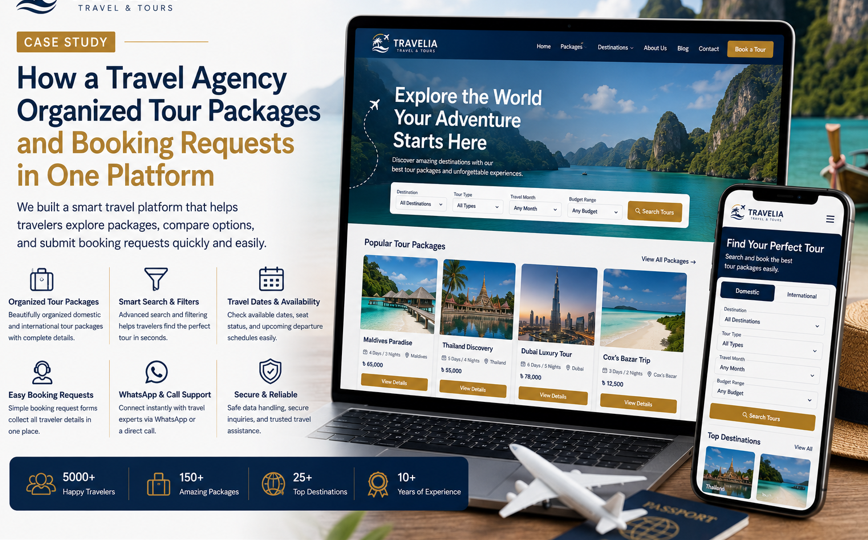
How a Travel Agency Organized Tour Packages and Booking Requests in One Platform
How a Travel Agency Organized Tour Packages and Booking Requests in One Platform

1. Project Overview
A growing travel agency needed a professional website that could organize its domestic and international tour packages, explain important travel details, and collect structured booking requests from one platform.
The agency offered:
- Domestic tours
- International holiday packages
- Group tours
- Couple and honeymoon packages
- Family vacations
- Corporate trips
- Customized travel plans
- Hotel booking assistance
- Transport arrangements
- Visa-support services where available
Before the website project, most customers discovered packages through Facebook posts, promotional images, WhatsApp messages, referrals, and travel groups.
Potential travelers repeatedly asked:
- Which packages are currently available?
- What is included in the price?
- Which travel dates can be selected?
- How many days and nights does the package cover?
- Are flights, hotels, meals, and transport included?
- Is visa support available?
- Can the itinerary be customized?
- How much advance payment is required?
- Can a private or family tour be arranged?
- How can a booking request be submitted?
Package information was scattered across multiple communication channels, making comparison and booking difficult.
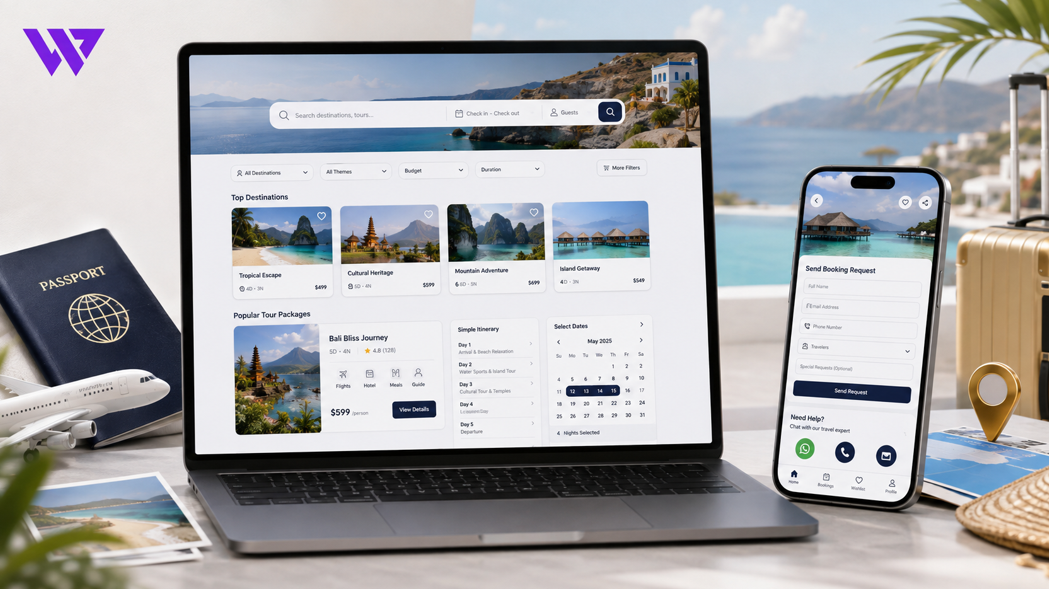
Webnion planned a responsive travel website that brought tour packages, itineraries, pricing guidance, travel dates, destination information, and booking requests into one organized platform.
The goal was to help travelers understand available packages and submit complete booking information before speaking with a travel consultant.
2. The Business Challenge
Travel decisions involve several connected details.
A customer may be interested in a destination but still need to understand:
- Travel dates
- Duration
- Hotel category
- Transportation
- Meals
- Activities
- Visa requirements
- Payment schedule
- Cancellation conditions
- Additional costs
The agency faced several common challenges:
- Package information was spread across social media posts
- Customers could not compare tours easily
- Old promotional posts remained visible after packages expired
- Booking messages often missed traveler numbers or dates
- Staff repeatedly answered the same questions
- Package inclusions and exclusions were unclear
- Domestic and international tours were mixed together
- Custom-tour requests lacked enough information
- Mobile visitors struggled with long itinerary images
- Customers did not know whether submitting a form confirmed the booking
- Agents managed inquiries through personal messages and spreadsheets
- The website lacked a scalable structure for future destinations
The agency needed a platform that improved both customer discovery and internal booking coordination.
3. Project Objectives
The project was planned around the following objectives:
- Organize tour packages clearly
- Separate domestic and international travel
- Make destination discovery easier
- Present complete itineraries
- Explain inclusions and exclusions
- Display available travel dates
- Collect structured booking requests
- Support customized tour inquiries
- Improve mobile browsing
- Reduce repetitive customer questions
- Support WhatsApp and direct calls
- Organize traveler and inquiry information
- Strengthen destination-level SEO
- Create a scalable system for future packages
Every section was designed to make the journey from travel interest to booking request clearer.
4. Our Strategy
We planned the customer journey around how travelers naturally research a trip.
The intended journey was:
Choose a destination → Explore available packages → Review itinerary and pricing → Check inclusions and dates → Select traveler details → Submit a booking request → Receive confirmation from the agency
The website separated package discovery from final confirmation.
Customers could review useful information independently, while the travel agency remained responsible for confirming:
- Availability
- Final price
- Hotel
- Transport
- Flight
- Visa requirements
- Payment deadlines
- Booking conditions
This created a more transparent and manageable booking process.
5. Professional Travel Brand Presentation
The website needed to communicate excitement and reliability at the same time.
The design direction focused on:
- Strong destination photography
- Clean and spacious layouts
- Consistent branding
- Clear package cards
- Readable travel details
- Visible booking actions
- Mobile-friendly forms
- Trust-focused information
- Organized itinerary sections
- Professional contact options
The design avoided overcrowded promotional graphics.
Destinations, package details, traveler confidence, and booking actions remained the main focus.
6. Organizing Tour Categories
The tour catalog was divided into clear categories such as:
- Domestic Tours
- International Tours
- Group Tours
- Private Tours
- Family Packages
- Couple Tours
- Honeymoon Packages
- Adventure Tours
- Religious Tours
- Corporate Tours
- Weekend Trips
- Customized Tours
This helped visitors begin with the type of travel experience most relevant to them.
A couple looking for a honeymoon package did not need to browse through corporate or large group tours.
7. Domestic and International Tour Separation
Domestic and international packages followed different planning requirements.
Domestic tours could focus on:
- Transportation
- Hotel
- Meals
- Sightseeing
- Local guides
- Pickup locations
- Group schedules
International tours could include:
- Airfare
- Visa guidance
- Passport requirements
- Hotel
- Airport transfers
- International transport
- Travel insurance information
- Currency considerations
- Country-specific requirements
Separating these journeys made package details easier to understand.
8. Destination-Based Discovery
Customers could browse packages by destination.
Destination sections could include:
- Cox’s Bazar
- Sylhet
- Sajek
- Bandarban
- Sundarbans
- Saint Martin
- Thailand
- Malaysia
- Singapore
- Dubai
- Maldives
- Indonesia
- Turkey
- Nepal
- India
Each destination page could show:
- Available packages
- Package duration
- Upcoming dates
- Main attractions
- Starting price
- Travel type
- Booking action
This improved destination discovery and created stronger SEO opportunities.
9. Tour Package Search and Filters
A package search system helped customers narrow available tours.
Filters could include:
- Destination
- Domestic or international
- Package type
- Travel month
- Duration
- Budget range
- Group or private tour
- Family-friendly packages
- Couple packages
- Available travel dates
- Visa-support availability
This helped customers reach suitable packages without reviewing the entire catalog.
10. Mobile-Friendly Filtering
Most customers arrived through smartphones after seeing travel advertisements or social media content.
The mobile filter experience allowed visitors to:
- Open filters when needed
- Select destination
- Choose month
- Select budget
- Choose package type
- Apply selections
- Remove active filters
- Reset the search
The filter panel remained compact and did not permanently cover the package listings.
11. Clear Tour Package Cards
Each tour card displayed the most useful information at a glance.
A package card could include:
- Destination image
- Package title
- Duration
- Travel dates
- Starting price
- Package type
- Hotel category
- Group or private status
- Available seat status
- View Details action
Consistent package cards made comparison faster.
Customers could identify relevant tours before opening the complete itinerary.
12. Detailed Package Pages
Every tour package received a structured detail page.
The page could include:
- Package title
- Destination
- Duration
- Travel date
- Return date
- Starting location
- Tour type
- Package price
- Available seats
- Hotel information
- Transportation
- Meals
- Daily itinerary
- Package inclusions
- Package exclusions
- Payment requirements
- Cancellation policy
- Important travel notes
- Booking request action
This gave customers one reliable source for the full package information.
13. Strong Package Overview
The top section of the package page presented the main information immediately.
It could display:
- Destination image
- Tour name
- Duration
- Available date
- Starting price
- Departure location
- Package type
- Remaining availability
- Request Booking button
- Ask on WhatsApp button
Visitors could understand whether the package matched their basic needs before reading the complete details.
14. Day-by-Day Itinerary
Long tour plans were organized into a clear daily itinerary.
For example:
Day 1: Departure and Hotel Check-in
- Departure from the selected meeting point
- Arrival at the destination
- Hotel check-in
- Rest and evening activities
Day 2: Main Sightseeing Tour
- Breakfast
- Visit major attractions
- Lunch
- Guided activities
- Return to hotel
Day 3: Free Time and Return
- Breakfast
- Personal shopping or free time
- Hotel checkout
- Return journey
Expandable itinerary sections kept long package pages easy to read on mobile devices.
15. Package Inclusions
Customers needed to understand what the package price covered.
The inclusion section could list:
- Hotel accommodation
- Transportation
- Airport transfer
- Breakfast
- Selected meals
- Sightseeing
- Entry tickets
- Local guide
- Tour coordinator
- Applicable taxes
- Visa-support service where stated
Only confirmed services were included in this list.
This reduced confusion during booking and payment discussions.
16. Package Exclusions
Exclusions were presented with equal clarity.
These could include:
- Passport fees
- Visa fees
- Airfare where not included
- Personal expenses
- Additional meals
- Optional activities
- Travel insurance
- Extra baggage
- Medical expenses
- Tips
- Services not mentioned in the inclusion list
Clear exclusions helped customers estimate the total travel cost more realistically.
17. Travel Dates and Availability
Each package could show:
- Departure date
- Return date
- Booking deadline
- Available seats
- Limited availability
- Sold-out status
- Upcoming schedule
- Private-tour availability
Availability remained subject to confirmation because seats, flights, hotels, and transport could change.
Expired packages could be automatically hidden or marked as closed.
18. Group and Private Tour Options
Customers could choose between group and private arrangements where available.
A group tour could explain:
- Fixed travel date
- Shared transportation
- Group itinerary
- Minimum participant requirement
- Tour coordinator
- Standard package structure
A private tour could offer:
- Flexible travel date
- Private vehicle
- Customized itinerary
- Selected hotel
- Family or personal group
- Personalized quotation
This helped customers choose the travel format that matched their expectations.
19. Hotel Information
Hotel details could include:
- Hotel category
- Room type
- Number of nights
- Sharing arrangement
- Breakfast availability
- Location
- Check-in and checkout guidance
- Upgrade options
Where the exact hotel depended on availability, the website could explain that a similar category hotel might be provided.
This prevented customers from assuming that an example hotel was guaranteed before confirmation.
20. Transportation Information
Transportation details could explain:
- Flight
- Bus
- Train
- Private vehicle
- Shared vehicle
- Airport transfer
- Local transport
- Pickup point
- Departure time
- Baggage conditions
The agency could specify which transport costs were included and which required separate payment.
21. Flight Information
For packages including air travel, the page could explain:
- Airline or estimated airline category
- Departure airport
- Arrival airport
- Flight inclusion
- Baggage allowance
- Transit information
- Ticket conditions
- Schedule-change possibility
Flight schedules and fares remained subject to airline confirmation.
The website avoided presenting temporary flight information as permanently fixed.
22. Visa Information
Where the agency provided visa support, the package page could explain:
- Whether visa support was available
- General document checklist
- Processing-time estimate
- Visa fee
- Service fee
- Application process
- Passport-validity requirement
- Interview possibility
- Additional-document requirements
The website clearly explained that visa approval was controlled by the relevant embassy, consulate, or immigration authority.
The agency did not guarantee visa approval.
23. Passport and Document Guidance
Travelers could review a general document checklist such as:
- Valid passport
- Passport-size photographs
- National identification
- Bank documents where required
- Employment or business documents
- Travel history
- Hotel and flight reservation
- Invitation letter where applicable
- Additional destination-specific records
The final requirement depended on the destination and current authority rules.
Customers were advised to confirm the latest checklist with the agency before applying.
24. Transparent Package Pricing
The package page could show:
- Price per person
- Child price
- Infant price
- Couple price
- Group price
- Single-room supplement
- Hotel-upgrade charge
- Visa fee
- Airfare status
- Additional activity charges
The website clarified whether a displayed amount was:
- Fixed
- Starting from
- Estimated
- Subject to availability
- Based on minimum group size
This reduced unexpected pricing changes during the consultation.
25. Child and Family Pricing
Family packages often required separate pricing rules.
The website could explain:
- Adult price
- Child with bed
- Child without bed
- Infant price
- Age conditions
- Family room availability
- Extra-bed charge
- Required identification
The final child policy depended on the hotel, airline, transport provider, and package structure.
26. Advance Payment and Booking Process
The package page explained the booking process clearly.
A typical process could be:
- Submit a booking request
- Receive availability confirmation
- Review the final quotation
- Submit traveler documents
- Pay the required advance
- Receive booking confirmation
- Complete the remaining payment
- Receive travel documents and final instructions
The page could also explain:
- Advance amount
- Payment deadline
- Remaining balance
- Payment methods
- Booking reference
- Refund conditions
- Cancellation policy
27. Booking Request Versus Confirmed Booking
The website clearly explained that submitting a form did not automatically confirm the tour.
After submission, the customer could see:
“Your booking request has been received. Our travel team will confirm package availability, final pricing, required documents, and payment instructions.”
This prevented customers from assuming that seats, flights, or hotel rooms had already been reserved.
28. Structured Booking Request Form
The booking form collected the information required for initial review.
Fields could include:
- Full name
- Phone number
- Email address
- Selected package
- Preferred travel date
- Number of adults
- Number of children
- Number of infants
- Departure city
- Room preference
- Passport availability
- Visa-support requirement
- Private or group tour
- Additional message
- Consent confirmation
This helped the travel consultant prepare before contacting the customer.
29. Automatic Package Information
When the booking form opened from a package page, it could automatically include:
- Package title
- Destination
- Travel date
- Package reference
- Page link
- Package type
- Inquiry source
Customers did not need to type or copy the package information manually.
The agency could identify the relevant tour immediately.
30. WhatsApp Booking Requests
A WhatsApp button could prepare a structured message.
For example:
Hello, I am interested in this tour package.
Package: Thailand 5 Days and 4 Nights
Preferred Date:
Adults: 2
Children: 1
Departure City: Dhaka
Visa Support Required: Yes
Package Link: [page link]
Please confirm availability, final price, and booking requirements.
This created more useful WhatsApp conversations and reduced incomplete messages.
31. Click-to-Call Support
Some customers preferred speaking directly with a travel consultant.
A click-to-call action could appear:
- In the header
- On package pages
- In the mobile sticky bar
- On destination pages
- Near visa information
- On the contact page
This helped customers who needed clarification before submitting a form.
32. Customized Tour Requests
Not every traveler wanted a fixed package.
A custom-tour form could collect:
- Destination
- Preferred travel dates
- Trip duration
- Number of travelers
- Traveler ages
- Budget range
- Hotel preference
- Transportation preference
- Activities
- Meal preference
- Visa-support requirement
- Special requests
The agency could use this information to prepare a personalized itinerary and quotation.
33. Honeymoon Package Requests
Couple and honeymoon tours could have a separate inquiry journey.
The form could collect:
- Destination preference
- Travel month
- Duration
- Budget
- Hotel category
- Room preference
- Special arrangements
- Photography request
- Private transfer
- Visa-support need
The website avoided guaranteeing specific decorations, room upgrades, or experiences before confirmation with the service provider.
34. Corporate and Group Travel Requests
Corporate and large group tours required additional information.
The inquiry form could collect:
- Organization name
- Contact person
- Number of travelers
- Destination
- Travel dates
- Budget
- Hotel requirement
- Meeting or event space
- Transportation
- Meal plan
- Invoice requirement
- Special support
This separated high-value group inquiries from ordinary individual bookings.
35. Tour Comparison
Customers could compare selected packages using information such as:
- Destination
- Duration
- Price
- Hotel category
- Meals
- Transportation
- Activities
- Visa support
- Available dates
- Group or private status
This helped travelers understand the difference between similar packages before contacting the agency.
36. Saved Tour Packages
A wishlist or saved-package feature allowed visitors to:
- Save preferred tours
- Compare later
- Share options with family
- Return after checking leave dates
- Review packages before payment
Travel decisions often require discussion and planning, so saved packages supported a longer decision journey.
37. Similar Tour Recommendations
A package page could recommend related options based on:
- Destination
- Budget
- Duration
- Travel month
- Package type
- Family or couple suitability
For example, a customer viewing a Thailand package could also see Malaysia, Singapore, or Bali tours within a similar budget range.
Recommendations remained relevant and limited.
38. Customer Reviews and Travel Proof
Customer feedback helped potential travelers understand the agency’s service experience.
Reviews could discuss:
- Booking communication
- Tour coordination
- Hotel experience
- Transportation
- Guide support
- Visa assistance
- Group management
- Overall organization
The website could display:
- Written reviews
- Customer photos
- Tour videos
- Group photographs
- Social media comments
- Video testimonials
Customer permission was required before publishing personal travel images or private messages.
39. Completed Tour Galleries
A travel gallery could organize real tour memories by:
- Destination
- Tour date
- Group name
- Package type
- Domestic or international
- Customer experience
Real galleries created stronger trust than generic stock images.
The agency needed to protect traveler privacy and receive permission before publishing identifiable images.
40. Tour Guide and Coordinator Information
Where appropriate, the website could introduce:
- Tour coordinator
- Local guide
- Language support
- Emergency contact process
- Group-management role
- Travel assistance
The assigned guide could change depending on package date and availability.
The website avoided guaranteeing a specific individual before final confirmation.
41. Important Travel Notes
Every package could include practical notes such as:
- Carry valid identification
- Follow the confirmed reporting time
- Review baggage limits
- Follow hotel policies
- Maintain personal travel documents
- Respect local laws and customs
- Confirm optional activity costs
- Follow group instructions
- Keep emergency contact details
These notes supported smoother coordination without replacing destination-specific official guidance.
42. Cancellation and Refund Information
The website could explain:
- Cancellation deadline
- Non-refundable services
- Airline ticket conditions
- Hotel cancellation rules
- Visa service fees
- Administrative charges
- Date-change conditions
- Traveler replacement conditions
- Refund-processing timeline
Cancellation terms could vary across packages and service providers.
The final conditions needed to be confirmed before payment.
43. Travel Insurance Information
Where relevant, the website could explain:
- Whether travel insurance was included
- Whether it was optional or required
- General coverage categories
- Provider information
- Claim process
- Policy exclusions
- Coverage dates
The website did not claim that insurance covered every event.
Travelers needed to review the provider’s complete terms before purchasing.
44. Emergency Contact Information
Confirmed travelers could receive:
- Agency emergency number
- Tour coordinator contact
- Local guide contact
- Hotel contact
- Transport contact
- Destination emergency guidance
The public website avoided publishing sensitive internal numbers unnecessarily.
Emergency procedures could be shared after booking confirmation.
45. Destination Guides
The agency could publish useful destination pages containing:
- Best travel seasons
- Main attractions
- Local transport overview
- Currency information
- General cultural guidance
- Popular activities
- Food information
- Travel tips
- Available packages
Travel requirements and conditions could change, so visitors were advised to confirm current official information before departure.
46. SEO-Friendly Destination Pages
Each important destination could have a focused SEO structure.
Potential pages included:
- Thailand tour package from Bangladesh
- Maldives honeymoon package
- Dubai family tour package
- Nepal group tour
- Cox’s Bazar tour package
- Sajek weekend tour
- Malaysia holiday package
- Singapore family tour
Each page could include:
- Destination overview
- Available packages
- Itinerary information
- Price guidance
- Travel dates
- Frequently asked questions
- Booking action
- Internal links
Content was written for travelers first and avoided unnatural keyword repetition.
47. Tour Package SEO
Every active package page could include:
- Descriptive title
- Destination
- Duration
- Travel type
- Package details
- Unique itinerary
- Meta description
- Image alt text
- Frequently asked questions
- Internal links
- Booking request action
Expired packages could be updated, archived, or redirected carefully to prevent outdated search results from confusing customers.
48. Travel Blog and Educational Content
The agency could publish articles such as:
- How to choose the right tour package
- What to check before booking an international trip
- How group tours work
- What documents may be needed for visa processing
- How to prepare for a family tour
- What to pack for a short international trip
- Group tour versus private tour
- How to understand package inclusions and exclusions
The content remained general and directed travelers to current official sources for changing rules and requirements.
49. Internal Linking
Internal links connected:
- Destination pages
- Tour packages
- Visa-information pages
- Travel guides
- Customer reviews
- Booking forms
- Similar tours
For example, a Thailand destination guide could link to current Thailand packages and visa-support information.
This improved customer navigation and strengthened the website structure for search engines.
50. Local and Business Trust Information
The website could display:
- Agency name
- Office address
- Contact numbers
- Map
- Business hours
- Business registration information where appropriate
- Payment methods
- Social media profiles
- Customer reviews
- Support process
Only verified memberships, approvals, partnerships, or certifications were displayed.
Trust was built through transparency rather than unsupported badges.
51. Multiple Branch Support
Where the agency operated several branches, each branch could have:
- Address
- Map
- Phone number
- Opening hours
- Assigned consultants
- Available services
- Appointment action
Customers could select their preferred branch when requesting a consultation or package booking.
52. Consultation Booking
Some travelers needed guidance before choosing a destination.
The website could support travel consultation requests for:
- International tours
- Honeymoon planning
- Family holidays
- Group travel
- Visa guidance
- Corporate trips
- Customized itineraries
The consultation form could collect budget, destination preferences, traveler count, and travel month.
This helped consultants prepare suitable options before the discussion.
53. Mobile-First Travel Experience
Most visitors arrived from mobile advertisements, social media posts, and WhatsApp links.
Mobile users could:
- Browse destinations
- Search packages
- Apply filters
- Review itineraries
- Check travel dates
- Read inclusions
- Compare packages
- Submit booking requests
- Open WhatsApp
- Call the agency
The design avoided displaying itineraries only through difficult-to-read images or desktop tables.
54. Fast Page Performance
Travel websites often contain many large destination images and videos.
The website was planned with attention to:
- WebP images
- Responsive image sizes
- Lazy loading
- Optimized galleries
- Reduced unnecessary scripts
- Efficient fonts
- Browser caching
- Lightweight animations
- Clean front-end code
Faster loading helped visitors move between destinations and packages without unnecessary waiting.
55. Booking Administration
Authorized staff could review booking requests through an organized dashboard.
Each request could include:
- Customer name
- Phone number
- Package
- Destination
- Travel date
- Number of travelers
- Visa-support requirement
- Room preference
- Inquiry source
- Assigned consultant
- Booking status
- Follow-up date
- Staff notes
Possible statuses included:
- New Request
- Contacted
- Availability Check
- Quotation Sent
- Waiting for Documents
- Waiting for Advance
- Booking Confirmed
- Payment Pending
- Completed
- Cancelled
This reduced dependence on spreadsheets and scattered messages.
56. Consultant Assignment
Booking inquiries could be assigned according to:
- Destination
- Domestic or international tour
- Package type
- Visa requirement
- Branch
- Customer language
- Consultant workload
- Campaign source
This helped the correct travel consultant receive the inquiry quickly.
It also reduced duplicate follow-ups from multiple staff members.
57. Traveler Management
After booking confirmation, the system could organize:
- Traveler names
- Contact details
- Passport status
- Visa status
- Payment status
- Room allocation
- Flight information
- Emergency contacts
- Special requests
- Document checklist
Access to personal and passport information needed to remain restricted to authorized staff.
58. Payment Tracking
The agency could record:
- Package price
- Advance payment
- Visa fee
- Ticket payment
- Remaining balance
- Payment date
- Payment method
- Receipt
- Refund or adjustment
- Payment status
This created a clearer internal booking record.
The website could provide customers with payment confirmation after verification.
59. Tour Date and Seat Management
Authorized staff could manage:
- Tour dates
- Seat capacity
- Available seats
- Minimum group size
- Booking deadline
- Sold-out status
- Waiting list
- Cancelled departures
- Additional dates
Availability updates could be reflected on the website without changing page code manually.
60. Automated Customer Notifications
Customers could receive notifications for:
- Booking request received
- Availability confirmed
- Quotation sent
- Document required
- Advance received
- Booking confirmed
- Payment reminder
- Tour briefing
- Schedule update
- Cancellation or rescheduling
Messages remained concise and avoided exposing sensitive travel-document information.
61. Analytics and Booking Behavior
The website could track actions such as:
- Destination searches
- Package views
- Filter use
- Itinerary interactions
- Package comparisons
- WhatsApp clicks
- Phone clicks
- Booking submissions
- Custom-tour requests
- Consultation requests
This helped the agency understand which destinations, dates, and package types attracted interest.
No unverified booking, revenue, traffic, or conversion percentages were claimed.
62. Privacy and Traveler Data
Travel inquiries may contain personal and passport-related information.
The website needed clear privacy practices explaining:
- What information was collected
- Why it was collected
- Who could access it
- How it was stored
- How long it might be retained
- Which third-party providers were involved
- How customers could request correction or deletion
- How uploaded documents were protected
The public booking form avoided requesting passport copies unless a secure and approved process was available.
63. Secure Form and File Handling
The platform could include:
- Encrypted website connection
- CSRF protection
- Input validation
- Spam protection
- Secure file uploads
- Restricted administrator access
- Role-based permissions
- Activity logging
- Scheduled backups
- Controlled data export
No platform can guarantee absolute security.
Appropriate technical and operational controls helped reduce unnecessary risk.
64. Travel Disclaimer
The website included a clear disclaimer explaining that:
- Package availability could change
- Prices required final confirmation
- Flight schedules could change
- Hotel availability was not guaranteed until confirmation
- Visa approval depended on the relevant authority
- Travel rules and entry requirements could change
- Itinerary adjustments might occur
- Submitting a request did not confirm the booking
- Travelers should review current official requirements
This supported transparent and responsible communication.
65. Design Approach
The visual direction focused on exploration, clarity, trust, and convenient booking.
The design system included:
- Large destination images
- Clean package cards
- Clear pricing hierarchy
- Organized itineraries
- Mobile-friendly filters
- Visible travel dates
- Structured booking forms
- Customer-review sections
- Professional contact information
- Responsive layouts
The website avoided unnecessary visual clutter.
Destination discovery and booking information remained the main priorities.
66. Key Features Delivered
The travel platform included:
- Responsive travel agency website
- Domestic and international categories
- Destination-based discovery
- Tour package search
- Mobile-friendly filters
- Detailed package pages
- Day-by-day itineraries
- Package inclusions and exclusions
- Available dates and seat status
- Group and private tour options
- Hotel and transport details
- Visa-support information
- Transparent pricing
- Adult and child pricing
- Structured booking requests
- Customized tour forms
- Honeymoon and corporate travel requests
- WhatsApp-assisted booking
- Click-to-call support
- Package comparison
- Saved tours
- Customer reviews
- Completed tour galleries
- Destination guides
- SEO-friendly package pages
- Consultation booking
- Booking administration
- Consultant assignment
- Traveler management
- Payment tracking
- Seat and departure management
- Customer notifications
- Privacy-conscious forms
- Secure file handling
- Analytics
- Scalable package management
Each feature was selected to improve package discovery, inquiry quality, customer trust, and internal booking organization.
67. The Outcome
The completed solution transformed the agency’s scattered package information into one structured travel platform.
Visitors could browse destinations, compare packages, review itineraries, understand pricing, check available dates, and submit complete booking requests.
The agency gained a clearer system for managing inquiries, assigning consultants, tracking travelers, recording payments, and controlling tour availability.
No unverified booking-growth, revenue, traffic, or conversion percentages are being claimed. However, the website directly addressed the information and booking problems that previously made travel inquiries difficult to manage.
68. Business Value Created
The platform helps the travel agency:
- Organize all tour packages
- Make destinations easier to discover
- Reduce repetitive customer questions
- Present itineraries clearly
- Explain inclusions and exclusions
- Receive more complete booking requests
- Support group and customized tours
- Manage visa-related inquiries
- Improve mobile browsing
- Connect social campaigns with packages
- Assign inquiries to the correct consultant
- Track traveler and payment information
- Manage seats and tour dates
- Strengthen destination-level SEO
- Add future destinations more easily
The project demonstrates that a travel website becomes more valuable when it connects inspiring destinations with accurate information and an organized booking process.
69. Why This Project Matters
Travel customers need more than attractive destination photographs.
They need to understand:
- Package duration
- Itinerary
- Price
- Inclusions
- Exclusions
- Hotel
- Transportation
- Visa requirements
- Available dates
- Payment process
A strong travel platform connects:
Destination discovery → Package details → Comparison → Booking request → Consultant confirmation → Payment → Travel preparation
The website becomes both a digital travel catalog and a booking-management platform.
It helps travelers make a more informed first decision while giving the agency better information for consultation and confirmation.
70. Frequently Asked Questions
Can customers search packages by destination and budget?
Yes. Filters can include destination, travel month, duration, package type, and budget range.
Can every tour package have a complete itinerary?
Yes. Each package can include daily activities, accommodation, transport, meals, and important notes.
Does submitting a form confirm the booking?
No. The agency must confirm availability, final pricing, required documents, and payment instructions.
Can customers request customized tours?
Yes. A custom-tour form can collect destination, date, budget, hotel, activities, and traveler information.
Can bookings be requested through WhatsApp?
Yes. A prepared message can include the package name, travel date, number of travelers, visa requirement, and page link.
Can the website show available seats?
Yes. Authorized staff can manage package capacity, remaining seats, deadlines, and sold-out status.
Can visa support be included?
Yes, where the agency provides that service. Visa approval cannot be guaranteed because it is controlled by the relevant authority.
Can customers compare several packages?
Yes. Package comparison can show duration, price, hotel, meals, transport, and available dates.
Can the agency manage traveler documents and payments?
Yes. Authorized staff can manage traveler records, payment status, booking stages, and required documents securely.
Can international travel requirements change?
Yes. Entry, visa, health, airline, and document requirements can change. Travelers should confirm current official information before booking and departure.
71. Need an Organized Travel Website for Your Agency?
A travel agency website should do more than display destination images and phone numbers.
It should help customers compare packages, understand itineraries, check inclusions, select dates, and submit the information your consultants need.
Webnion designs and develops responsive websites for:
- Travel agencies
- Tour operators
- Visa-support businesses
- Domestic tour companies
- International holiday providers
- Honeymoon planners
- Corporate travel companies
- Customized travel businesses
We create travel platforms that combine destinations, packages, itineraries, booking requests, WhatsApp communication, traveler management, and SEO-friendly content.
Build a travel agency website that organizes your packages and turns travel interest into structured booking opportunities.